# Introduction
### What is Perpl?
Perpl is a high-performance, decentralized, perpetual futures (perps) exchange handcrafted for Monad EVM. Monad is an open, permissionless, geographically distributed blockchain (L1) that provides fast finality and 100% EVM-compatibility.
Perps just need a price oracle and a stablecoin for margin. They allow traders and speculators to take positions in crypto assets with leverage. Unlike traditional derivatives, they don't have an expiration, which fosters deeper liquidity in markets. See our blog on [perpetual future contracts](https://blog.perpl.xyz/what-are-perps-perpetual-futures-contracts/).
### Why another Perp DEX?
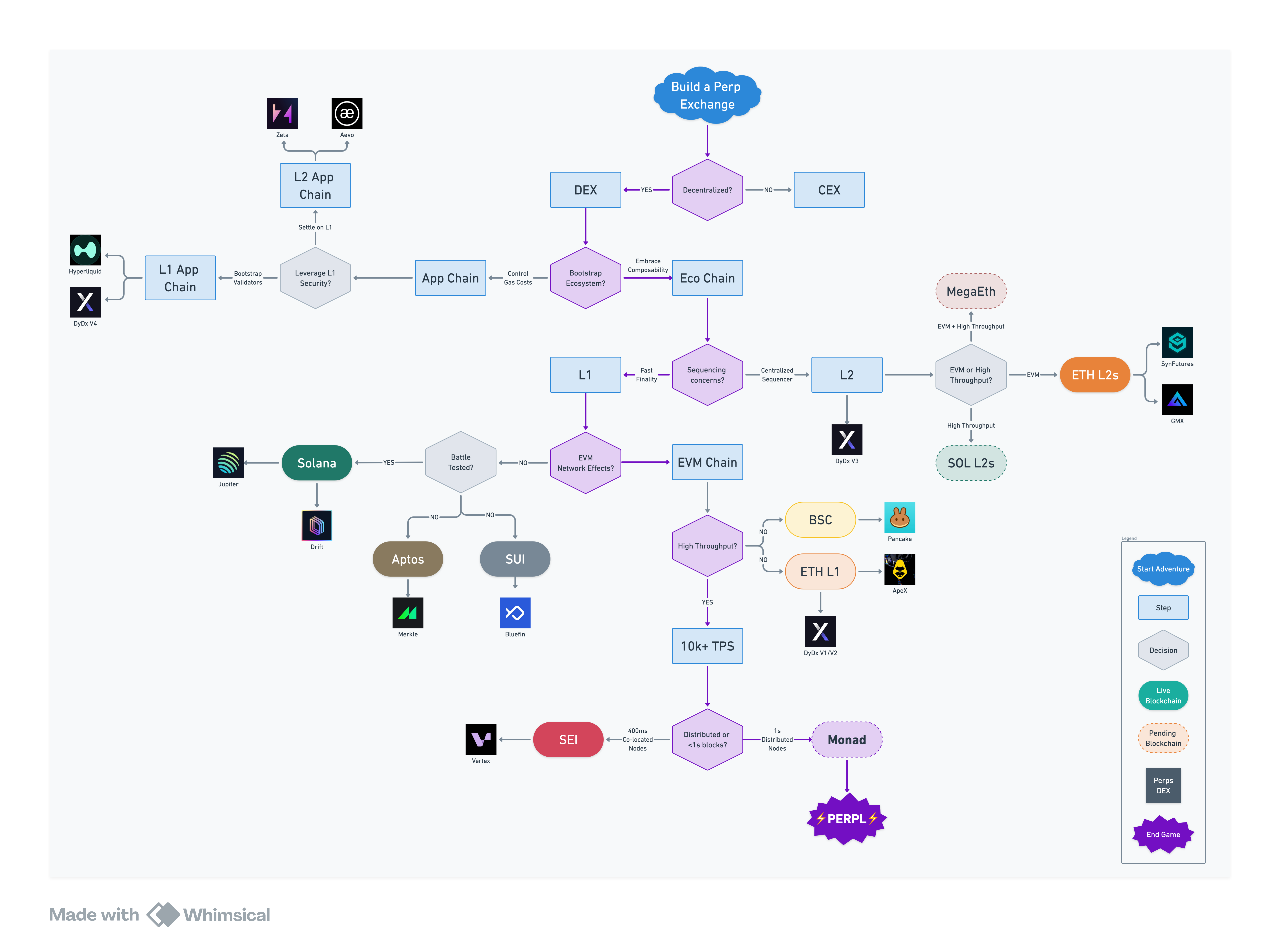
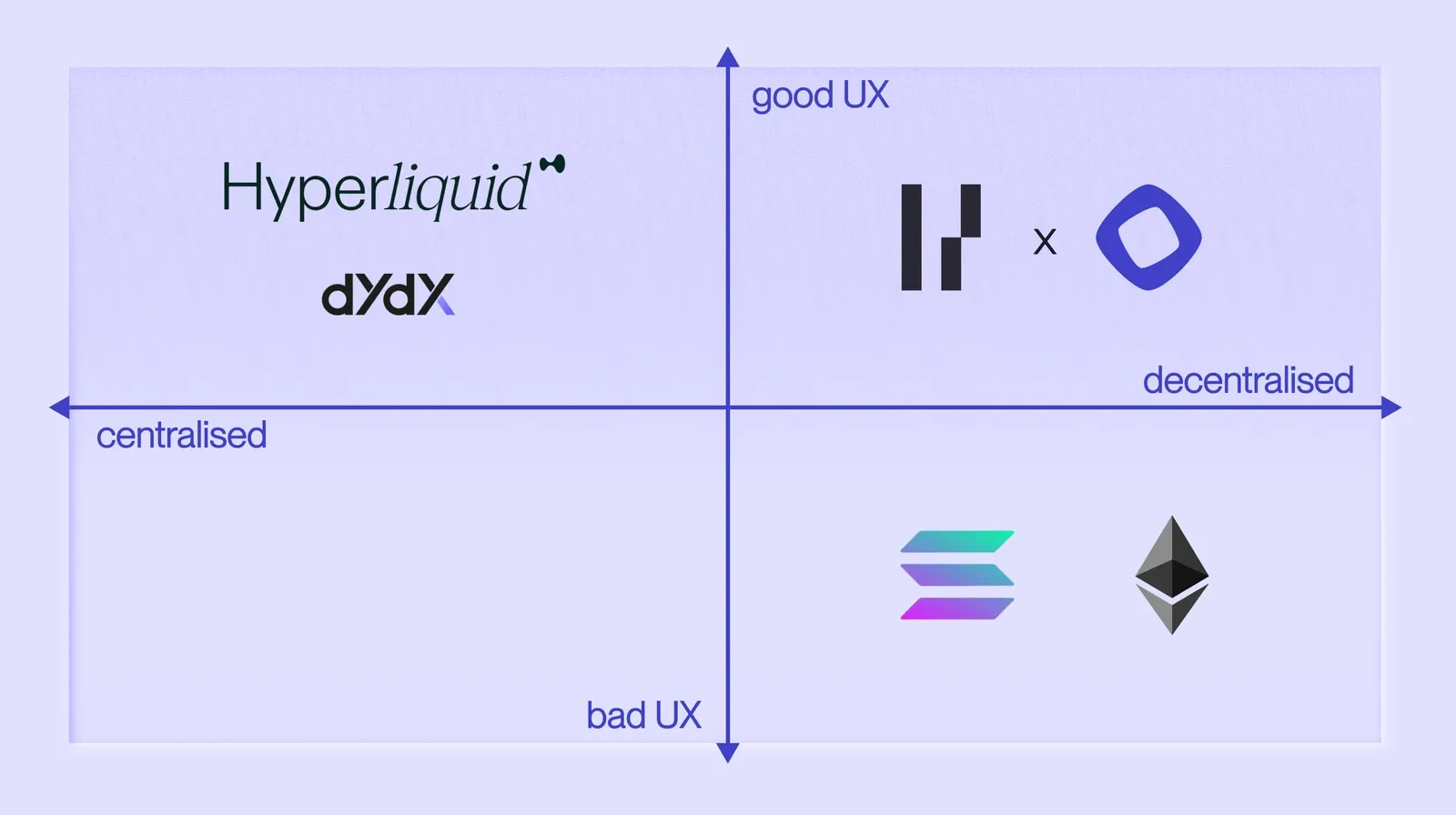
Centralized exchanges (CEX) and decentralized exchanges (DEX) are the two types of exchanges that offer perps. CEXs have good UX, but have onerous KYC/AML requirements and custodial risk. DEXs are self-custodial and enable global, permissionless trading, but they have relied on slower, decentralized infrastructure. See our blog on the differences between [decentralized vs. centralized exchanges](https://blog.perpl.xyz/decentralized-vs-centralized-exchanges/).
The early DEX era was dominated by AMMs, not because they were better, but because L1 infrastructure couldn’t support performant order books. Teams eventually pivoted to “app-chains” to run central limit order books (CLOBs). However, they couldn’t enter new markets as quickly as CEXs because they relied on external MMs. See our blog on the differences between [AMMs vs. CLOBs](https://blog.perpl.xyz/order-books-vs-automated-market-makers-amms/).
Pooled liquidity vaults, pioneered by GMX (GLP), provide liquidity to AMM-based markets with relatively simple strategies. However, CLOB-based perp DEXs require active liquidity management. This is where Hyperliquid's HLP changed the game for bootstrapping CLOB-based perp DEXs.
However, there are centralized points of failure and other risks when a single team operates the exchange, vault, and blockchain. We believe the optimal combination is a performant on-chain DEX built on a standalone high-throughput L1, and bootstrapped by independently operated vaults.
### True Decentralization, Optimal UX
The holy grail of DeFi is **a fully on-chain perp DEX with CEX-like trading experience on EVM**. Perpl, built on the Monad L1, is positioned to achieve this ideal while honoring the boundaries between protocol, liquidity, and infrastructure.
Unlike other DEXs on L1s that use AMMs or off-chain matching, everything on Perpl happens on-chain. The exchange, matching, and settlement runs **entirely on-chain with no off‑chain or centralized points of failure**. See our blog on [on-chain perps](https://blog.perpl.xyz/onchain-perps-balancing-profit-vs-peril/).
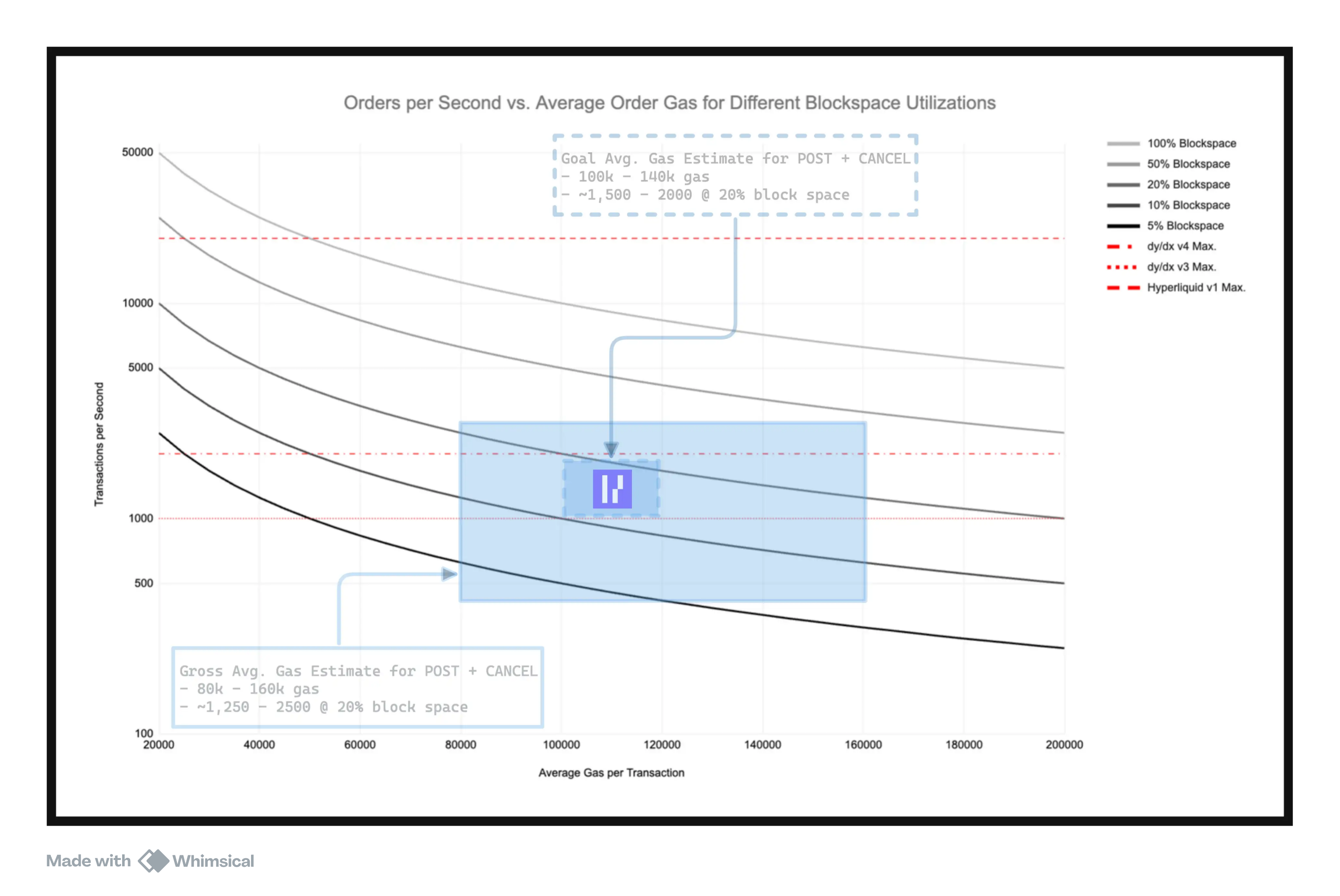
Building a DEX is hard; building a DEX on a blockchain you don't control/operate is even harder. However, we're building Perpl to be anti-fragile, scalable, and to leverage the benefits of composability. We have hyper-optimized the exchange on a specific vector: <100k gas for market-maker post+cancel. Every GWEI of gas matters because more gas costs = fewer market maker updates = wider quotes = worse fills for the end-user.
# Architecture
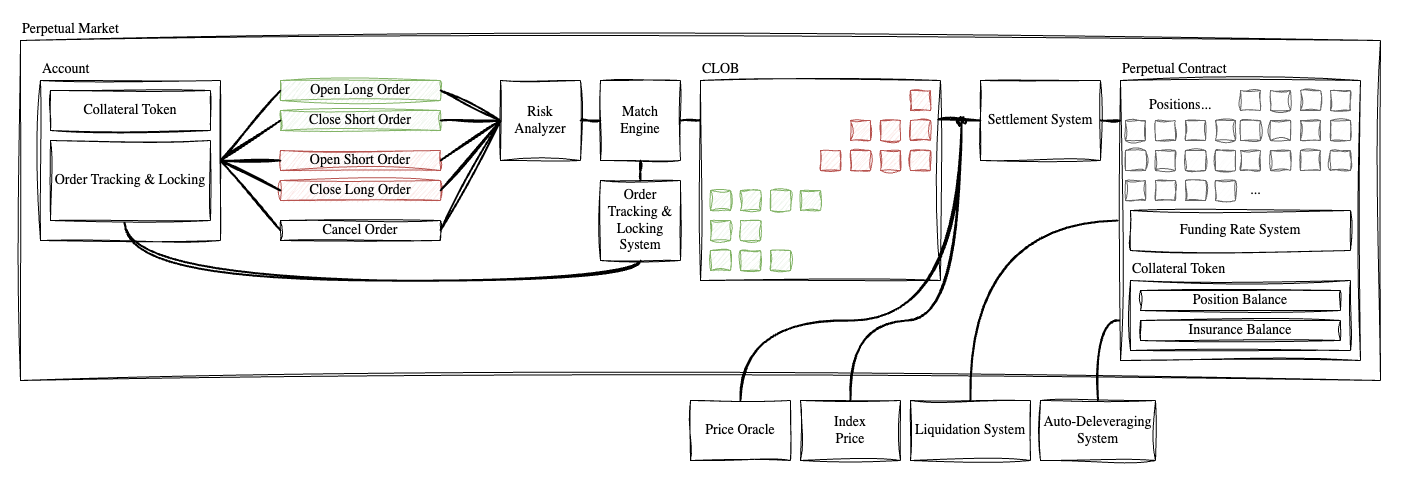
Perpl’s protocol architecture consists of multiple on-chain systems that work in tandem to deliver the highest-quality perp trading experience.
These systems include:
1. **Order book**: to match buy and sell orders using price-time priority. Every trade is matched and settled on-chain.
2. **Margin**: validates collateral, ensuring that traders always have sufficient funds to open and maintain a trade.
3. **Liquidation System**: continuously monitors positions and triggers liquidation when accounts fall below maintenance margin.
1. **ADL & Insurance Fund**: protects protocol from large trading anomalies and helps protect traders from large market fluctuations.
4. **Funding Rate**: periodic (hourly) payment exchanged between long and short traders to ensure that the price of the perp aligns with the actual price index of an asset.
5. **Price Index**: aggregate and process external spot price data from multiple exchanges to generate an accurate index price.
We will dive deeper into each of these concepts in the rest of the documentation.
# Order Book
The order book is a real-time on-chain record of all open buy and sell orders for any given market.
* **Limit Orders**: Rest on the book until matched or canceled. Specified with price and quantity.
* **Market Orders**: Execute immediately against the best available orders in the book
* **Priority**: Orders are matched based on best price first, then earliest submission time
* **Visibility**: the order book is entirely on-chain, meaning anyone can verify the order state at any time without relying on a central operator.
#### Architecture
Our order book is the most gas-performant primitive achievable on EVM. A post-and-cancel order costs 100k gas, including solvency checks. For context, a simple Uniswap V2 AMM swap costs 200k gas.
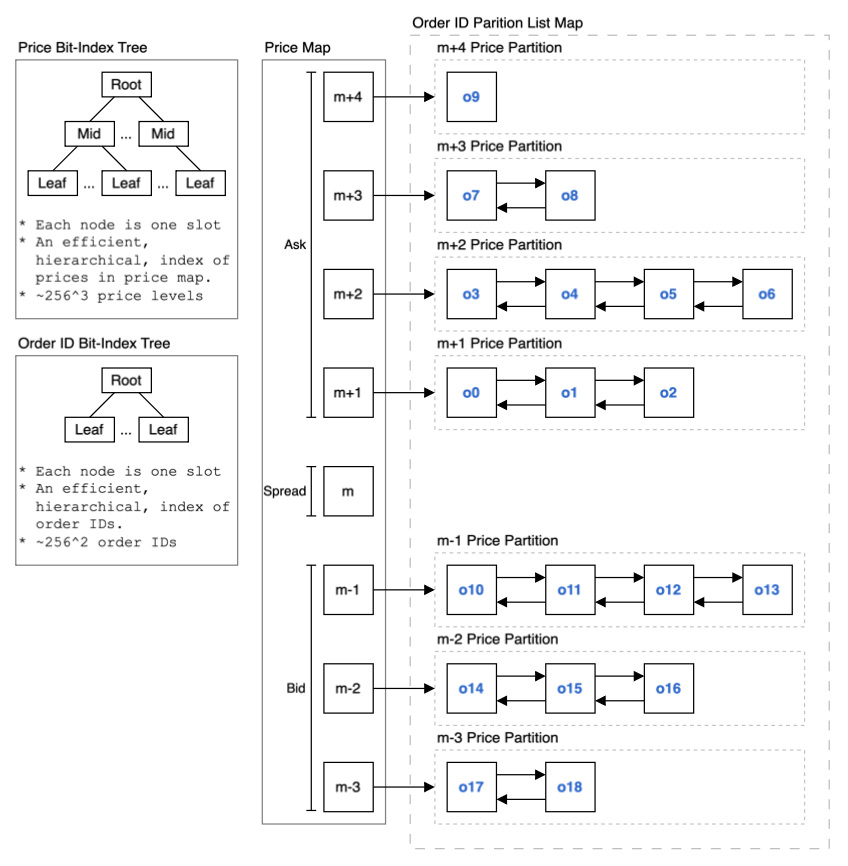
The key design objective was to minimize gas for market maker post + cancel, as that is the most common operation. Perpl achieves O(1) constant time for post, O(1) constant time for cancel, and O(N) linear time for matching.
Figure 1: Order book design consisting of two bit-index trees and a partition map list
#### Price Levels
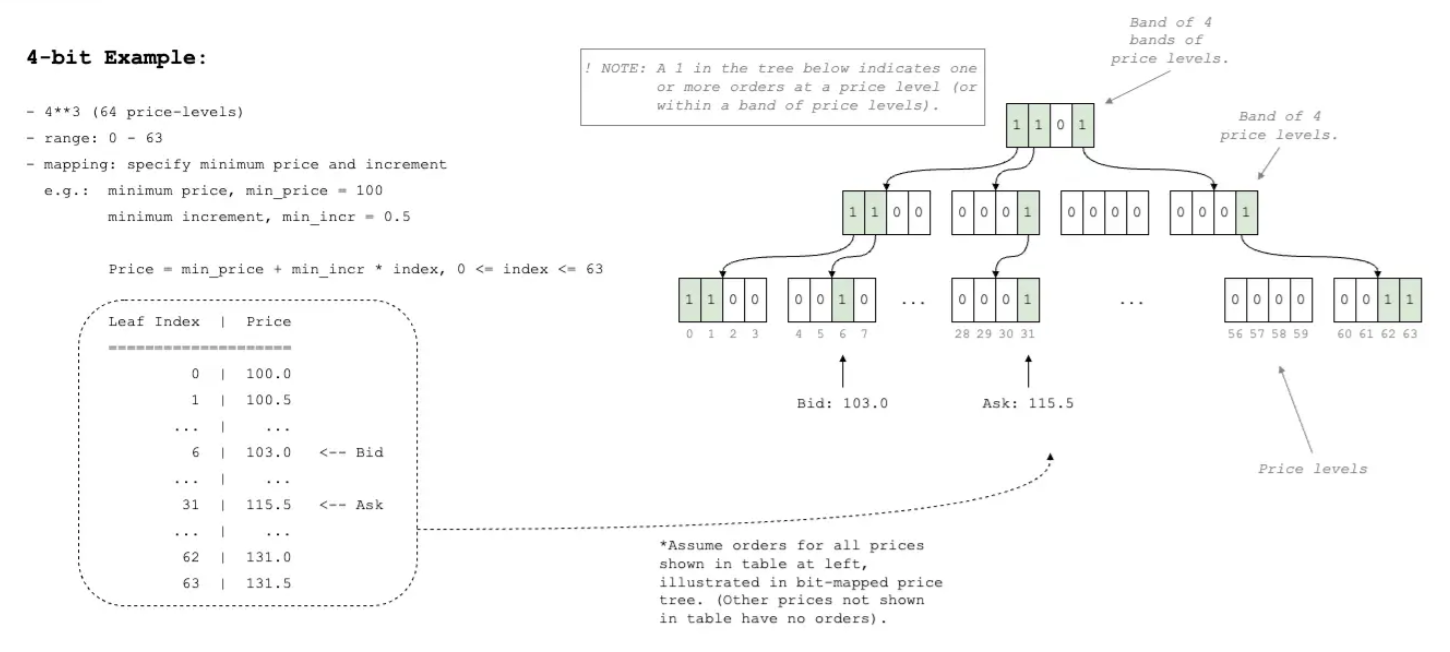
The order book is extremely granular, allowing for more than 16M price levels, so large assets like Bitcoin can be potentially quoted in dimes ($0.10) increments. One bit-index tree is a three-level, 256-bit-word index of prices that contain orders in the partition map list. It allows for quick discovery of the next price above or below a specified price in a gas-efficient manner.
Figure 2: Bit-Index tree with 4-Bit words showing 64 price-levels mapped to start at $100.0 in increments of $0.5.
#### Order IDs
The other bit-index tree is a two-level, 256-bit-word index of order IDs, allowing more than 65k orders per contract. It also functions as an order ID counter for the perpetual contract’s CLOB, assigning unique order IDs to each new order.
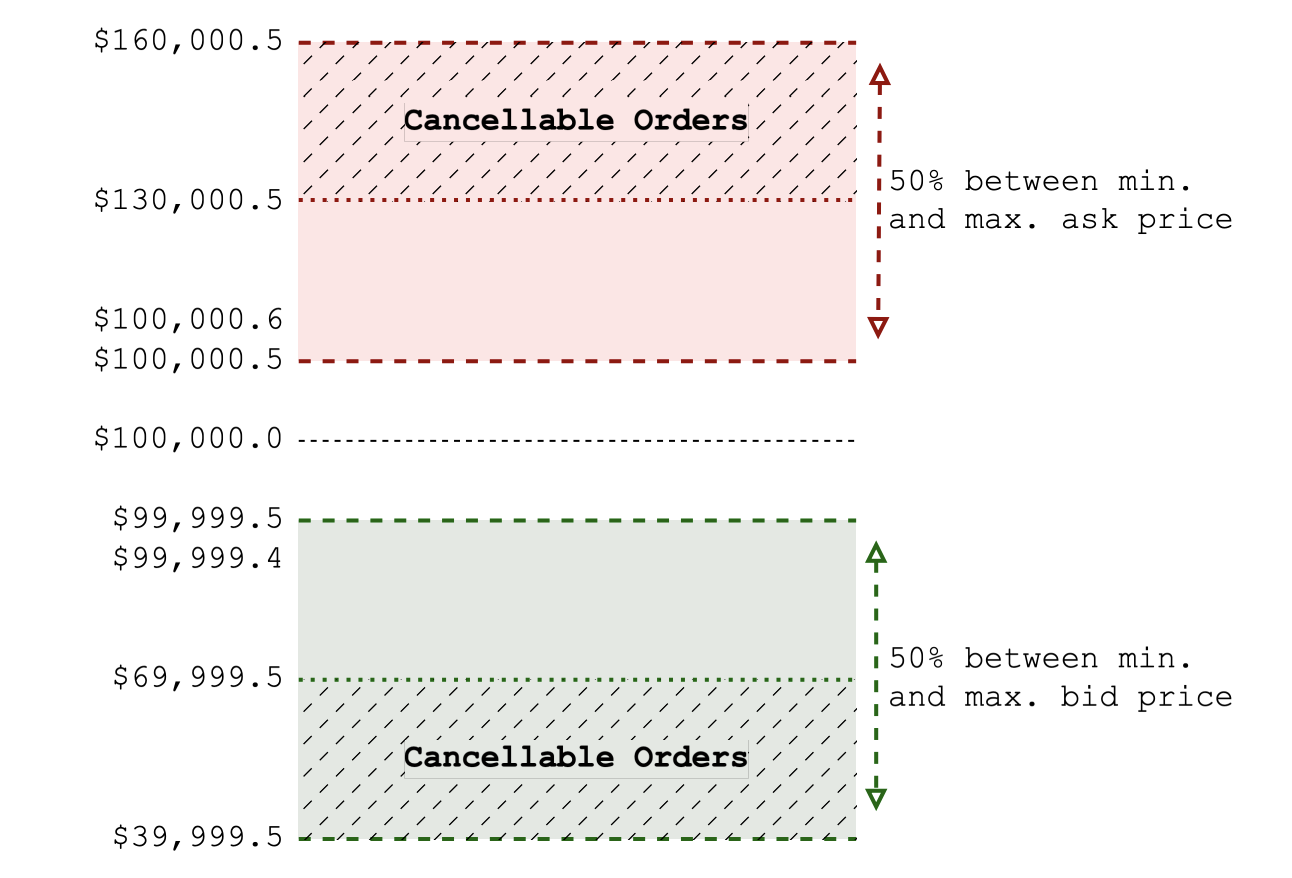
To mitigate DDoS attacks on the order book, we have designed a permissioned order cancellation system. When the number of available orders falls below a given threshold, the backend can cancel orders that are a configurable distance from the maximum bid or minimum ask prices.
Figure 3: Order book bid and ask levels showing region where permissioned cancel is possible when number of orders exceeds permissionless cancel threshold.
#### Time in Force: Expiry Blocks and Recycle Fees
For non-immediate orders, the time in force can be specified with an expiry block, so the order automatically expires after the specified block. Orders with an expiry block require the issuer to pay an order recycling fee. This fee is refunded if the order is completely filled or canceled by the issuer.
If the order has expired and another market participant encounters the expired order in a traversal of the order book, the recycling fee is paid to this participant as compensation for clearing the order. Recycling fees can be configured at run time and changed during operation.
The ability to change recycling fees allows tuning the incentive to match current market conditions — higher recycling fees when many orders are impeding market transactions or when gas costs are high.
#### Change Order: Efficient Cancel-Post
Market makers can quote orders with tighter spreads—the distance between the bid and ask prices—when the cost of canceling and reposting orders is reduced. Tighter spreads are attractive because they mean that the DEX is better able to compete with centralized solutions on price.
As prices move, market makers cancel existing orders and post new ones to follow price movements. This is inefficient in an on-chain exchange because it implies deallocation of storage for the canceled order and allocation of new storage for the newly posted order. Figure 1 above shows how order storage and order IDs can be shared across different price levels, from m+4 down to m-3.
Shared storage allows order storage to be moved to effect a price change, rather than being inefficiently deallocated and subsequently reallocated. Rather than submitting two transactions, a single transaction, “Change”, replaces Cancel and Post transactions.
If the market maker is only changing the lot size or expiry block of an order, then the operation uses less gas as it does not need to move the order storage to a new partition. The change operation would move the order to the end of the current price partition's list if the order's lot size is increased or the expiry block is changed (the order is not moved to the end of the list if the lot size is decreased).
# Margin
The margin engine ensures that users who place trades always have sufficient capital to open and maintain their intended positions.
* **Initial Margin**: The amount required to open a position; calculated as a percentage of notional value based on the asset's risk profile.
* **Maintenance Margin**: Minimum collateral required to keep a position open; if breached, liquidation is triggered
Initial margin requirements on Perpl are dynamic and may vary by market, depending on volatility and position size.
#### **Liquidation Distance**
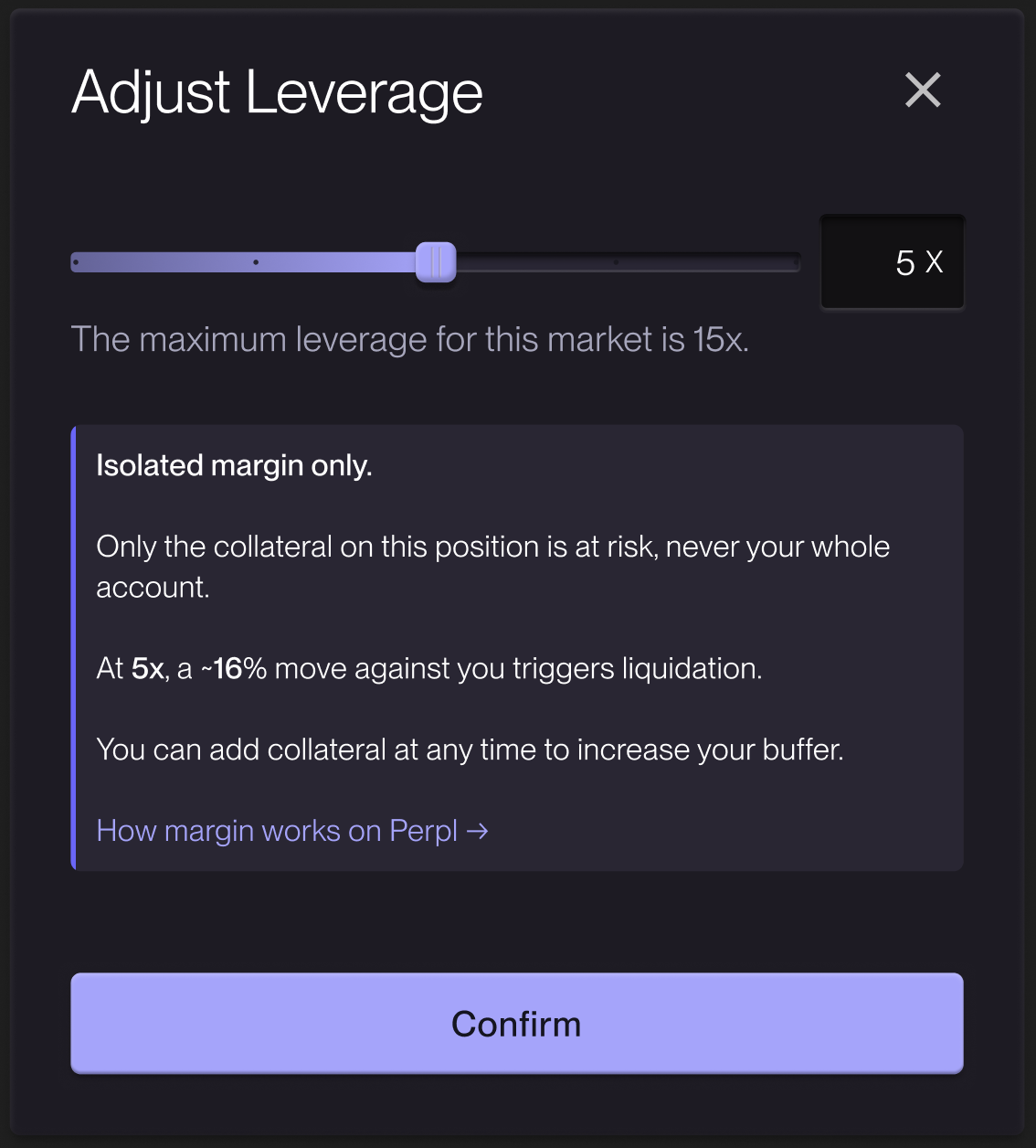
Your liquidation distance is how far the price can move against you before your position is liquidated. It's set by two things: the leverage you choose (which determines your initial margin) and the market's maintenance margin.
For example, on a market with a 5% maintenance margin, opening at 5x means posting 20% initial margin. The position is liquidated once your equity falls to the 5% maintenance level — roughly a 16% adverse move:
(20% − 5%) ÷ (1 − 5%) ≈ 16%
Lower leverage widens this distance; higher leverage narrows it. Maintenance margin varies by market, so the exact figure for your position is shown live in the Adjust Leverage dialog. You can add collateral to an open position at any time to increase it.
#### Margin Mode
The difference between a cross and an isolated margin is:
* **Isolated Margin**: Each position has its own margin
* **Cross Margin**: All collateral in the account is shared across positions
* **Hybrid Margin**: Manually manage margin between positions
{% hint style="info" %}
To begin with, Perpl will be restricted to isolated margin.
{% endhint %}
#### Position Equations
Perpetual contracts can be implemented using the following representation of lot sizes, L:
* {L : L > 0, L ∈ Z}
**Position Notional Value, *****N*****:**
N = P · L
*P = The mark, entry, or realized price, depending on whether or not the value being calculated is unrealized, position, or realized notional value, respectively.*\
*L = The position lot size (the number of contracts of the position).*
**Position Margin Requirement, *****MR*****:**
MR = N/MF
*N = The position notional value.*\
*MF = The margin fraction (analogous to leverage).*
**Position Initial Margin Requirement, *****IMR*****:**
IMR = N/IMF
*N = The position notional value.*\
*IMF = Initial margin fraction (maximum leverage allowed to open a position).*
**Position Maintenance Margin Requirement, *****MMR*****:**
MMR = N/MMF
*N = The position notional value.*\
*MMF = Maintenance margin fraction (minimum collateralization permitted before a position can be*\
*liquidated).*
#### Collateral Management
**Increase Collateral**
Traders can add margin to an existing position at any time to reduce the risk of liquidation. This increases the position's `depositCNS` without affecting the entry price or lot size.
**Decrease Collateral (DCP)**
Traders can remove excess margin from a position, subject to the following constraints:
* **120-second expiry**: A DCP request must be executed within 120 seconds of submission. After this window, the request expires and must be resubmitted.
* **Margin tolerance check**: The remaining collateral after the decrease must still satisfy the initial margin requirement for the position.
* **OI threshold**: DCP is blocked when the perpetual's open interest exceeds the `dcpBorrowThreshHdths` threshold (default 85% of capacity), as the market is under stress.
{% hint style="info" %}
The 120-second expiry on DCP prevents stale withdrawal requests from being executed after market conditions have changed significantly.
{% endhint %}
#### Margining Criteria
The price used to determine the notional value in the invariants presented in this section is the most accurate price available. For example, the best price to use for the notional value of a new position is the price at which the position is entered (realized).
In some situations, for example, auto-deleveraging a position, a realization price is not available, and the failed position's bankruptcy price is used. In other situations, the mark or synthetic perpetual price may be used to calculate the position's fair market value (for the value of an existing position).
**Collateralization for establishing or changing a position:**
FMV >= IMR
*FMV = Position fair market value.*\
*IMR = Position initial margin requirement.*
{% hint style="info" %}
**Reduce-only exemption**: Closing or decreasing a position does not require FMV >= IMR. This allows traders to close underwater positions that would otherwise be trapped.
{% endhint %}
**Collateralization for liquidation:**
0 < FMV <= MMR
*FMV = Position fair market value.*\
*MMR = Position Maintenance margin requirement.*
**Collateralization for Auto Deleverage (ADL):**
FMV <= 0
*FMV = Position fair market value.*
# Liquidation
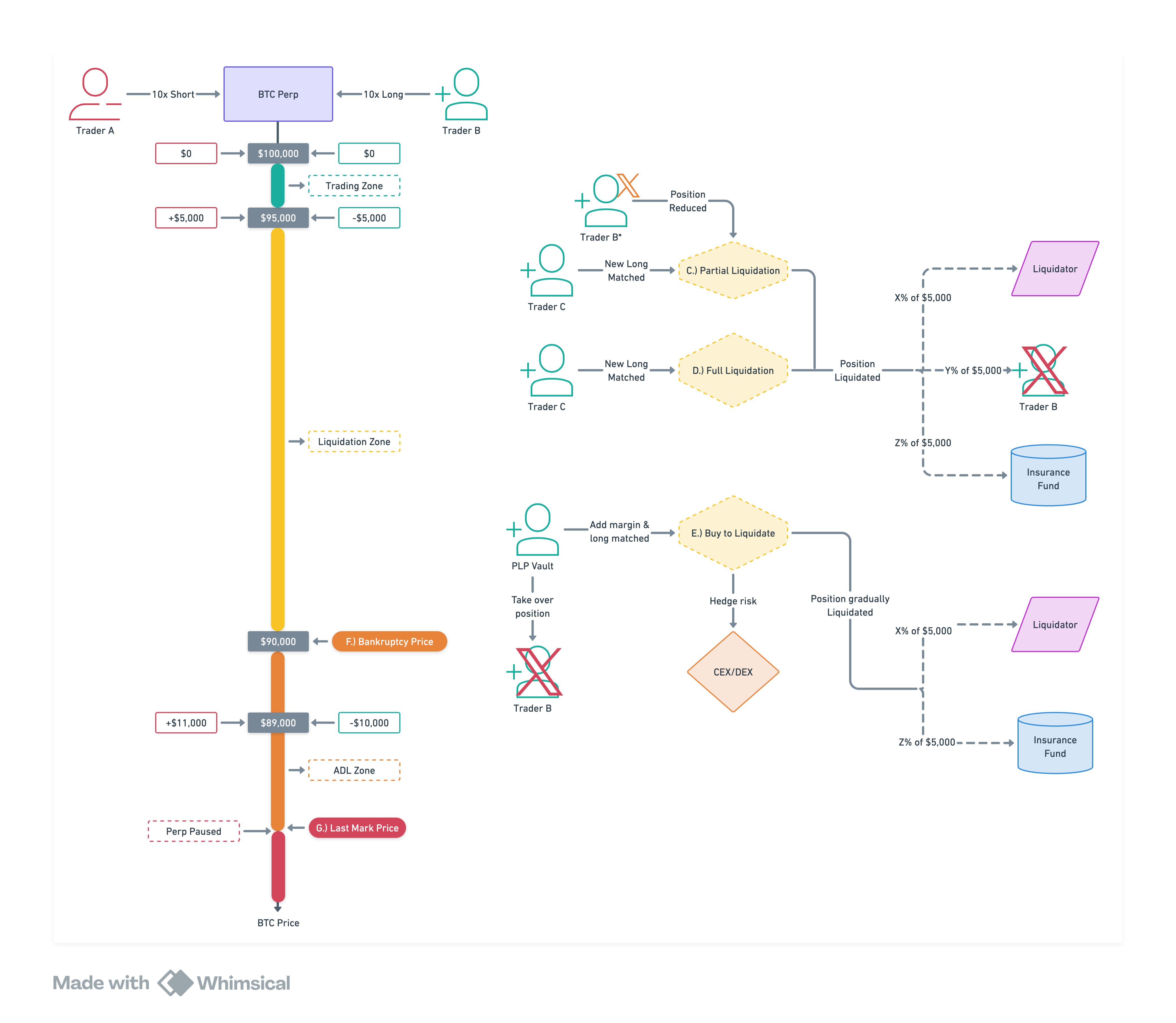
Liquidation occurs when the position value falls below the maintenance margin requirement. Liquidations are crucial for maintaining the protocol's functionality and protecting other traders.
## Example: a $100k BTC long at 10x
You post **$10,000** to open a **$100,000** position (10x leverage).
* A 10% drop would wipe out your full $10,000.
* But you are liquidated *before* that — at a **6% drop, when BTC reaches $94,000**.
At $94,000 your remaining margin is **$4,000**: your $10,000 deposit minus the $6,000 the move cost you. That surviving **$4,000 — the residual — is split**: **$3,200 (80%) is returned to you**, and **$400 (10%) each to the insurance fund and the protocol**.
Because you are stopped *before* your margin reaches zero, the amount you keep is 80% of whatever remains at that moment.
> **Why a 6% drop and not 10%?** BTC's **maintenance margin is 4%** of the position. Liquidation triggers when your remaining margin falls to that level — not when it reaches zero. Higher leverage posts less initial margin, so your liquidation sits closer to the current price; the exact distance for your position is shown live in the Adjust Leverage dialog (see [Margin](/exchange/margin)).
## Maintenance margin by market
Your liquidation point is set by each market's **maintenance margin** — the minimum margin a position must keep before it is liquidated. It is a fixed protocol parameter (you do not choose it) and it varies by market:
| Market | Maintenance margin | Maximum leverage |
| ------ | ------------------ | ---------------- |
| BTC | 4% | 15x |
| ETH | 5% | 12x |
| SOL | 5% | 12x |
| MON | 5% | 10x |
| HYPE | 5% | 10x |
| ZEC | \~6.7% | 8x |
A 4% maintenance margin means a position is liquidated once its remaining margin falls to 4% of the position's value. Maximum leverage shown is the base maximum; initial margin requirements are dynamic and can rise — lowering the effective maximum — for larger positions or in volatile conditions (see [Margin](/exchange/margin)).
Here is how liquidation works on Perpl:
1. The liquidation engine identifies undercollateralized positions (positions where the value is at or beneath the maintenance margin)
2. The liquidation engine attempts to close the position on the order book.
3. The proceeds from the position closing due to liquidation are then distributed as follows:
1. 80% to the original position holder
2. 10% to the perpetual's insurance fund
3. 10% to the protocol
All liquidation events will be recorded on-chain. To learn more about liquidation, read our blog on [understanding liquidation in perp markets.](https://blog.perpl.xyz/understanding-liquidations-in-perp-markets/)
> **Note on liquidation PnL:** The PnL shown for a liquidated position is the *would-be* PnL had you closed at the exit price. Your actual balance change is larger, because liquidation proceeds are distributed (see below). You retain 80% of the remaining margin, not all of it. Always check your balance history for the realized impact.
### Order Book Liquidations
Order book liquidations are initiated by the protocol; a position meeting the liquidation criteria is sold to the order book if possible, with the proceeds distributed to the original position holder, perpetual insurance fund, and protocol.
#### Invariant: Collateralization for liquidation:
0 < FMV <= MMR
*FMV = Position fair market value.*\
*MMR = Position Maintenance margin requirement.*
#### Calculating Liquidation Price
A position’s liquidation price can be calculated as follows:
Where:
* *P**Entry* is the entry price of the position.
* *s* is the side of the position or position type (if the position is long, then a mark price at or below the liquidation price indicates the position should be liquidated; the opposite is true for a short position).
* *C**MMR* is the Maintenance Margin Requirement (MMR) of the position. (See note on calculating this value below.)
* *C**Deposit* is the collateral deposited in the position.
* *C**Funding* is the funding payment owed by the position (available in the smart contract as premium PNL).
* *L* is the final liquidation lot size of the position.
The position’s MMR can be calculated as follows:
C_{MMR} = \frac{P_{Entry} * L}{C_{MMF}}
Where:
* *C**MMF* is the Maintenance Margin Factor (MMF) of the perpetual (`Perpetual::maintMarginFracHdths`).
The position’s bankruptcy price can be calculated similarly, except the Maintenance Margin Requirement value becomes zero (because the position is now bankrupt and has no value—it’s possible for a position to have a negative value at prices beneath the bankruptcy price, but this is clamped to zero in the auto-deleveraging process). The calculation of bankruptcy price is:
P_{Bankruptcy} = P_{Entry} - s \cdot \frac{C_{Deposit} + C_{Funding}}{L}
#### Partial vs Full Liquidation
Depending on the position size, the crypto asset, and market conditions, the protocol may choose to perform a partial liquidation. This allows the trader to keep the trade open for a longer period. On the other hand, positions can be fully closed. In that scenario, the proceeds are split between the protocol, the insurance fund, and the trader. Both of these liquidations happen on the order book.
#### Liquidation Proceeds Distribution
When a position is liquidated, it is closed at the liquidation price; above the bankruptcy price, so residual margin typically remains. These proceeds are distributed between three parties:
| Recipient | Share |
| -------------- | ----- |
| Trader (you) | 80% |
| Protocol | 10% |
| Insurance fund | 10% |
The trader retains the majority of any margin left after the position is closed. The protocol and insurance fund shares cover liquidation costs and backstop solvency (see Insurance & ADL).
Distribution is configured per perpetual, so the exact split may vary by market. The values above are the current default.
#### Buy to Liquidate
In certain scenarios, when the position to be liquidated is too large to close out on the book, the PLP vault can buy the position to liquidate gradually.
# Insurance & ADL
In the event of a Black Swan scenario, there are measures in place to ensure the exchange remains solvent while minimizing negative consequences for users.
### Insurance Fund
An insurance fund is maintained individually for each perpetual contract. It serves as a backstop when the perpetual's main balance is insufficient to cover obligations.
**Funding sources:**
* Liquidation proceeds — a configurable share (`liqInsAmtPer100K`) of each order book liquidation is directed to the insurance fund
**Usage:**
* Covers shortfalls when a perpetual's balance goes negative during settlement
* Distributed pro-rata to profitable positions during contract unwinding
### Force Close
If there is no resting liquidity in the order book and the price remains stagnant or sideways for an extended period, traders can request that the protocol force-close their position at the mark price and exit the perpetual contract.
### Auto-Deleveraging (ADL)
This usually happens when there's not enough new liquidity entering, or price gaps up/down drastically. ADL ensures the protocol stays solvent, as was widely experienced during the October 10th, 2025, crash. Rapid price changes can push liquidatable positions into bankruptcy before the system can liquidate them.
In this situation, it's important for the system to remove positions (deleverage) quickly to ensure that other users with profitable positions are paid. Failure to do so in a timely manner, along with continued price fluctuations, could result in the perpetual's insolvency.
**How ADL works:**
* The caller provides a sorted list of opposing position IDs (most profitable first)
* Positions are force-closed at the mark price against these opposing profitable positions
* The **perp is not paused** and can continue operating
{% hint style="info" %}
ADL position selection is performed off-chain. The caller submits the sorted list of opposing positions to be deleveraged against.
{% endhint %}
### Contract Unwind
Unlike ADL, the **perp is paused** due to an extreme trading scenario (price manipulation, black swan events, thinly traded markets, etc.). The perpetual contract may be delisted under some conditions.
The unwind is a controlled 3-stage process:
#### Stage 1: Prepare (`UnwindPrepared`)
* All position changes are frozen — no new orders, no position modifications
* This stage is **reversible** — the Owner can cancel the unwind and return the perpetual to normal operation
* Existing resting orders remain on the book, but cannot be matched
#### Stage 2: Initialize (`UnwindInitialized`)
* The protocol commits the sum of all positive fair market values (FMVs) across all positions
* This establishes the total payout obligation for the perpetual
* This stage is also **reversible**
#### Stage 3: Trigger (`UnwindStarted`)
* Positions with positive value are paid out **pro rata** from the perpetual's remaining balance plus the insurance fund
* This stage is **irreversible** — once triggered, the perpetual is effectively delisted
* If the perpetual does not have sufficient funds to pay all positions at full value, payouts are reduced proportionally
In an unwind, the perpetual may not have sufficient funds to pay existing positions at the value implied by the mark price. Regardless, it will compensate positions with positive values on a pro-rata basis from the remaining funds. The price used to determine position value is the mark price at the time of pausing.
{% hint style="info" %}
The price may be adjusted by the protocol under extreme circumstances. All such changes are logged on the chain for transparency.
{% endhint %}
# Funding
Funding rate is a feedback mechanism to force the perpetual price to follow the underlying asset price more closely. Funding rate is computed over a funding interval and then applied to position holders during a funding event. Funding events occur periodically on perpetual exchanges and are often described as long position holders paying funding payments to short position holders (or vice versa).
The direction of payment depends on whether the funding rate is positive (payment flows from long positions to short positions) or negative (payment flows in the opposite direction). Premium PNL is the cumulative funding payments paid and received by a position.
The settlement of these payments through centralized exchanges is near or at the funding event. Unfortunately, this is prohibitive for decentralized perpetual exchanges that are not running on an app-chain, where gas is not a consideration, or for custom op-codes that can be crafted to enable low-gas-use implementation of such payments. The following sections outline the funding rate mechanism that affects a position’s premium PNL. Two major challenges involved in implementing the mechanism are:
1. Computing the funding rate over the funding interval.
2. Settling funding payments for all positions at every funding event.
Both challenges are difficult on-chain due to their implications for gas usage.
### Computing Funding Rate
The method used by contemporary exchanges to compute the funding rate involves frequently computing an impact price on both sides of the order book for a specified notional amount. This operation is performed frequently during the funding interval, implying significant gas use that would have to be absorbed by users interacting with the contract, an off-chain keeper system, or both.
Alternative methodologies are being explored that could provide a similarly robust funding rate calculation, while being more gas-efficient on-chain. Key considerations are gas efficiency and resistance to attack vectors. The initial release of this decentralized perpetual exchange enables funding rate values, computed from transparent on-chain data, to be set at a fixed time prior to the funding event using a permissioned method.
The funding rate can be applied approximately once per hour. *Approximately* because it is applied after a constant number of Monad blocks:
* Every 8571 blocks (assumes 0.42 second average consensus time)
* Can be set up to 143 blocks in advance (1 minute, assuming 0.42-second average consensus time). *Cannot be set after the funding event block.*
The funding rate is set with two parameters:
* *C**FundingRate* is the funding rate calculated over the current funding interval, as detailed below.
* The funding rate is clamped in the contract such that its absolute value does not exceed `absFundingClampPctPer100k` , configurable abs. magnitude from \[0%, 15%]
* *P**FundingPrice* is the funding price, essentially the spot market price feed value at the time the funding rate is set.
* This value is constrained to be within the reference tolerance % of the Chainlink Oracle price. The Chainlink Oracle price must not be stale (i.e., its timestamp’s distance from the current block timestamp cannot exceed the maximum reference price age parameter).
The funding rate is computed throughout the funding interval as follows:
Where:
* *n* is the sample number within the funding interval.
* *T* is the sample period (for example, 5 seconds on Binance).
* *k* is the last sample in the funding interval (if the funding rate is set \~1 minute before the funding event, then \~11 samples would be ignored for *T=5*.
k = \frac{3600}{T}-1
* *C**ImpactPriceDifference* is the impact price difference at a given sample point. It is calculated as follows for values at a given sample point:
* *P**ImpactBid* and *P**ImpactAsk* are the resulting execution prices of trading a specified notional amount in $USD on the bid and ask sides of the order book, respectively.
* The notional amount should be configurable and would be converted to a lot amount to execute the order—i.e., if ETH was trading at $4,000 and the notional amount was $2,000, then the prices would be computed for trades of 0.5 lots.
This methodology for computing the funding rate was described by [Hyperliquid](https://hyperliquid.gitbook.io/hyperliquid-docs/trading/funding) and is congruent with the method described by [Binance](https://www.binance.com/en/support/faq/detail/360033525031). *However, importantly, the method herein does not model the cost difference in borrowing USD versus spot crypto.*
### Settling Funding Payments
Explicitly settling funding payments on-chain for every funding event incurs prohibitive gas costs. This is because perpetual contracts can have hundreds to thousands of positions concurrently. During a funding event, each position’s account must transfer funds to or from the other position’s accounts according to the position size, funding rate, and funding event price. This implies hundreds to thousands of transfers per transaction, requiring significant state changes, which is prohibitively expensive.
To address funding issues, payments must be made virtually. This means that the effect of the funding payment settlement is visible after a single transaction, permitting all perpetual contract users to continue as though the payments had settled, without having to update the individual state of each of their positions in the contract. Virtualizing payments is further complicated because funding payments have a cumulative effect on a position held through multiple funding events.
Perpl debuts a novel solution to efficiently settle funding payments for all positions in a perpetual contract virtually. It is based on adapting the staking algorithm and virtual orders idea to eliminate the need for explicit periodic funding payment settlement.
#### A Virtualized Implicit Funding Event Payment Settlement Solution
To derive a virtualized implicit funding payment settlement solution, consider the following equation for funding payment:
F_{payment}[j] = P_i[j] · F_{rate}[j] · L
*Frate\[j] = Funding rate for funding event at block number j.*\
*P**i** =* Funding rate price, which is the spot index price at the time of the funding event.\
*L = Position lot size.*
The position lot size L, and side (long or short), remain constant throughout each funding event during which a position is held (a smart contract constraint forces the realization of funding payments when the position lot size or side is changed).
This means that for all positions, cumulative funding payment information across multiple funding events can be determined using superposition. Instead of storing funding rate and index price for each funding event and looking up each funding event a position has been held through, a funding product sum can be stored to reduce read operations.
The funding product is the product of the funding rate and index price for a particular funding event–\
Importantly, the funding product is independent of information specific to an individual position:
F_{product}[j] = P_i[j] · F_{rate}[j]
*F**product**\[j] = Funding product for funding event at block number j.*\
*P**i** =* Funding rate price, which is the spot index price at the time of the funding event.\
*F**rate**\[j] = Funding rate for funding event at block number j.*\
*j = funding event block number.*
Substituting equation Fproduct into equation Fpayment yields the following equation for the funding payment:
F_{payment}[j] = (F_{product}[j]) · L
*F**product**\[j] = Funding product for funding event at block number j.*\
*L = Position lot size.*
The funding product sum is the sum of all previous funding products. The funding product sum is causal\
and thus is defined as zero prior to the creation of the perpetual contract.
F_{sum}[j] = \begin{cases} 0, & j \leq i \\ \sum_{j=i}^{N} F_{product}[j], & j > i \end{cases}
*F**product**\[j] = Funding product for funding event at block number j.*\
*j = funding event block number.*\
*i = Perpetual contract creation block number.*
A funding product of a particular block can be determined by subtracting any two adjacent funding sums, as shown in the equation below:
F_{product}[j] = F_{sum}[j] − F_{sum}[j − k]
*F**sum**\[j] = Funding product sum for funding event.*\
*F**sum**\[j − k] = Funding product sum for previous funding event.*\
*j = funding event block number.*\
*k = The number of blocks in a funding interval.*
Substituting equation Fproduct into equation Fpayment, the funding payment for a position that has been held through a single funding event at block j, can be computed:
F_{payment}[j] = (F_{sum}[j] − F_{sum}[j − k]) · L
*F**sum**\[j] = Funding product sum for funding event.*\
*F**sum**\[j − k] = Funding product sum for previous funding event.*\
*j = funding event block number.*\
*k = The number of blocks in a funding interval.*\
*L = Position lot size.*
Observing that equation *F**payment* only depends on the lot size and side (long or short) of a position, it is possible to extend the solution to compute funding payments cumulatively owed for a position held through multiple events. For example, consider a position held through 3 funding events, up to and including a funding event at block j. Its cumulative funding payment could be computed as follows:
F_{payment}[j] = (F_{sum}[j] − F_{sum}[j − 3k]) · L
*F**sum**\[j] = Funding product sum for funding event.*\
*F**sum**\[j − 3k] = Funding product sum for the three funding events prior.*\
*j = funding event block number.*\
*k = The number of blocks in a funding interval.*\
*L = Position lot size.*
Importantly, notice that the cumulative funding payment owed can be determined in only two read operations. An important gas efficiency. Furthermore, the value of the funding payment need not be written to the chain until the entire position settles, bypassing the problem of immediate explicit settlement.
Thus, the generalized solution to compute any position’s cumulative funding payment, which can also be expressed as its premium PNL, θpnl, is:
θ_{pnl} = F_{payment}[j] = (F_{sum}[j] − F_{sum}[m]) · L
*F**sum**\[j] = Funding product sum for funding event.*\
*F**sum**\[m] = Funding product sum for funding event prior to position creation.*\
*j = funding event block number.*\
*m = The funding event block number for the funding event prior to position creation.*\
*L = Position lot size.*
# Price Indices
## Price Indices
Perpl works with three price quantities. Understanding how each is produced explains how your positions are valued, when they can be liquidated, and how funding is charged.
| Price | What it is | Where it comes from |
| -------------------- | --------------------------------------------------------------- | -------------------------------------------------------------------------------- |
| **Spot Index Price** | The fair spot price of the underlying asset | Chainlink Data Streams, pushed on-chain |
| **Mark Price** | A robust estimate of the fair *perpetual* price | Computed off-chain from several sources, then anchored tightly to the Spot Index |
| **Funding Rate** | The periodic payment that keeps the perpetual trading near spot | Computed off-chain from the order book relative to the Spot Index |
***
### Spot Index Price
The **Spot Index Price** (also called the *oracle price*) is the reference spot price of the underlying asset. It is sourced from **Chainlink Data Streams** — low-latency, cryptographically signed price reports — with one feed per market.
The pricing service writes a fresh Spot Index on-chain whenever either of the following is true:
* the price has moved more than **0.1%** since the last on-chain value, or
* the on-chain value is within **10 seconds** of its maximum permitted age (so it never goes stale).
The Spot Index has three jobs:
1. **Anchor for the Mark Price.** The Mark Price is held within a tight band around the Spot Index (see below).
2. **Settlement of funding.** Funding payments are calculated against the Spot Index, not the Mark Price.
3. **Staleness guardrail.** Settlement and liquidation are rejected by the smart contract if the on-chain Spot Index is older than its maximum age, protecting users from trading against a frozen oracle.
***
### Mark Price
The **Mark Price** is an unbiased, robust estimate of the fair price of the perpetual. It is the price the protocol uses for:
* unrealized profit and loss (PnL),
* additional collateral requirements when a position is opened or increased if its PnL is negative,
* triggering liquidation and auto-deleveraging,
* the realized price in force-close and unwind operations.
#### How it is computed
The Mark Price is recomputed every block from up to **four independent inputs**, combined with a **median** so that no single source can dominate:
1. **External price** — the weighted median of mid prices from major venues (**Binance, Hyperliquid, OKX, Bybit**) for the corresponding perpetual.
2. **Basis-adjusted fair value** — the Spot Index scaled by the recent average *basis* (the premium at which the perpetual trades over spot on those venues): `(1 + average_basis) × spot_index`. The basis is a smoothed (exponential moving average) measure and is itself clamped to a small range.
3. **Impact mid price** — the midpoint of the volume-weighted average prices (VWAP) obtained by walking Perpl's own order book to a set of notional depths (**$1,000 / $2,000 / $5,000**).
4. **Book price** — the median of the best bid, the best ask, and the last traded price (the last trade is dropped if it is too old).
In symbols, writing $$P\_{\text{spot}}$$ for the Spot Index Price:
$$
P\_{\text{median}} = \operatorname{median}\bigl(P\_{\text{ext}},; P\_{\text{fair}},; P\_{\text{impact}},; P\_{\text{book}}\bigr)
$$
where the basis-adjusted fair value (input 2) is
$$
P\_{\text{fair}} = \bigl(1 + \overline{b},\bigr),P\_{\text{spot}},
\qquad
b\_i = \operatorname{EMA}!\left(\frac{P\_i^{\text{mid}}}{P\_{\text{spot}}} - 1\right)
$$
and $$\overline{b}$$ is the clamped, weighted average of the per-venue basis values $$b\_i$$.
If fewer than four of these inputs are fresh, the median is backstopped first by a smoothed order-book price and, if necessary, by the raw Spot Index, so a Mark Price is always available even in thin or quiet conditions.
#### The Spot Index clamp (most important)
After the median is taken, the result is **currently clamped to within ±0.25% (25 basis points) of the Spot Index** before it is published on-chain. In production this band is **25 bps on every market**:
$$
P\_{\text{mark}} = \operatorname{clamp}\bigl(P\_{\text{median}},; (1-\delta),P\_{\text{spot}},; (1+\delta),P\_{\text{spot}}\bigr),
\qquad \delta = 25\ \text{bps} = 0.0025
$$
In other words: however the order book or external venues move, the on-chain Mark Price **never sits more than a quarter of one percent away from the Chainlink Spot Index.** This keeps the Mark Price an accurate, manipulation-resistant reflection of spot and bounds how far it can be pulled by a single noisy input.
The Mark Price is written on-chain whenever it moves more than **0.05%** from the last published value, or when the on-chain value is close to expiring. The smart contract independently rejects any proposed Mark Price that falls outside its configured tolerance of the Spot Index; the ±0.25% clamp keeps every published value comfortably inside that tolerance.
***
### Funding Rate
The **Funding Rate** is the mechanism that keeps the perpetual price aligned with the underlying spot price. When the perpetual trades above spot, longs pay shorts; when it trades below, shorts pay longs.
#### How it is computed
Perpl uses an **impact-premium** method. Throughout each funding interval, every few seconds the system measures how far the order book is from the Spot Index:
$$
f\_t = \frac{\max\bigl(P^{\text{impact}}*{\text{bid}} - P*{\text{spot}},; 0\bigr) - \max\bigl(P\_{\text{spot}} - P^{\text{impact}}*{\text{ask}},; 0\bigr)}{P*{\text{spot}}}
$$
where $$P^{\text{impact}}*{\text{bid}}$$ *and* $$P^{\text{impact}}*{\text{ask}}$$ are the VWAP execution prices for trading a fixed notional (**$1,000**) into the bid and ask sides of the book. The interval's funding rate $$F$$ is the **average of those samples** over the interval, then clamped to a maximum magnitude $$F\_{\max}$$:
$$
F = \operatorname{clamp}!\left(\frac{1}{k+1}\sum\_{t=0}^{k} f\_t,; -F\_{\max},; +F\_{\max}\right)
$$
#### How it is charged
The funding payment on a position is:
$$
\text{funding payment} = Q \cdot F \cdot P\_{\text{spot}}
$$
where $$Q$$ is the position's lot size. Funding is charged against the **Spot Index**, *not* the Mark Price. The funding interval is set by the protocol (approximately one hour).
# Order Types
Perpl supports the following order types:
* **Market Order**: Executes immediately against the order book at the best available prices (see [How market orders execute](#how-market-orders-execute))
* **Limit Order**: Executes at the specified price or better
* **Stop Market Order**: Becomes a market order when the trigger price is reached
* **Stop Limit Order**: Becomes a limit order when a trigger price is reached
* **Take Profit Order**: Closes a position when a profit target is reached
* **TWAP** (coming soon): Time weighted average price, executes large orders over some time, breaking them into smaller, more frequent trades, to minimize the impact on the market price.
{% hint style="info" %}
**On-chain vs SDK order types**: The smart contract supports 7 fundamental order types: OpenLong, OpenShort, CloseLong, CloseShort, Cancel, IncreasePositionCollateral, and Change (modify price/size/expiry of a resting order). Advanced order types like Stop Market, Stop Limit, Take Profit, and TWAP are abstractions built on top of these on-chain primitives via the SDK and keeper layer — they are not native contract operations.
{% endhint %}
### Order Options:
* **Good Til Cancel (GTC)**: An order that rests on the order book until it is filled or canceled
* **Immediate or Cancel (IOC)**: An order that will be canceled if it is not immediately filled
* **Fill or Kill (FOK)**: If the full quantity of the order cannot be filled instantly, the order is automatically canceled, preventing any partial or delayed execution
* **Reduce Only**: An order that reduces a current position as opposed to opening a new position in the opposite direction. A Reduce Only order can only be placed if there is an existing position.
* **Post Only**: An order that is added to the book only; it will revert if it would immediately cross the spread and match against an existing order.
* **Max Matches**: Caps the number of book matches per operation, helping control gas costs for large orders.
* **Threshold Price**: Maximum slippage protection, up to 65,535 bps from the reference price.
* **Expiry Block**: Time-in-force expressed as a block number. Expired orders can be cleared by anyone (with a recycle-fee incentive enabled when configured).
* **Minimum Size**: Every order must be for at least one size unit of the market (for example 0.00001 BTC, 0.001 ETH, 1 MON). There is no dollar minimum to place an order today, and closing your entire position is always allowed. See [Minimum Orders](/exchange/minimum-orders).
{% hint style="info" %}
**Change Orders**: Resting limit orders on the book can be modified in-place (price, size, or expiry) using a single Change operation. This reuses the existing order's storage slot, saving approximately 15,000 gas compared to canceling and re-placing an order.
{% endhint %}
## How market orders execute
A market order fills against the resting liquidity in the order book, consuming price levels from the best price outward until the full size is filled. The price you receive is the **volume-weighted average** of every level consumed — not a single price. On a deep book that average sits at or near the best price; on a thin or fast-moving market it can be several levels away.
{% hint style="info" %}
**Mark price vs. fill price — the key distinction.** Your unrealized PnL, a stop order's trigger, and liquidation are all measured against the [**Mark Price**](/exchange/price-indices#mark-price). The price you actually receive — and therefore your **realized** PnL — comes from the **order book**. These are different numbers. A stop can trigger exactly at your mark-based level and still fill at a worse average price when the book is thin at that moment: the order behaved correctly; the gap is the book, not the trigger.
{% endhint %}
**Example.** A stop-loss triggers when the Mark Price falls to 63,583.0. At that instant the best bid is 63,534.9, and the size needed is spread across 8 resting orders down to 63,515.6 — so the position closes at an average of 63,519.8. The trigger fired on mark; the fill came from the book.
### How a market order is built: a marketable limit IoC
Perpl's smart contract has no native "market order." As noted above, the on-chain order primitives are all limit-style (OpenLong, OpenShort, CloseLong, CloseShort). When you submit a market order — or press **Close** — the app constructs it as a single **limit order priced at your maximum-slippage bound, with** [**Immediate-or-Cancel (IOC)**](#order-options) **time-in-force**. That order:
* fills immediately against every resting order at or better than the slippage bound, walking the book level by level, and
* **cancels whatever it cannot fill** within that bound.
In other words, a "market order" is really *"take all available liquidity up to my slippage limit, then stop."* It is never a promise to fill the whole size at any price — it is a promise never to fill worse than your slippage bound.
### Slippage protection
Your **maximum slippage** limit — set in the app's trade Settings, and carried on-chain as the order's [Threshold Price](#order-options) — is what sets that bound. Because the order is IoC, any size that would only fill beyond the bound is **not** executed: a market order, including a one-click **Close**, can come back **partially filled, or not filled at all**, on a thin or fast-moving book. If the whole book has moved past your bound, the IoC order has nothing to fill within range and is canceled — which can look like pressing Close and having nothing happen. Widening the slippage limit trades a worse possible price for a higher chance of a complete fill.
### Stop-Loss and Take-Profit: market vs. limit
When a stop order triggers (evaluated against the Mark Price), it is submitted as one of two things, depending on whether you set a limit price:
* **No limit price → market order** (default). Fills immediately at the best available price; slippage is possible, but the order is very likely to execute.
* **Limit price set → limit order.** Rests at your chosen price; you get that price or better, but the order may **never execute** if the book does not reach it.
{% hint style="warning" %}
**On thin markets you are choosing between price and certainty.** A market stop guarantees execution but not price; a limit stop guarantees price but not execution. If you use a limit stop, set its limit price *past* the trigger (further into the loss for a stop-loss) so there is book depth to fill against — otherwise the order can trigger and then sit unfilled.
{% endhint %}
To learn more about order types, read our blog on [perp exchange order types](https://blog.perpl.xyz).
# Minimum Orders
Perpl keeps order minimums as low as the contract can represent. In short: **there is no dollar minimum to place an order today**, and you can **always close your entire position**, however small.
Three separate rules tend to get confused — the exchange checks them independently.
## Minimum order size (always on)
Every order must be for at least **one size unit** of the market — the smallest amount the market can represent. This never changes.
| Market | Minimum order size (1 unit) | Roughly worth |
| ------ | --------------------------- | -------------- |
| BTC | 0.00001 BTC | a few dollars |
| ETH | 0.001 ETH | a few dollars |
| SOL | 0.001 SOL | under a dollar |
| MON | 1 MON | under a dollar |
| HYPE | 0.01 HYPE | under a dollar |
| ZEC | 0.0001 ZEC | under a dollar |
One size unit is 1 divided by the market's size scale. "Roughly worth" is indicative and moves with price.
{% hint style="info" %}
If a client or trading library blocks you at a larger size (for example "minimum 0.0005 BTC"), that limit is coming from that tool — not from Perpl. The exchange and the Perpl web app both use the one-unit floor above.
{% endhint %}
## Minimum order value (currently $0)
Separately from size, the exchange can require a minimum **dollar value** per order. **Today this is set to $0 on both mainnet and testnet, so it does not block anything.** It exists so the exchange can raise the bar during heavy congestion or an order-book spam attack, and can be set anywhere from $0 up to about $164 per order.
When a minimum order value is in effect, it is measured on how much collateral value the order moves — not raw notional:
* **Opening** (a new position, adding to one, or flipping sides): the initial margin for the new size (size × price ÷ leverage), plus any value freed by closing an opposite side in the same order.
* **Closing** (reducing): the pro-rata fair value removed — the share of the position's collateral plus its profit or loss that the closed portion represents.
{% hint style="info" %}
**Closing your whole position is always allowed.** A full close is exempt from the order-value minimum even if one is switched on — this is what lets you fully exit a tiny ("dust") position at any time.
{% endhint %}
## Minimum to open an account (a deposit rule, not an order rule)
To create a new trading account you make a first deposit of at least **$10 on mainnet** ($100 on testnet). This is a one-time check when the account is first funded — not a per-order limit.
## Current live settings
| Setting | Mainnet | Testnet |
| ---------------------------------- | ----------------- | ----------------- |
| Minimum order size | 1 unit per market | 1 unit per market |
| Minimum order value | $0.00 | $0.00 |
| Minimum deposit to open an account | $10.00 | $100.00 |
These values are owner-adjustable. Integrators should read them live rather than hard-code them — see the developer note in [Networks & Configuration](/resources/for-developers/networks-and-configuration).
# Fees
Perpl uses a maker-taker model. Maker fees are paid when adding liquidity to the order book, while taker fees are paid when removing liquidity from it. The user only pays fees to open a trade, not to close it. See the fee structure below in BPS.
Tier
14‑day Volume
Maker Open
Taker Open
Maker Close
Taker Close
T1
< $5M
0.9
6.9
0
0
T2
≥ $5M
0.5
6
0
0
T3
≥ $25M
0.3
5
0
0
T4
≥ $100M
0
4.2
0
0
T5
≥ $250M
-0.01
3.5
0
0
VIP1
≥ $500M
-0.1
3
0
0
VIP2
≥ $1B
-1
2.5
0
0
### Fee Types
| Fee | Description |
| ----------------- | --------------------------------------------------------------------------------------------------------------------------------------------------------------------------------- |
| **Trading fee** | Charged per trade on the notional value. Configurable per perpetual, maximum 10%. |
| **Recycle fee** | Applied to orders with an expiry block. Refunded if the order is filled or self-canceled. Paid to whoever clears an expired order as an incentive. Currently set to 0 on mainnet. |
| **Insurance fee** | A portion of liquidation proceeds directed to the per-perpetual insurance fund (`liqInsAmtPer100K`). |
| **Protocol fee** | The remainder of liquidation proceeds after user and insurance shares. |
# Referrals
The referral system is designed to reward one thing: bringing in traders who trade.
#### How It Works
When someone joins using your code and trades, you earn a share of their fees. When *they* refer someone who trades, you earn from that too.
***
#### Referral Rewards
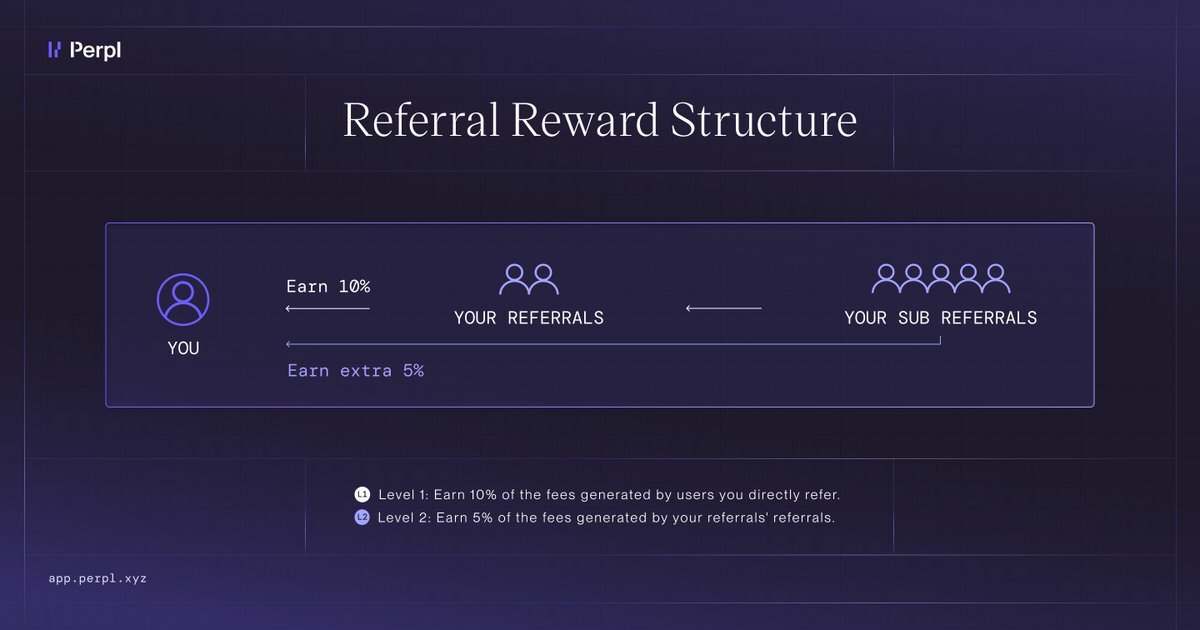
Your referral network has two degrees:
* **First-degree** — traders who joined using your invite code
* **Second-degree** — traders who joined using your referrals' invite codes
You will earn:
* **10%** of trading fees from first-degree referrals
* **5%** of trading fees from second-degree referrals
Both the referrer and the referee also earn a **points bonus**. Each side earns an extra 5% on the referee's trading points.
Epoch snapshots are taken every Wednesday at 16:00 UTC. Transfers are processed biweekly. Circumstances permitting.
***
#### Tracking Your Referrals
Track your active referrals, cumulative earnings, and invite code usage on the referral page:
[app.perpl.xyz/referrals](https://app.perpl.xyz/referrals)
***
#### Summary
| | |
| ----------------- | --------------------------------------- |
| 1st-degree reward | 10% of fees, per referral |
| 2nd-degree reward | 5% of fees, per referral |
| Payouts | Bi-weekly, within 3 days of each Monday |
| Tracking | Live on the Referrals page |
# Points
Perpl Points reward organic trading and meaningful participation on the exchange.
Season One of the Points Program was launched on 10 June 2026.
Early users will be awarded additional points for Pre-season activity at a later date.
### How To Get Points
Four core activities reward points:
* Organic trading activity.
* PLP participation (soon).
* Referrals (both the referrer and the referee earn an extra 5% on the referee's trading points).
* Bonus points (tournaments, builder codes, partnerships, IRL events, etc).
### Weekly Points Distribution
* For Season One, the total points pool for each week is 50,000 points.
* Your share is calculated on your activity relative to the rest of the\
protocol, across trading, PLP, and referrals.
* Weekly snapshots of activity every Wednesday.
* Weekly points drop within 48 hours of each snapshot.
* Points are allocated across the core activities: trading, PLP\
participation, and referrals.
* All distributions and history can be tracked via the [Points](https://app.perpl.xyz/points) page.
### Notes
Perpl reserves the right to update earning criteria, weights, and program structure at any time.
Inorganic behavior (such as wash trading or self-dealing) may result in reduced volume multipliers for a given weekly epoch.
For the latest updates, follow us on X and Discord.
# mPoints
### $1,000,000 in MON incentives
Starting July 8th, we’re launching a 16-week campaign where users can earn mPoints every week based on their organic trading activity on Perpl. At the end of the campaign, your total mPoints will determine your share of up to $1,000,000 in MON rewards.
* **Rewards pool:** $500,000 - $1,000,000
* **Total mPoints supply:** 1,000,000
* **Weekly mPoints emissions:** 50,000 mPoints
* **Duration:** 16 weeks
* **Rewards:** Distributed in $MON at the end of the campaign
### Rewards Pool
We’ve allocated a **guaranteed base of $500,000** for this campaign.
On top of this, we’re allocating up to an additional $500,000 (for a total of $1,000,000) that we will unlock based on trading activity on Perpl.
These extra rewards will be released in $100,000 increments when the platform’s total OI-Adjusted ADV sustains the required level over any rolling 7-day period.
#### **OI-Adjusted ADV is calculated as:**
$$min(Avg Daily Volume, TimeWeighted Average Open Interest × 10)$$
Stronger, sustained organic trading activity = more rewards.
| Tier | Total Platform OI-Adjusted ADV | Extra Rewards Released | Total Rewards |
| ---- | ------------------------------ | ---------------------- | ------------- |
| 1 | Guaranteed | +$500,000 | $500,000 |
| 2 | $5,000,000 | +$100,000 | $600,000 |
| 3 | $10,000,000 | +$100,000 | $700,000 |
| 4 | $20,000,000 | +$100,000 | $800,000 |
| 5 | $30,000,000 | +$100,000 | $900,000 |
| 6 | $40,000,000 | +$100,000 | $1,000,000 |
*Note: The rewards are not affected by volatility in the MON price. The final, claimable, reward will be in $MON, but will be denominated in USD.*
### mPoints
mPoints are the points system for Purple Summer. A total of 1,000,000 mPoints will be distributed during the 16-week campaign. These mPoints directly determine your share of the up to $1,000,000 MON reward pool at the end of the campaign.
Out of the total 1,000,000 mPoints:
* 800,000 mPoints will be distributed through weekly trading rewards (50,000 mPoints per week × 16 weeks)
* 200,000 mPoints are reserved for other activations, including builder codes, tournaments, and bonus rewards for the active community
mPoints are earned based on organic trading activity. Snapshots happen every Wednesday, and mPoints are distributed every Monday.
#### **Key details:**
* **Total mPoints supply:** 1,000,000
* **Weekly trading allocation:** 50,000 mPoints
* **Other activations:** 200,000 mPoints
* **Snapshots:** Every Wednesday
* **Distribution:** Every Monday
* **Rules:** Only organic activity counts toward mPoints
* **Users:** Institutional Market Makers will be excluded from the mPoints program
Purple Summer is a double points season for Perpl users. mPoints run alongside the existing Perpl Points system. The two are separate and do not affect each other.
#### Claiming your MON
After the 16-week campaign ends, users will be able to claim their share of the total unlocked MON reward pool based on their accumulated mPoints.
### Growth Mode
On July 7th, we removed Access Codes. Everyone can now join Perpl and start trading.
Our current Referral Rewards system remains in place:
* Referrers earn 10% of revenue from their direct referrals and 5% from sub-referrals.
* Referrers earn extra points equal to 5% of their direct referrals' weekly Perpl Points.
* Referees receive a +5% Perpl Points boost.
To further encourage referrals in this new open era, we’re adding a permanent +5% mPoints boost both ways for the entire 16-week Purple Summer campaign. The mPoint boost will work similarly to the Perpl Points referral boost.
If you join without a referral code, you can add one at any time on the referrals page.
# Tournaments
Learn how Perpl tournaments work and how to take part.
Perpl runs trading tournaments periodically to reward eligible traders for their performance and activity.
Each tournament has its own eligibility requirements, leaderboards, prizes, and rules. Review the event page before participating.
### How tournaments work
Eligible activity is tracked during the tournament period. Each leaderboard ranks participants independently.
Prizes follow the event's published rules. Perpl may disqualify accounts for manipulation or other rule violations.
# Tournament #2
### $100K Monad Cards Invitational
An invite-only, four-week trading tournament, with two leaderboards.
$100,000 on the line.
Bonus prize: Monad Cards Invitational Badge SBT NFT for everyone who participates.
The competition runs from **16 July, 15:00 UTC to 13 August, 15:00 UTC**.
### Who's Invited
The Invitational is gated to two groups:
* [**Monad Cards NFT holders**](https://cards.monad.xyz/)
* **Perpl Points holders above a certain threshold**
The exact Perpl Points threshold will be announced after the Week 5 Perpl Points snapshot.
If you are invited, all you need to do to participate is put in 1 trade.
Your wallet will automatically appear on the leaderboard, and you will qualify for the SBT Badge.
### Two Leaderboards, Two Ways to Win
The competition runs on two independent leaderboards. All traders compete for both. Every market is eligible.
### Trading Contest - $85,000
Ranks traders by a trading score that combines profit and volume, across all positions over the tournament period. PNL includes both realized and unrealized.
Calculated as:
> Score = PNL × √Volume
| **Place** | **Cash Prize** | **Other Prizes** |
| --------- | -------------- | ---------------- |
| 1 | $25,000 | Perpl VIP box |
| 2 | $15,000 | Perpl VIP box |
| 3 | $10,000 | Perpl VIP box |
| 4 | $7,500 | Perpl VIP box |
| 5 | $5,000 | Perpl VIP box |
| 6–10 | $2,500 each | |
| 11–20 | $1,000 each | |
| **Total** | **$85,000** | |
### Volume Contest - $15,000
Ranks traders by total notional volume traded. Maker and taker volume count equally.
| **Place** | **Cash Prize** | **Other Prizes** |
| --------- | -------------- | ---------------- |
| 1 | $3,800 | Perpl VIP box |
| 2 | $2,500 | Perpl VIP box |
| 3 | $2,000 | Perpl VIP box |
| 4 | $1,500 | |
| 5 | $1,200 | |
| 6 | $1,000 | |
| 7 | $900 | |
| 8 | $800 | |
| 9 | $700 | |
| 10 | $600 | |
| **Total** | **$15,000** | |
### Monad Cards Invitational Badge
Every trader who participates will receive the Monad Cards Invitational Badge. A soulbound NFT.
To be eligible for the badge you need at least one trade.
The badge is permanent proof that you were here for the First Monad Cards Invitational Tournament.
### Settlement
Payouts will be sent directly to the winners' accounts within 7 days of the leaderboards being finalized.
### Rules
Perpl reserves the right to disqualify accounts at its discretion if an award recipient fails AML/KYC check performed by Perpl or if market manipulation practice is detected.
Wash trading, self-dealing and volume generated between coordinated wallets are not allowed and may result in disqualification from a Perpl leaderboard.
Institutional market makers are not eligible for participation in the tournament.
A minimum of $250k volume is required to be eligible for a prize.
# Tournament #1
*This tournament ended on **July 1, 17:00 UTC 2026.***
***
Welcome to the 1st Perpl Mainnet Trading Tournament. For two weeks, traders can compete across two independent leaderboards for **$50,000** in cash prizes.
Every market is eligible.
The competition runs from **June 17, 17:00 UTC** to **July 1, 17:00 UTC**.
### **Two Ways to Win**
The competition runs on two leaderboards that score independently. A trader can rank on one, the other, or both.
### **ROI Contest - $25,000**
Ranks traders by percentage return on capital, including both realized and unrealized gains, over the time period of the tournament, across all positions. Calculated as:
`ROI = PNL across all markets / (starting amount + deposits)`
| **Place** | **Cash Prize** | **Other Prizes** |
| --------- | -------------- | -------------------- |
| 1 | $10,000 | Perpl Summer VIP box |
| 2 | $5,000 | Perpl Summer VIP box |
| 3 | $3,000 | Perpl Summer VIP box |
| 4 | $2,000 | |
| 5 | $1,500 | |
| 6 | $1,000 | |
| 7 | $800 | |
| 8 | $700 | |
| 9 | $600 | |
| 10 | $400 | |
| **Total** | **$25,000** | |
### **Volume Contest - $25,000**
Ranks traders by total notional volume traded. Maker and taker volume count equally.
| **Place** | **Cash Prize** | **Other Prizes** |
| --------- | -------------- | -------------------- |
| 1 | $7,000 | Perpl Summer VIP box |
| 2 | $4,200 | Perpl Summer VIP box |
| 3 | $3,000 | Perpl Summer VIP box |
| 4 | $2,500 | |
| 5 | $2,000 | |
| 6 | $1,750 | |
| 7 | $1,500 | |
| 8 | $1,250 | |
| 9 | $1,000 | |
| 10 | $800 | |
| **Total** | **$25,000** | |
#### Settlement
Both leaderboards pay out the top 10 traders in cash.
Payouts will be sent directly to the winners' accounts within 7 days of the leaderboards being finalized.
#### How to Participate
Everyone who uses Perpl while the tournament is running automatically participates.
#### Minimum Requirements
* A deposit of $100
* $100,000 in trading volume during the 2-week duration of the tournament.
#### Rules
Perpl reserves the right to disqualify accounts at its discretion where manipulation is detected.
Wash trading and volume generated between coordinated wallets are not allowed and may result in disqualification from both leaderboards.
# Rescue UI
## Rescue Mode
[Rescue Mode](https://recovery.perpl.xyz/) is a stripped-down version of Perpl that lets you close positions and withdraw funds even when the main app is unavailable. It is hosted as a standalone single-page app, and depends on nothing from our servers or frontend infrastructure.
If the main site is down, your funds are still safe and still yours to move.
### Why it exists
A perpetual futures DEX is only as trustworthy as your ability to exit. Most of the time, you'll never see Rescue Mode – but if our frontend goes offline, a node provider has an outage, or anything else takes the main app down, you should never be locked out of your own money.
Because Rescue Mode talks directly to the chain, it keeps working when the rest of the stack doesn't.
### What it can do
Rescue Mode is **reduce-only**. It is intentionally limited to the actions you need to protect your account:
* View your open positions and orders
* Close positions, fully or partially
* Close all positions at once
* Cancel open orders
* Withdraw your funds
You cannot open new positions, increase existing ones, or place new entry orders. This is by design – Rescue Mode is an exit, not a trading terminal.
### What you'll see
**Account panel**
* **Maintenance Margin** — the minimum margin required to keep your positions open
* **Available Margin** — margin not currently committed to positions
* **Balance** — your total account balance
* **Unrealized PnL** — open profit or loss across your positions
* **Close ALL positions** — a single action to flatten your entire account
**Positions and Orders**
Each position shows its market, side and leverage (e.g. BTC Long 10x), size, mark price, and liquidation price, along with partial-close controls. The Orders tab lists any resting orders, which you can cancel.
### How to use it
If the main app is down, Perpl will direct you to Rescue Mode automatically
1. Open the Rescue Mode site (automatically or via .)
2. Connect the same wallet you use to trade on Perpl.
3. Review your positions and orders.
4. Close positions partially or fully, cancel orders, and withdraw as needed.
### How it works
Rescue Mode reads your account state directly from the chain and submits reduce-only and withdrawal transactions straight to the smart contracts — no API, no backend, no dependency on Perpl's servers. As long as the network is running and you can reach an IPFS gateway, you can act on your account.
### Good to know
* **You'll usually be sent here automatically.** If the main app is down, Perpl points you to Rescue Mode.
* **Prices may look different.** Rescue Mode is built for safety and resilience, not for precise execution – expect a simpler view than the main trading app.
* **It's reduce-only.** If you want to open or add to positions, use the main Perpl app once it's back.
* **Your funds are always yours.** Rescue Mode exists so that your ability to exit never depends on us being online.
# Security
# Limiting Open Interest
### Overview
Open interest (OI) caps protect the exchange from taking on more aggregate market exposure than it can safely support. As total OI grows, the protocol's risk of insolvency, liquidity stress, and liquidation cascades increases. Perpl enforces a per perpetual OI cap (`maxOpenInterestLNS`) and dynamically scales margin requirements as open interest approaches that cap.
There are four thresholds that activate progressively as OI grows:
| Threshold | Default | Effect |
| --------------------------- | ---------- | --------------------------------------------------------------------------------- |
| `dcpBorrowThreshHdths` | 85% | Decrease Collateral (DCP) blocked — traders cannot withdraw margin from positions |
| `unityDescentThreshHdths` | 90% | Dynamic IMF begins descending from the perpetual's default toward 1x leverage |
| `overColDescentThreshHdths` | 95% | Dynamic IMF descends further, approaching full collateralization |
| `maxOpenInterestLNS` | 100% (cap) | **Hard cap** — only reduce-only orders allowed; open orders are auto-canceled |
These thresholds are configurable per perpetual by the Owner and must satisfy: `dcpBorrowThresh < unityDescentThresh < overColDescentThresh`.
### Hard OI Cap
When total open interest reaches `maxOpenInterestLNS`:
* **Only reduce-only orders are accepted** — no new positions or position increases
* **Resting open orders on the book are auto-canceled** with the recycle fee remitted to the canceller
* **Normal operation resumes** when OI drops back below the cap
This serves as the ultimate backstop to prevent the exchange from becoming overexposed in any single market.
### Dynamic Initial Margin (OIMF)
Instead of using a constant Initial Margin Fraction (IMF), the protocol dynamically adjusts the margin requirement as open interest approaches its maximum. This makes it progressively more expensive to open leveraged positions as the market becomes crowded.
The dynamic IMF is computed as a piecewise-linear function of the perpetual's forward-looking open interest:
#### Segment 1 — Default IMF (OI below 90%)
When open interest is below `unityDescentThreshHdths`:
The perpetual's default IMF applies unchanged. For example, if the perpetual allows 50x leverage, traders can use up to 50x.
#### Segment 2 — Unity Descent (OI between 90%–95%)
Between `unityDescentThreshHdths` and `overColDescentThreshHdths`:
IMF interpolates linearly from the perpetual's default down toward 1x leverage (unity). As OI grows through this range, the maximum allowed leverage decreases. A perpetual that normally allows 50x might only allow 25x at 92.5% OI.
#### Segment 3 — Over-Collateralization Descent (OI above 95%)
After `overColDescentThreshHdths`, up to maximum open interest:
IMF continues descending below unity toward a minimum value, effectively requiring full or over-collateralization. At this point, opening new leveraged positions becomes impractical — the margin requirement approaches or exceeds the full notional value.
```
Max Leverage
(IMF) ^
|
50x |_______________
| \
| \ (linear descent)
| \
1x | \________
| \
+----------------------------\---------> Open Interest (%)
0% 85% 90% 95% 100%
^ ^ ^ ^
| | | |
DCP Unity OverCol Hard
Block Descent Descent Cap
```
#### DCP Borrow Threshold (OI above 85%)
Before the IMF curve activates, the first protective measure kicks in at 85% OI: Decrease Collateral Position (DCP) requests are blocked. This prevents traders from withdrawing margin from existing positions when the market is under stress, preserving collateral buffers across the system.
### Reference
For concrete visualizations and finite-precision behavior of the OIMF curve, refer to the Desmos example:
# Withdrawal Limits
### Overview
The withdrawal rate limit is a safety mechanism that limits the global rate of fund withdrawals from the exchange. It is designed to slow mass withdrawals during a security incident, giving operators time to detect and respond before protocol funds are drained.
This rate limit applies to **all accounts**, including the Owner (unless explicitly bypassed). It does **not** affect internal protocol transfers or accounting operations that do not reduce TVL.
The system operates using Monad block approximations, not timestamps. Assuming an average block consensus time of **0.42 seconds**, an "hour" is represented by **8,571 blocks**.
### Parameters
| Parameter | Default | Range | Description |
| --------------------- | --------------------- | ---------------- | ---------------------------------------------------- |
| `wrlsThousandthsTvl` | 100 (10% of TVL/hour) | 1–250 (0.1%–25%) | Fraction of TVL withdrawable per hour |
| `minWithdrawLimitCNS` | $1,000,000 | $1M–$100M | Floor on hourly withdrawal limit for low-TVL periods |
| Blocks per hour | 8,571 | Fixed | Based on 0.42s average Monad block time |
Both parameters are configurable by the Owner via `setThousandthsTvlWRLS` and `setMinWithdrawLimit`.
### Rate-Limit Calculation
When the first withdrawal of a new hour-period occurs, the contract:
1. Reads the current Total Value Locked (TVL)
2. Computes the maximum allowed withdrawal for the upcoming hour
#### Hourly Withdrawal Limit
$$
\textbf{hourly limit} = \max\left( \frac{\textit{wrlsThousandthsTvl} \cdot \text{TVL}}{1000},\ \textit{minWithdrawLimitCNS} \right)
$$
This ensures:
* The limit scales with protocol size
* There is a minimum cap to ensure usability when TVL is small
#### Collateral Per Block (Release Rate)
$$
\textbf{collateralPerBlock} = \frac{\text{hourly limit}}{\text{8,571 blocks}}
$$
This controls how quickly additional withdrawal capacity becomes available as blocks are mined.
### Burst Window (First \~15 Minutes)
At the start of each hour period:
* A burst amount equal to \~25% of the hourly limit is immediately available
* This includes any rounding remainder from integer division
* After this initial window, additional capacity unlocks block-by-block at the `collateralPerBlock` rate
The burst ensures:
* Regular user withdrawals remain smooth
* Emergency withdrawals remain possible
* Attackers cannot instantly drain the protocol
### Withdrawal Availability Curve
```
^
|
|
hourly --+ - - - - - - - - - - - - - - - - - - - - - - - - - - - -*+*
limit | ***
| *** |
| ***
3/4 | *** |
hourly - + - - - - - - - - - - - - - - - - - - - - - -*+*
limit | *** | |
| ***
| *** | |
1/2 | ***
hourly - + - - - - - - - - - - - - - -*+* | |
limit | ***
| *** | | |
| ***
1/4 | Burst *** | | |
hourly --+****************
limit | | | | |
|
| | | | |
|
+---------------+-------------+---------------+-------------+------------>
|
| | | | |
|
~15 Minutes ~30 Minutes ~45 Minutes ~1 Hour
Start of
Limit Period
NOTE: Burst amount includes remainder from downward rounding division.
```
#### Key Behaviors
* **First \~15 minutes**: Burst amount available immediately (\~25% of hourly limit)
* **15–60 minutes**: Linear increase at `collateralPerBlock`
* **At \~60 minutes**: Limit fully consumed; next withdrawal resets the cycle
* **Next withdrawal after hour boundary**: Recomputes limit using new TVL
### Cycle Reset
At the end of the hour (approximate block count reached):
* The next withdrawal call resets the cycle
* The current TVL is used to recompute the new hourly limit
* The cycle repeats: burst → linear release → reset
### Bypass Addresses
The Owner can designate addresses that bypass the withdrawal rate limit entirely via `setWithdrawBypass`. This is used for:
* Protocol-operated addresses that need unrestricted withdrawal access
* Emergency response — ensuring critical operations are not blocked during high-withdrawal periods
Bypass status is toggled per address and emits a `WithdrawRateLimitBypassSet` event for transparency.
### Owner Force Reset
The Owner can manually reset the withdrawal rate limit cycle at any time via `forceResetWithdrawRateLimit`. This immediately:
* Recomputes the hourly limit from the current TVL
* Restarts the burst + ramp cycle
* Restores withdrawal availability for all users
This is the primary incident response tool when legitimate withdrawals are being blocked.
### Known Limitation
A user can temporarily exhaust the withdrawal rate limit by depositing a large amount and immediately withdrawing up to the available allowance. This blocks other users from withdrawing until the limit replenishes or the cycle resets.
**Mitigations:**
* **Bypass address list**: Critical addresses (e.g., market makers, protocol vaults) can be whitelisted to bypass the rate limit
* **Owner force reset**: The Owner can manually reset the cycle to immediately restore withdrawal capacity
* **TVL-proportional scaling**: Larger protocol TVL means larger absolute withdrawal limits, making this attack more capital-intensive
# Vaults: PLP
Vaults are passive investment strategies on Perpl that also help bolster the exchange's liquidity and safety.
PLP's primary purpose will be to provide deep liquidity to the order books, and it can also be used as backstop liquidity, depending on asset, market, and risk conditions.
### Technical Specifications
* Standard ERC-4626 Vault
* Depositors get LP tokens
* Margin/Deposit collateral: AUSD
* Withdrawal delay: 7 days
* Deposit schedule: weekly post-fee/reward distribution
* Fees are distributed via the smart contract, weekly
* Strategies can be run on-chain or off-chain at the discretion of the curator
* Funds have to stay on-chain and in-vault (no bridging externally)
### Why Hedge?
Market making is a risky endeavor, and taking directional risk to provide deep liquidity on Perpl can lead to massive drawdowns and/or losses. Leveraging [Fireblocks OES](https://fireblocks.com/platforms/off-exchange/) allows the vault curator to offload some of the risk on other venues, primarily centralized exchanges.
# Design Goals
Perpl is built on the following design pillars:
1. **Clean**
2. **Understandable**
3. **User-centred**
4. **Beautiful**
We chose these principles because they are simple ideas we can use to guide the overall user experience.
#### Clean
Our designs embrace simplicity and minimalism, removing unnecessary elements to focus on what truly matters. Every component serves a clear purpose.
#### Understandable
Interface elements should be intuitive and self-explanatory. Users should know how to interact with our product without requiring extensive documentation. But if something is unfamiliar, they should be able to find out about it easily.
#### User-centred
We design with real user needs in mind, constantly gathering feedback and adapting our solutions to better serve our users' goals and preferences. This isn’t just a UI choice, this is a whole approach to doing design. We will actively seek feedback, and we will continuously improve the product.
#### Beautiful
Beyond functionality, our designs should be visually appealing. And beyond visual appeal, they should also create a delightful experience that users enjoy interacting with. Admittedly, you can’t make a perps dex *that* exciting (and if you do, it's probably not that usable), but we will try and make it look and feel as good as possible.
# Funding a wallet
Before trading on Perpl, you must have an EVM wallet set up. If you already have a funded wallet, you can skip to the next document. If you’re new to the space and do not have an EVM-compatible wallet, it’s important that you make one. Wallets are how you interact with different protocols and are where you can store assets, confirm transactions, and trade.
### Wallet Setup
Perpl is built on Monad and EVM EVM-compatible chain, meaning you will need an EVM wallet to start trading. There are many different wallets to choose from, including [Rabby](https://rabby.io/), [Phantom](https://phantom.com/), [Metamask](https://metamask.io/), [Uniswap](https://wallet.uniswap.org/) wallet, and more. Visit the sites of any of these wallets and follow the directions there to get started. We recommend setting up your wallet as a Chrome extension to make it easier to connect with Perpl.
Important: Your wallet will generate a secret recovery phrase. Anyone with this phrase can access your funds. Never share it, and store it securely in a safe physical location.
Now that you have a wallet installed, you will need funds to start trading.
### Collateral Requirements
Collateral, AKA funds, are necessary to trade on Perpl. Perpl currently uses AUSD for all transactions.
You can send AUSD to your wallet from a centralized exchange wallet or by using fiat onramps directly in the wallet. Depending on which wallet you have selected, your onramp options will be different and we suggest you follow the instructions from your specific wallet.
You will need to have MON to create an account, AUSD for trade margin on Perpl and some sort of gas token (ETH for ETH/BASE/ARB or SOL for Solana wallets) to bridge your AUSD to Monad. Once you have these assets in your wallet, you’re ready to bridge to Monad and begin trading.
# Bridging to Monad
Before trading on Perpl, you must have AUSD on Monad. Because of its EVM compatibility, bridging to Monad is easy.
Step 1: Connect your wallet
1. Go to the official Monad Bridge[ https://monadbridge.com/](https://monadbridge.com/)
2. Connect either an EVM or a Solana wallet
Step 2: Select Source and Destination Chains
* From: Ethereum, Base, Arbitrum, Optimism (Choose the chain you have assets on and would like to bridge)
* To: Monad
⭐ Make sure the asset you are trying to bridge is supported by both chains.
Step 3: Choose Asset and Amount
* Choose ETH, USDC, AUSD, etc.
Reminder: All transactions on Perpl will take place using AUSD. If you do not bridge AUSD, you will have to swap your bridged asset for AUSD on a Monad exchange.
* Enter the amount you wish to send.
Step 4: Approve and initiate Transfer
* Click Approve to allow the bridge to access your tokens
* Click Bridge
* Confirm tx in wallet
Your transaction should take 1-5 minutes to finalize. If you do not see your assets bridged, check out[ Etherscan](https://etherscan.io/) or[ Monad Explorer](https://testnet.monadexplorer.com/) to view tx status.
\
Now that you have funds in your wallet, you are ready to trade. Head to app.perpl.xyz.
# Waitlist
# Audits
# For Developers
* Welcome to the developer documentation for **Perpl**, a perpetual futures exchange built on Monad.
These docs walk you through everything you need to build on Perpl — from your first authenticated request to running trading strategies through the SDK.
## Where to start
* **New here?** Read the [Overview](/resources/for-developers/overview) to understand what Perpl offers, then follow the [Quickstart](/resources/for-developers/quickstart) to make your first call.
* **Connecting an app?** Set up [Networks & Configuration](/resources/for-developers/networks-and-configuration) for the environment you target (mainnet, testnet, or solonet).
## Main sections
#### [Getting Started](/resources/for-developers/overview)
Orientation, network/environment configuration, and a hands-on quickstart.
#### [API Guide](/resources/for-developers/api/authentication)
The HTTP and streaming surface: [Authentication](/resources/for-developers/api/authentication), the [REST API](/resources/for-developers/api/rest), the [WebSocket API](/resources/for-developers/api/websocket), shared [Types & Errors](/resources/for-developers/api/types-and-errors), and [Builder Codes](/resources/for-developers/api/builder-codes) for fee-charging integrations.
#### [SDK Guide](/resources/for-developers/sdk/install)
The recommended path for most integrations: [Install the SDK](/resources/for-developers/sdk/install), core [Concepts](/resources/for-developers/sdk/concepts), a [Quickstart](/resources/for-developers/sdk/quickstart), the [perpl-cli](/resources/for-developers/sdk/perpl-cli) debugging tool, and runnable [Examples](/resources/for-developers/sdk/examples).
#### [Direct API](/resources/for-developers/api/typescript)
Talk to the exchange without the SDK, from [TypeScript](/resources/for-developers/api/typescript) or [Python](/resources/for-developers/api/python).
#### [Recipes](/resources/for-developers/recipes)
Task-oriented, copy-pasteable solutions to common integration problems.
# Overview
Perpl is an **isolated-margin perpetual-futures decentralized exchange (DEX)** that runs on the [Monad](https://monad.xyz/) blockchain. A *perpetual future* ("perp") is a derivatives contract that tracks the price of an underlying asset (for example BTC or ETH) with no expiry date. You post collateral, open a long or short position with leverage, and the position stays open until you close it or it is liquidated.
This page introduces the core concepts you need before you write any code, then walks through the two ways to integrate with Perpl:
* [**Direct REST + WebSocket API**](#two-ways-to-integrate) — call the HTTP and WebSocket endpoints from any language.
* [**Rust SDK**](#two-ways-to-integrate) — use the `perpl-sdk` crate and the `perpl-cli` command-line tool.
## Isolated margin
Perpl uses **isolated margin**, not cross margin. This is the single most important concept to understand before trading:
* **Each position has its own dedicated collateral deposit.**
* **Your account balance does *****not***** back your open positions.** Free balance sitting in your account is never automatically pulled in to save a position that is moving against you.
* If a position's own margin is exhausted, that position is liquidated on its own — it cannot cascade into your other positions or your account balance.
> **Note:** If you are coming from an exchange that uses cross margin, this behavior will surprise you. A position can be liquidated even while your account holds ample free balance. To add margin to a position, you must explicitly increase that position's collateral — the account balance will not do it for you.
This model prevents one losing position from cascading into the rest of your account.
## Markets
Each tradable perp is identified by a numeric `market_id`. **Market IDs differ between mainnet and testnet**, so always confirm which network you are targeting.
**Mainnet** (Chain ID `143`):
| `market_id` | Symbol |
| ----------- | ------ |
| 1 | BTC |
| 10 | MON |
| 20 | ETH |
| 31 | SOL |
| 40 | HYPE |
| 50 | ZEC |
**Testnet** (Chain ID `10143`):
| `market_id` | Symbol |
| ----------- | ------ |
| 16 | BTC |
| 32 | ETH |
| 48 | SOL |
| 64 | MON |
| 256 | ZEC |
> **Note:** On mainnet, SOL was relisted as perp **31** on 2026-07-06. The legacy SOL perp **30** only appears in historical / on-chain data during migration — use **31** for the active SOL market.
Per-market parameters (price and size scaling, fees, leverage limits) are served live by the API. Fetch them from the public context endpoint (`GET /v1/pub/context`) rather than hard-coding them — see the [API Guide](#where-to-go-next).
## Collateral (AUSD)
Positions and account balances on Perpl are denominated in **AUSD (Agora Dollar)**, an ERC-20 stablecoin with **6 decimals**. All collateral amounts are integers scaled by `10^6` (so `100000000` = 100.0 AUSD).
| Network | Collateral token | Address | Decimals |
| ------- | ------------------- | -------------------------------------------- | -------- |
| Mainnet | AUSD (Agora Dollar) | `0x00000000eFE302BEAA2b3e6e1b18d08D69a9012a` | 6 |
| Testnet | aUSD | `0xa9012a055bd4e0eDfF8Ce09f960291C09D5322dC` | 6 |
To trade you must hold an on-chain **exchange account**, created by depositing collateral into the Exchange contract. Authenticating with the API is *not* the same as having an exchange account — the two are separate steps, covered in the [Quickstart](#where-to-go-next).
| Network | Exchange contract | RPC URL |
| ------- | -------------------------------------------- | ------------------------------- |
| Mainnet | `0x34B6552d57a35a1D042CcAe1951BD1C370112a6F` | `https://rpc.monad.xyz` |
| Testnet | `0x1964C32f0bE608E7D29302AFF5E61268E72080cc` | `https://testnet-rpc.monad.xyz` |
The full network reference lives in [Networks](/resources/for-developers/networks-and-configuration).
## Two ways to integrate
{% tabs %}
{% tab title="Path A: REST + WebSocket API" %}
The API has two channels:
| Channel | Protocol | Purpose | Auth |
| -------------- | -------- | ---------------------------------------- | ------ |
| REST | HTTPS | History queries, authentication, profile | Varies |
| WebSocket (WS) | WSS | Real-time data and trading | Varies |
Base URLs:
| Network | REST base URL | WebSocket URL |
| ------- | ------------------------------- | ------------------------- |
| Mainnet | `https://app.perpl.xyz/api` | `wss://app.perpl.xyz` |
| Testnet | `https://testnet.perpl.xyz/api` | `wss://testnet.perpl.xyz` |
**Public market data requires no authentication.** For example, fetch the chain and market configuration:
```typescript
const API_URL = process.env.PERPL_API_URL || 'https://app.perpl.xyz/api';
// Fetch context (markets, tokens, chain config)
const context = await fetch(`${API_URL}/v1/pub/context`)
.then(r => r.json());
console.log(context.markets); // Available markets
console.log(context.chain); // Chain configuration
```
Subscribe to a real-time stream over the market-data WebSocket:
```typescript
const WS_URL = process.env.PERPL_WS_URL || 'wss://app.perpl.xyz';
const ws = new WebSocket(`${WS_URL}/ws/v1/market-data`);
ws.onopen = () => {
// Subscribe to the BTC order book (market_id=1 on mainnet)
ws.send(JSON.stringify({
mt: 5, // MsgTypeSubscriptionRequest
subs: [{ stream: 'order-book@1', subscribe: true }]
}));
};
ws.onmessage = (event) => {
const msg = JSON.parse(event.data);
console.log('Message type:', msg.mt);
};
```
**Authenticated calls** (order history, trading) use an **API key**: an Ed25519 key pair that you enroll once with a one-time wallet signature, then use to sign every request. There is no session cookie or bearer token. The signing scheme and the full endpoint list are covered in the [API Guide](#where-to-go-next).
This path works from **any language** — JavaScript, TypeScript, Python, Rust, or anything that can make HTTPS and WebSocket calls.
{% endtab %}
{% tab title="Path B: Rust SDK" %}
If you build in Rust, the `perpl-sdk` workspace gives you typed access to exchange state and events, plus `perpl-cli` for reading and tracing the exchange from the command line.
| Crate | Purpose |
| ----------- | -------------------------------------------------------------------------------------------------------- |
| `perpl-sdk` | SDK types for building and maintaining an in-memory cache of exchange state, plus order-posting helpers. |
| `perpl-cli` | Command-line tool for reading and tracing exchange state and events. |
Requirements: **Rust `>= 1.85.0`** (edition 2024). Add the SDK as a path dependency in your `Cargo.toml`:
```toml
[dependencies]
perpl-sdk = { path = "../dex-sdk/crates/sdk" }
```
The `Chain` type carries the per-network configuration (chain ID, Exchange address, collateral token, and the active perpetual list). Built-in constructors cover both networks:
```rust
use perpl_sdk::Chain;
let chain = Chain::mainnet(); // or Chain::testnet()
println!("chain_id = {}", chain.chain_id()); // 143
println!("exchange = {}", chain.exchange()); // 0x34B6…12a6F
println!("collateral = {}", chain.collateral_token());
println!("perpetuals = {:?}", chain.perpetuals()); // [1, 10, 20, 31, 40, 50]
```
To browse the generated API reference:
```bash
cargo doc -p perpl-sdk --no-deps --open
```
> **Note:** The SDK currently sources events via log polling and does not yet process funding events. See the [SDK Guide](#where-to-go-next) for the current module map, streaming model, and limitations.
> {% endtab %}
> {% endtabs %}
## Where to go next
| Guide | What it covers |
| ---------------------------------------------------------------- | --------------------------------------------------------------------------------- |
| [Quickstart](/resources/for-developers/quickstart) | Create an exchange account, deposit collateral, and place your first order. |
| [Networks](/resources/for-developers/networks-and-configuration) | Full mainnet and testnet reference: URLs, chain IDs, contract addresses, tokens. |
| [API Guide](/resources/for-developers/api) | REST endpoints, WebSocket streams, and API-key authentication (any language). |
| [SDK Guide](/resources/for-developers/sdk) | The `perpl-sdk` crate and `perpl-cli`: state cache, event streams, order posting. |
# Quickstart
Get from zero to your first authenticated Perpl API call in a few minutes.
Perpl authenticates programmatic clients (bots, terminals, scripts) with an **API key** — an **Ed25519 key pair** (a modern elliptic-curve digital-signature scheme). The server stores only the public key; the private key never leaves your machine. There is no bearer token or session cookie: **every request is signed** with the key's private key.
This page covers the fastest path: create a key, configure your environment, then sign and send a REST (Representational State Transfer, over HTTPS) request. When you are ready to trade, jump to [placing an order](#next-steps).
## Prerequisites
* **Node.js 18 or newer** — for the built-in `fetch` and `Buffer` `base64url` support used in the snippets below.
* The **`@noble/ed25519`** package for signing:
```bash
npm install @noble/ed25519
```
{% stepper %}
{% step %}
## Create an API key
Create a key in the web UI. Connect your wallet, then open the API-keys page:
| Network | API-keys page |
| ------- | ----------------------------------- |
| Mainnet | |
| Testnet | |
The UI walks you through the wallet-signed enrollment and hands you two values:
* **`X-API-Key` token** — the opaque token sent on every request.
* **Ed25519 private key** — used to sign every request; **store it now, it is not re-derivable.**
A key carries a **scope** (`read`, `trade`, or both; `trade` implies `read`). Reading your account data needs only `read`; placing orders needs `trade`. Withdrawals and transfers-out are **never** permitted via an API key, at any scope.
> **Note:** An API key only authorizes API access. Trading also requires an on-chain exchange account (created with initial collateral on the Exchange contract). Until that account exists, some authenticated endpoints return **404**.
Third-party integrations can also enroll keys programmatically with a wallet-signed flow — see [Integrations](/resources/for-developers/api/authentication).
{% endstep %}
{% step %}
## Configure your environment
The snippets read configuration from environment variables. Set the ones for your target network:
```bash
# Mainnet (defaults shown; omit to use them)
export PERPL_API_URL="https://app.perpl.xyz/api"
export PERPL_WS_URL="wss://app.perpl.xyz" # WebSocket URL has NO /api prefix
export PERPL_CHAIN_ID="143"
# Testnet
# export PERPL_API_URL="https://testnet.perpl.xyz/api"
# export PERPL_WS_URL="wss://testnet.perpl.xyz"
# export PERPL_CHAIN_ID="10143"
# Your enrolled key (from Step 1)
export PERPL_API_KEY=""
export PERPL_API_KEY_SECRET=""
```
| Variable | Purpose | Mainnet default |
| ---------------------- | ----------------------------------------- | --------------------------- |
| `PERPL_API_URL` | REST base URL (**includes** `/api`) | `https://app.perpl.xyz/api` |
| `PERPL_WS_URL` | WebSocket base URL (**no** `/api` prefix) | `wss://app.perpl.xyz` |
| `PERPL_CHAIN_ID` | Chain ID — part of every signature | `143` (testnet: `10143`) |
| `PERPL_API_KEY` | The opaque `X-API-Key` token | — |
| `PERPL_API_KEY_SECRET` | Hex of the 32-byte Ed25519 private key | — |
For the full network reference (RPC URLs, contract and token addresses, market IDs), see [Networks](/resources/for-developers/networks-and-configuration).
{% endstep %}
{% step %}
## Sign and send your first request
Every REST call is signed. The signature covers a **canonical string** of six fields joined by newlines (`\n`):
```
e.g. GET, POST
path + query string exactly as sent, e.g. /v1/trading/fills?count=1
unix epoch milliseconds, decimal
client-random, base64url (no padding)
hex of SHA-256 over the raw body ("" body → sha256 of empty string)
```
The signature is `base64url(ed25519_sign(privateKey, canonical))` (no padding), sent alongside three more headers:
| Header | Value |
| ----------------- | ----------------------------------------------- |
| `X-API-Key` | the opaque token from Step 1 |
| `X-API-Timestamp` | the `timestamp_ms` used in the canonical string |
| `X-API-Nonce` | the `nonce` used in the canonical string |
| `X-API-Signature` | `base64url(ed25519 signature)` |
Save the following as `first-request.ts` and run it. It reads your most recent fill — a small, safe read that works with a `read`-scoped key:
```typescript
import { createHash, randomBytes } from 'crypto';
import * as ed from '@noble/ed25519';
const API_URL = process.env.PERPL_API_URL || 'https://app.perpl.xyz/api';
const CHAIN_ID = Number(process.env.PERPL_CHAIN_ID) || 143;
const API_KEY = process.env.PERPL_API_KEY!;
const privateKey = Buffer.from(
(process.env.PERPL_API_KEY_SECRET ?? '').replace(/^0x/, ''),
'hex',
);
// `target` is the path + query string exactly as sent.
async function signedFetch(method: string, target: string, body = '') {
const timestamp = Date.now().toString();
const nonce = randomBytes(16).toString('base64url');
const bodyHash = createHash('sha256').update(body).digest('hex');
const canonical = [CHAIN_ID, method, target, timestamp, nonce, bodyHash].join('\n');
const sig = await ed.signAsync(Buffer.from(canonical), privateKey);
return fetch(`${API_URL}${target}`, {
method,
headers: {
'X-API-Key': API_KEY,
'X-API-Timestamp': timestamp,
'X-API-Nonce': nonce,
'X-API-Signature': Buffer.from(sig).toString('base64url'),
...(body ? { 'Content-Type': 'application/json' } : {}),
},
...(body ? { body } : {}),
});
}
// Example: read your most recent fill.
const res = await signedFetch('GET', '/v1/trading/fills?count=1');
console.log(res.status, await res.json());
```
> **Note:** The `request-target` must match **byte-for-byte** what the server receives — include the query string (`?count=1`) exactly as sent, and sign that exact string.
### Signature validity
* **Timestamp window** — `X-API-Timestamp` must be within **30 seconds** of server time. Keep the client clock in sync.
* **Nonce** — single-use within the validity window. Generate a fresh random `nonce` per request; replays are rejected.
### If it fails
| Status | Meaning | Fix |
| ---------------- | ------------------------------------------------------------------------------------- | ---------------------------------------------------------------------------------- |
| `401` | Bad/stale signature, replayed nonce, revoked or expired key, or source IP not allowed | Re-sign with a fresh timestamp + nonce; check the clock, key status, and source IP |
| `403` | Scope insufficient (e.g. a `read` key trying to trade) | Enroll a `trade`-scoped key |
| `404` | No matching resource — often no on-chain exchange account yet | Create an on-chain account with collateral, then retry |
| `429` | Rate limited | Back off (1s / 2s / 4s) and retry |
| {% endstep %} | | |
| {% endstepper %} | | |
## Next steps
* **Place an order.** Orders are submitted over the trading WebSocket (`/ws/v1/trading`): authenticate with a signed `ApiKeySignIn` frame, then send `OrderRequest` frames. See [Placing orders over WebSocket](/resources/for-developers/api/websocket).
* **Use the SDK.** For a higher-level Rust client that tracks exchange state and builds orders for you, see the [SDK Quickstart](/resources/for-developers/sdk/quickstart).
* **Explore the endpoints.** Browse the full [REST API reference](/resources/for-developers/api/rest) and [WebSocket reference](/resources/for-developers/api/websocket).
# Recipes
Copy-pasteable, task-oriented snippets for the most common Perpl integration jobs: placing and cancelling an order, streaming your own fills, reading live positions and balances, subscribing to the order book, and attaching a take-profit / stop-loss (TP/SL) to a position.
Each recipe shows the direct-API approach first (REST over HTTPS and the WebSocket streams) and then notes the equivalent in the Rust SDK (software development kit, the `perpl-sdk` crate) where one exists. Acronyms used throughout: **REST** (Representational State Transfer), **WSS** (WebSocket Secure), **API** (application programming interface), **RPC** (remote procedure call), **IOC** (immediate-or-cancel), **FOK** (fill-or-kill), **GTC** (good-till-cancel), **bps** (basis points), **PnL** (profit and loss), **FIFO** (first-in-first-out).
> **Note:** These recipes assume you have already created an API key and set your environment variables. If not, start with the [Quickstart](/resources/for-developers/quickstart) and the [Networks & Configuration](/resources/for-developers/networks-and-configuration) reference.
***
## Before you start
Two things every recipe reuses: environment configuration and a request signer.
### Environment
API keys are **Ed25519 key pairs** (a modern elliptic-curve signature scheme). The server stores only your public key; the private key never leaves your machine, and **every request is signed** — there is no bearer token or session cookie.
```typescript
// Mainnet defaults; set the testnet values to target testnet.
const API_URL = process.env.PERPL_API_URL || 'https://app.perpl.xyz/api'; // REST base URL — includes /api
const WS_URL = process.env.PERPL_WS_URL || 'wss://app.perpl.xyz'; // WebSocket base URL — NO /api prefix
const CHAIN_ID = Number(process.env.PERPL_CHAIN_ID) || 143; // 143 mainnet, 10143 testnet
// Enrolled key (see the Quickstart):
const API_KEY = process.env.PERPL_API_KEY!; // opaque X-API-Key token
const privateKey = Buffer.from(
(process.env.PERPL_API_KEY_SECRET ?? '').replace(/^0x/, ''),
'hex',
); // 32-byte Ed25519 private key
// Market IDs are network-specific — never hard-code across networks.
// Mainnet: BTC=1, MON=10, ETH=20, SOL=31, HYPE=40, ZEC=50
// Testnet: BTC=16, ETH=32, SOL=48, MON=64, ZEC=256
const MARKETS = { BTC: 1, MON: 10, ETH: 20, SOL: 31, HYPE: 40, ZEC: 50 } as const;
```
### The `signedFetch` helper (REST)
Every REST call is signed over a **canonical string** of six fields joined by newlines: ``, ``, `` (path + query string exactly as sent), ``, `` (client-random, base64url, no padding), ``. The signature and three companion headers are sent as `X-API-*`.
```typescript
import { createHash, randomBytes } from 'crypto';
import * as ed from '@noble/ed25519';
// `target` is the path + query string exactly as sent, e.g. /v1/trading/fills?count=100
async function signedFetch(method: string, target: string, body = '') {
const timestamp = Date.now().toString();
const nonce = randomBytes(16).toString('base64url');
const bodyHash = createHash('sha256').update(body).digest('hex');
const canonical = [CHAIN_ID, method, target, timestamp, nonce, bodyHash].join('\n');
const sig = await ed.signAsync(Buffer.from(canonical), privateKey);
return fetch(`${API_URL}${target}`, {
method,
headers: {
'X-API-Key': API_KEY,
'X-API-Timestamp': timestamp,
'X-API-Nonce': nonce,
'X-API-Signature': Buffer.from(sig).toString('base64url'),
...(body ? { 'Content-Type': 'application/json' } : {}),
},
...(body ? { body } : {}),
});
}
```
{% hint style="info" %}
The `request-target` must match **byte-for-byte** what the server receives — include the query string exactly as sent, and sign that exact string. The timestamp must be within **±30 seconds** of server time, and each `nonce` is single-use. See [Authentication](/resources/for-developers/api/authentication) for the full signing spec.
{% endhint %}
### Opening the trading WebSocket
Orders, fills, positions, and balances all flow over the authenticated trading WebSocket at `/ws/v1/trading`. The **first** frame after the socket opens must be a signed `ApiKeySignIn` frame (message type `mt: 29`). Placing orders requires a **`trade`-scoped** key; a `read`-scoped key still receives snapshots and updates but its order frames are rejected with `403`.
```typescript
import { randomBytes } from 'crypto';
import * as ed from '@noble/ed25519';
// Minimal trading-socket wrapper the recipes below build on. It authenticates,
// captures the account id + block height, and seeds the request-id counter.
function openTradingSocket(onMessage: (msg: any) => void) {
const ws = new WebSocket(`${WS_URL}/ws/v1/trading`);
const ctx = { accountId: 0, currentBlock: 0, nextRq: 0, lastSn: undefined as number | undefined };
ws.onopen = async () => {
// Canonical string for WS sign-in: 4 fields joined by "\n".
const timestamp = Date.now().toString();
const nonce = randomBytes(16).toString('base64url');
const canonical = [CHAIN_ID, 'trading-ws-signin', timestamp, nonce].join('\n');
const sig = await ed.signAsync(Buffer.from(canonical), privateKey);
ws.send(JSON.stringify({
mt: 29, // ApiKeySignIn — must be the first frame
chain_id: CHAIN_ID,
api_key: API_KEY,
timestamp,
nonce,
signature: Buffer.from(sig).toString('base64url'),
}));
};
ws.onmessage = (event) => {
const msg = JSON.parse(event.data);
switch (msg.mt) {
case 19: // WalletSnapshot — accounts, balances, and the sequence seed
ctx.accountId = msg.as?.[0]?.id ?? ctx.accountId;
// Seed the request-id counter from the account's last-forwarded id (lfr).
ctx.nextRq = (msg.as?.[0]?.lfr ?? 0);
ctx.lastSn = msg.sn;
break;
case 100: // Heartbeat — carries the head block number (h) and sequence (sn)
if (ctx.lastSn != null && msg.sn !== ctx.lastSn + 1) {
// Sequence gap → messages may have been lost; force a reconnect.
ws.close();
return;
}
ctx.lastSn = msg.sn;
ctx.currentBlock = msg.h;
break;
}
onMessage(msg);
};
// Keep-alive: send a Ping (mt: 1) about every 30 s.
setInterval(() => {
if (ws.readyState === WebSocket.OPEN) ws.send(JSON.stringify({ mt: 1, t: Date.now() }));
}, 30_000);
return { ws, ctx };
}
```
{% hint style="info" %}
On close code **3401** (authentication failure), reconnect and re-send a freshly signed `mt: 29` frame (new timestamp + nonce). Full connection, snapshot, sequence-tracking, and reconnection semantics are in the [WebSocket reference](/resources/for-developers/api/websocket).
{% endhint %}
**SDK equivalent.** The Rust SDK does not use the WebSocket API. It maintains an in-memory cache of on-chain exchange state: build a snapshot with `state::SnapshotBuilder`, then keep it current from a per-block event stream (`stream::raw`) fed into `Exchange::apply_events`. See [SDK Concepts](/resources/for-developers/sdk/concepts).
***
## Place and cancel an order
Orders are submitted as `OrderRequest` frames (`mt: 22`) on the trading WebSocket.
### Key fields
| Field | Meaning |
| ------------- | ------------------------------------------------------------------------------------------------------------------------------- |
| `rq` | Request ID — per-account idempotency key, **strictly increasing**. The server guarantees at-most-once execution per `rq`. |
| `mkt` / `acc` | Market ID and your account ID. |
| `t` | Order type: `1` OpenLong, `2` OpenShort, `3` CloseLong, `4` CloseShort, `5` Cancel, `6` IncreasePositionCollateral, `7` Change. |
| `p` | Limit price (scaled). **`0` = market order.** |
| `s` | Size (scaled by the market's `size_decimals`). |
| `ms` | Maximum market-order price slippage, in bps (recommended for market orders). |
| `fl` | Flags: `0` GTC, `1` PostOnly, `2` FOK, `4` IOC. |
| `lv` | Leverage in **hundredths** (`1000` = 10x). |
| `lb` | Last execution block — the last Monad block at which the order is valid. |
| `oid` | Order ID — required for Cancel / Change. |
{% hint style="info" %}
`rq` must be strictly increasing per account. Seed it from the account's last-forwarded request ID (`lfr`, delivered in the WalletSnapshot and AccountUpdate frames): `rq = max(localCounter, account.lfr) + 1`. Submitting `rq <= lfr` fails with reject reason `sr: 32` (OrderDescIdTooLow) — retry once with a fresh `rq`.
{% endhint %}
### Place a limit order (open long)
Prices and sizes are scaled integers. On mainnet BTC, `price_decimals = 1` (so `$95,000` → `950000`) and `size_decimals = 5` (so `0.1 BTC` → `10000`). Read the per-market decimals from `GET /api/v1/pub/context`.
```typescript
const { ws, ctx } = openTradingSocket((msg) => {
if (msg.mt === 24) console.log('order update', msg.d); // OrdersUpdate
});
// ...after the WalletSnapshot has populated ctx.accountId and ctx.nextRq:
function placeLimitLong(marketId: number, priceScaled: number, sizeScaled: number, leverageX: number) {
const order = {
mt: 22,
rq: ++ctx.nextRq, // strictly increasing per account
mkt: marketId,
acc: ctx.accountId,
t: 1, // OpenLong
p: priceScaled, // limit price (scaled); 0 would mean market
s: sizeScaled, // size (scaled)
fl: 0, // GTC
lv: leverageX * 100, // hundredths: 10x -> 1000
lb: ctx.currentBlock + 100, // valid for ~100 blocks
};
ws.send(JSON.stringify(order));
return order.rq; // track this to correlate updates
}
// 0.1 BTC long at $95,000 with 10x leverage (mainnet scaling)
const rq = placeLimitLong(MARKETS.BTC, 95000 * 10, 10000, 10);
```
### Place a market order
Set `p: 0`, use the IOC flag, and bound your slippage with `ms`:
```typescript
function placeMarketLong(marketId: number, sizeScaled: number, leverageX: number, maxSlippageBps: number) {
const order = {
mt: 22,
rq: ++ctx.nextRq,
mkt: marketId,
acc: ctx.accountId,
t: 1, // OpenLong
p: 0, // market
s: sizeScaled,
ms: maxSlippageBps, // e.g. 50 = 0.5%
fl: 4, // IOC — fill what crosses now, cancel the rest
lv: leverageX * 100,
lb: ctx.currentBlock + 100,
};
ws.send(JSON.stringify(order));
return order.rq;
}
```
### Cancel an order
Cancel by order ID (`oid`) with order type `5`:
```typescript
function cancelOrder(marketId: number, orderId: number) {
const order = {
mt: 22,
rq: ++ctx.nextRq,
mkt: marketId,
acc: ctx.accountId,
oid: orderId, // the id of the order to cancel
t: 5, // Cancel
s: 0,
fl: 0,
lv: 0,
lb: ctx.currentBlock + 100,
};
ws.send(JSON.stringify(order));
return order.rq;
}
```
**Recommended validation** before sending (see the WebSocket reference): `size > 0`; `leverage` within the market's limits (`MarketConfig.initial_margin`); `marketId` present in `/api/v1/pub/context`; `price > 0` for limit orders and `price = 0` for market; `lb` no more than `head_block + market.order_ttl_blocks`; and the socket is open. Order-status updates arrive as OrdersUpdate (`mt: 24`) — orders carrying `r: true` should be removed from your open-orders view.
**SDK equivalent.** Build a `types::OrderRequest`, call `.prepare(&exchange)` to scale the decimal fields into the on-chain `OrderDesc`, and submit through the generated exchange binding:
```rust
use perpl_sdk::types::{OrderRequest, RequestType};
use fastnum::UD64;
// Open long: request_id becomes the on-chain client_order_id.
let req = OrderRequest::new(
request_id, perp_id, RequestType::OpenLong,
None, // order_id (None -> 0)
price, size, // UD64 decimals — the SDK scales them for you
None, // expiry_block
false, false, false,// post_only, fill_or_kill, immediate_or_cancel
None, // max_matches
UD64::from(10u64), // leverage (human units, e.g. 10x)
None, None, 0u16, // last_exec_block, amount, max_neg_pnl_collat_bps
);
let desc = req.prepare(&exchange);
// Cancel: RequestType::Cancel with the order_id set.
// Submit the prepared descriptor(s):
let receipt = instance
.execOrders(vec![desc], /* revert_on_fail */ true)
.send().await?.get_receipt().await?;
```
The SDK works in human-readable leverage (not hundredths) and scales prices/sizes via the perpetual's converters. Note the order-type numbering differs between the two layers: the WebSocket API's `t` field is **1-indexed** (`1` OpenLong … `7` Change, as in the table above), while the SDK's `RequestType` enum is **0-indexed** (`0` OpenLong … `6` Change) — the same operation, offset by one. See [SDK Concepts → Building and sending orders](/resources/for-developers/sdk/concepts#building-and-sending-orders).
***
## Stream your own fills
After the trading socket authenticates, fills stream in as **FillsUpdate** (`mt: 25`). Each `Fill` carries the market (`mkt`), order (`oid`), order type (`t`), liquidity side (`l`: `1` Maker, `2` Taker), fill price (`p`, scaled), size (`s`, scaled), and fee/rebate (`f`).
```typescript
const { ws } = openTradingSocket((msg) => {
if (msg.mt === 25) { // FillsUpdate
for (const fill of msg.d) {
console.log({
market: fill.mkt,
orderId: fill.oid,
side: fill.l === 1 ? 'maker' : 'taker',
price: fill.p, // scale by price_decimals
size: fill.s, // scale by size_decimals
fee: fill.f, // fees in micros (10^-6); negative = rebate
});
}
}
});
```
For **historical** fills, page through the signed REST endpoint `GET /api/v1/trading/fills` (newest→oldest; `count` max 100; follow the `np` cursor):
```typescript
async function getAllFills() {
const fills: any[] = [];
let cursor: string | undefined;
do {
const params = new URLSearchParams({ count: '100' });
if (cursor) params.set('page', cursor);
const res = await signedFetch('GET', `/v1/trading/fills?${params.toString()}`);
const data = await res.json();
fills.push(...data.d);
cursor = data.np;
} while (cursor);
return fills;
}
```
{% hint style="info" %}
The history endpoints do not support server-side filtering by market or date — filter client-side. See the [REST API reference](/resources/for-developers/api/rest).
{% endhint %}
**SDK equivalent.** Layer the normalized trade stream `stream::trade` on top of `stream::raw`. It aggregates all maker fills belonging to one taker into a single `Trade` and normalizes the fixed-point values to decimals. Each `Trade` exposes `taker_account_id`, `taker_side`, `total_size()`, `avg_price()`, `perpetual_id`, `taker_fee`, and `maker_fills` (each with `maker_account_id`, `maker_order_id`, `size`, `price`, `fee`). See [SDK Concepts → the normalized trade stream](/resources/for-developers/sdk/concepts#optional--the-normalized-trade-stream-streamtrade).
***
## Fetch positions and balances
Live positions and balances come from the trading WebSocket snapshots delivered right after authentication, then stay current via updates:
* **Balances** — WalletSnapshot (`mt: 19`) and AccountUpdate (`mt: 21`). The account object carries `b` (balance), `lb` (locked balance), and `lfr` (last forwarded request ID — also your `rq` seed).
* **Positions** — PositionsSnapshot (`mt: 26`) then PositionsUpdate (`mt: 27`).
```typescript
const positions = new Map(); // key by position id
const { ws } = openTradingSocket((msg) => {
switch (msg.mt) {
case 19: // WalletSnapshot — balances live on each account entry
for (const acc of (msg.as ?? [])) {
console.log(`account ${acc.id}: balance=${acc.b} locked=${acc.lb} lfr=${acc.lfr}`);
}
break;
case 21: // AccountUpdate — balance changed
console.log(`account ${msg.id}: balance=${msg.b} locked=${msg.lb}`);
break;
case 26: // PositionsSnapshot — replace your view
case 27: // PositionsUpdate — apply deltas
for (const p of msg.d) positions.set(p.id, p);
break;
}
});
```
For **historical** positions and account events, use the signed REST endpoints `GET /api/v1/trading/position-history` and `GET /api/v1/trading/account-history` (same `{ d, np }` paginated shape as fills). Account events are typed by `et` (AccountEventType), e.g. `1` Deposit, `2` Withdrawal, `4` Settlement, `5` Liquidation, `8` Funding. Balances and amounts are decimal strings; fees are in micros (`10^-6`).
{% hint style="info" %}
There is no REST endpoint for *current* positions — the live view is the WebSocket PositionsSnapshot/PositionsUpdate stream. REST `position-history` returns historical position records. The `Position` and `Account` type fields are documented in [Types & Errors](/resources/for-developers/api/types-and-errors).
{% endhint %}
**SDK equivalent.** Snapshot the accounts you care about and read state directly off the cache:
```rust
let exchange = SnapshotBuilder::new(&chain, provider.clone())
.with_accounts(vec![my_account.into()]) // fetch this account + its positions
.build().await?;
```
`.with_accounts(...)` fetches the accounts' balances and positions; alternatively `.with_all_positions()` fetches every position (the two are mutually exclusive). See [SDK Concepts → the snapshot workflow](/resources/for-developers/sdk/concepts#the-snapshot-then-stream-workflow).
***
## Subscribe to the order book
The order book is public — connect to the market-data WebSocket at `/ws/v1/market-data` (no authentication) and subscribe to `order-book@` with a SubscriptionRequest (`mt: 5`). You receive an L2BookSnapshot (`mt: 15`) then incremental L2BookUpdate (`mt: 16`) messages. **L2** = level 2 (aggregated by price level). Each price level is `{ p, s, o }` (price, size, number of orders); a level with `o: 0` has been removed.
```typescript
class OrderBook {
private ws!: WebSocket;
private bids = new Map();
private asks = new Map();
constructor(private marketId: number) {}
connect() {
this.ws = new WebSocket(`${WS_URL}/ws/v1/market-data`);
this.ws.onopen = () => {
this.ws.send(JSON.stringify({
mt: 5, // SubscriptionRequest
subs: [{ stream: `order-book@${this.marketId}`, subscribe: true }],
}));
};
this.ws.onmessage = (event) => {
const msg = JSON.parse(event.data);
if (msg.mt === 15) { // snapshot — reset local state
this.bids.clear(); this.asks.clear();
this.apply(msg.bid, this.bids); this.apply(msg.ask, this.asks);
} else if (msg.mt === 16) { // update — apply deltas
this.apply(msg.bid, this.bids); this.apply(msg.ask, this.asks);
}
};
}
private apply(levels: Array<{ p: number; s: number; o: number }>, book: Map) {
for (const lvl of levels ?? []) {
if (lvl.o === 0) book.delete(lvl.p); // o:0 -> remove level
else book.set(lvl.p, { size: lvl.s, orders: lvl.o });
}
}
bestBid() { return [...this.bids.keys()].sort((a, b) => b - a)[0]; }
bestAsk() { return [...this.asks.keys()].sort((a, b) => a - b)[0]; }
}
const book = new OrderBook(MARKETS.BTC);
book.connect();
```
{% hint style="info" %}
Prices and sizes are scaled by the market's `price_decimals` / `size_decimals` (from `GET /api/v1/pub/context`). Other market-data streams use the same `mt: 5` subscribe shape: `trades@`, `candles@*`, `market-state@`, `funding@`, `gas-stats@`, and `heartbeat@`. See the [WebSocket reference](/resources/for-developers/api/websocket).
{% endhint %}
**SDK equivalent.** The SDK maintains a full **L3** (level 3, per-order) book: snapshot a perpetual, stream events, and read `perp.l3_book()` alongside `perp.mark_price()`, `perp.last_price()`, and `perp.oracle_price()`:
```rust
let mut exchange = SnapshotBuilder::new(&chain, provider.clone())
.with_perpetuals(vec![16])
.build().await?;
let from = exchange.instant();
let raw = stream::raw(&chain, provider.clone(), from, |d| tokio::time::sleep(d));
let mut raw = std::pin::pin!(raw);
while let Some(block) = raw.next().await {
if exchange.apply_events(&block?)?.is_some() {
if let Some(perp) = exchange.perpetuals().get(&16) {
println!("mark = {}, book = {}", perp.mark_price(), perp.l3_book());
}
}
}
```
The command-line tool prints the same book without writing code: `perpl-cli show book --perp `. See [SDK Concepts](/resources/for-developers/sdk/concepts) and the [CLI reference](/resources/for-developers/sdk/perpl-cli).
***
## Set a take-profit / stop-loss (trigger orders)
A **take-profit / stop-loss (TP/SL)** is a *trigger order*: a normal `OrderRequest` (`mt: 22`) that carries a trigger price and condition, and is not posted to the book until the market crosses that price. Trigger-specific fields:
| Field | Meaning |
| ----- | --------------------------------------------------------------------------------------- |
| `tp` | Trigger price (scaled). |
| `tpc` | Trigger condition: `1` GTELast, `2` LTELast, `3` GTEMark, `4` LTEMark. |
| `lp` | Linked position ID — the trigger is cancelled when that position closes or inverts. |
| `tr` | Linked request ID — activate on the linked request's fill, cancel on its failure. |
| `lb` | **Must be `0` for trigger orders** (no expiry block; the server manages the lifecycle). |
For a **long** position you protect it with two reduce-only `CloseLong` (`t: 3`) triggers linked to the position via `lp`:
* **Stop-loss** — close when price falls to/below your stop → condition `LTELast` (`2`) or `LTEMark` (`4`).
* **Take-profit** — close when price rises to/above your target → condition `GTELast` (`1`) or `GTEMark` (`3`).
```typescript
// Stop-loss on a long position: close it if the MARK price falls to 90,000.
function stopLossLong(marketId: number, positionId: number, sizeScaled: number, stopScaled: number) {
const order = {
mt: 22,
rq: ++ctx.nextRq,
mkt: marketId,
acc: ctx.accountId,
t: 3, // CloseLong (reduce-only)
p: 0, // fill at market once triggered
s: sizeScaled,
tp: stopScaled, // trigger price (scaled)
tpc: 4, // LTEMark — fire when mark <= trigger
lp: positionId, // cancel automatically when the position closes
fl: 4, // IOC once triggered
lv: 0,
lb: 0, // REQUIRED: trigger orders set lb = 0
};
ws.send(JSON.stringify(order));
return order.rq;
}
// Take-profit on the same long: close it if the LAST price rises to 110,000.
function takeProfitLong(marketId: number, positionId: number, sizeScaled: number, targetScaled: number) {
const order = {
mt: 22,
rq: ++ctx.nextRq,
mkt: marketId,
acc: ctx.accountId,
t: 3, // CloseLong (reduce-only)
p: 0,
s: sizeScaled,
tp: targetScaled,
tpc: 1, // GTELast — fire when last >= trigger
lp: positionId,
fl: 4,
lv: 0,
lb: 0,
};
ws.send(JSON.stringify(order));
return order.rq;
}
```
For a **short** position, mirror the logic with `CloseShort` (`t: 4`): the stop-loss fires on a GTE condition (price rising against you) and the take-profit on an LTE condition (price falling in your favor).
{% hint style="info" %}
The number of resting trigger orders per account is capped by `max_account_trigger_orders` from the `ProtocolInstance` in `GET /api/v1/pub/context`. Trigger-order lifecycle, the `tr` request-linking behavior, and order-status transitions (`8` Untriggered → `9` Triggered) are described in the [WebSocket reference](/resources/for-developers/api/websocket).
{% endhint %}
**SDK equivalent.** Not documented. The `OrderRequest::new` constructor in the current SDK sources exposes order-lifecycle fields (price, size, expiry, post-only / FOK / IOC, leverage, collateral amount) but **no** trigger-price / trigger-condition / linked-position fields, so trigger orders are placed over the WebSocket API shown above.
> **TODO(author):** Confirm whether `perpl-sdk` gained a trigger-order path (e.g. additional `OrderRequest` fields or a dedicated request type) in a version newer than the sources reviewed here; if so, document the SDK equivalent for TP/SL.
***
## Handling reconnects and rate limits
* **WebSocket sequence gaps** — track `sn`; seed it from the WalletSnapshot and require each Heartbeat (`mt: 100`) to be `sn + 1`. On a gap, reconnect and re-subscribe / re-authenticate to get a fresh snapshot.
* **WebSocket auth failure** — close code `3401`; reconnect and re-send a freshly signed `mt: 29` frame.
* **Rate limits** — approximate: REST public \~100 req/min, REST authenticated \~60 req/min, WS \~50 msg/sec per connection, \~5 connections per IP. On HTTP `429`, back off exponentially (1s / 2s / 4s).
Full reconnection and error-handling patterns are in the [WebSocket reference](/resources/for-developers/api/websocket) and [Types & Errors](/resources/for-developers/api/types-and-errors).
***
## See also
* [Quickstart](/resources/for-developers/quickstart) — create a key and make your first signed call.
* [Networks & Configuration](/resources/for-developers/networks-and-configuration) — endpoints, addresses, market IDs.
* [Authentication](/resources/for-developers/api/authentication) — REST and WebSocket signing spec.
* [REST API reference](/resources/for-developers/api/rest) — every endpoint, pagination, response shapes.
* [WebSocket reference](/resources/for-developers/api/websocket) — message types, streams, order semantics.
* [Types & Errors](/resources/for-developers/api/types-and-errors) — enums, `Position` / `Account` fields, reject reasons.
* [SDK Concepts](/resources/for-developers/sdk/concepts) — the Rust `perpl-sdk` snapshot/stream/order model.
> **TODO(author):** Confirm the final GitBook navigation slugs for the cross-links above once the site structure is published (the API pages may live under a `direct-api/` section rather than `api/`); adjust the relative paths to match.
# API
{% embed url="" %}
# Authentication
Perpl authenticates programmatic clients — bots, trading terminals, and scripts — with **API keys**. An API key is an **Ed25519 key pair** (Ed25519 is a public-key signature algorithm). The server only ever stores the **public** key; the private key never leaves your machine. There is no bearer token and no session cookie to leak: **every request is signed with the key's private key**.
This page covers how to obtain a key (web UI or programmatic enrollment) and how to sign each REST (Representational State Transfer, i.e. HTTPS) and WebSocket request with it.
{% hint style="info" %}
The signing scheme includes the network's numeric **chain ID**, so you must sign with the value for the network you are calling. The two live networks are Mainnet (chain ID `143`, default) and Testnet (chain ID `10143`). Full endpoint, contract, and market details are on the [Networks](/resources/for-developers/networks-and-configuration) page — reuse those values rather than hard-coding your own.
{% endhint %}
| Network | Chain ID | REST base URL | WebSocket URL |
| ----------------- | -------- | ------------------------------- | ------------------------- |
| Mainnet (default) | `143` | `https://app.perpl.xyz/api` | `wss://app.perpl.xyz` |
| Testnet | `10143` | `https://testnet.perpl.xyz/api` | `wss://testnet.perpl.xyz` |
{% hint style="info" %}
The REST base URL includes the `/api` suffix; the WebSocket URL does **not**.
{% endhint %}
The snippets below read the key material and network from environment variables:
| Variable | Meaning |
| ---------------------- | ------------------------------------------------ |
| `PERPL_API_URL` | REST base URL (e.g. `https://app.perpl.xyz/api`) |
| `PERPL_WS_URL` | WebSocket base URL (e.g. `wss://app.perpl.xyz`) |
| `PERPL_CHAIN_ID` | Chain ID (`143` mainnet, `10143` testnet) |
| `PERPL_API_KEY` | The opaque `X-API-Key` token from enrollment |
| `PERPL_API_KEY_SECRET` | The Ed25519 private key, hex of the 32-byte key |
## API keys and scopes
Every key carries a **scope**, chosen at enrollment. Scope is stored as a 32-bit bitmask (`scope_mask`). Trade implies read.
| `scope_mask` | Name | Grants |
| ------------ | ------------------ | --------------------------------------------------------------- |
| `1` | `read` (`1 << 0`) | Read account, order, position, history, and points/rewards data |
| `2` | `trade` (`1 << 1`) | Place / cancel / modify orders (**implies read**) |
| `3` | `read \| trade` | Both |
{% hint style="info" %}
**Withdrawals and transfers-out are never permitted via an API key, regardless of scope.** Those actions require a wallet signature on the Exchange contract directly.
{% endhint %}
### API auth is not the same as an exchange account
**This is a common source of confusion.** Enrolling and authenticating an API key authorizes *API access* for your wallet. It does **not** create an on-chain trading account.
| Concept | What it means | Required for |
| ---------------------- | ------------------------------------------------------------------- | ---------------------------------------------------------------------------- |
| **API authentication** | An enrolled API key can call authenticated API endpoints | Reading order history, position history, connecting to the trading WebSocket |
| **Exchange account** | An on-chain account exists on the Exchange contract with collateral | Placing orders, holding positions, trading |
To trade you must additionally create an on-chain account with initial collateral by calling `createAccount(uint256 amountCNS)` on the Exchange contract. Until that account exists, some authenticated calls return **404**. See the [Networks](/resources/for-developers/networks-and-configuration) page for the Exchange contract address per network, and the account-creation walkthrough for the `cast` commands.
## Creating a key
### Web UI
Connect your wallet and create a key at:
* **Mainnet** — [app.perpl.xyz/apikeys](https://app.perpl.xyz/apikeys)
* **Testnet** — [testnet.perpl.xyz/apikeys](https://testnet.perpl.xyz/apikeys)
The UI hands you the opaque `X-API-Key` token and the Ed25519 private key. Store both — the token is not re-derivable.
{% hint style="info" %}
Listing and revoking keys is done from the web UI (`/apikeys`), **not** via the API. A revoked public key cannot be re-enrolled — generate a fresh key pair.
{% endhint %}
### Programmatic enrollment
Third-party integrations can enroll keys directly on behalf of a user's wallet. Enrollment is a one-time, wallet-authorized flow across two endpoints:
| Method | Path | Auth | Purpose |
| ------ | ------------------------- | ---------------- | --------------------------------- |
| `POST` | `/api/v1/api-key/payload` | Wallet signature | Get the EIP-712 payload to sign |
| `POST` | `/api/v1/api-key/enroll` | Wallet signature | Enroll the key, receive the token |
EIP-712 is the Ethereum standard for signing typed structured data. The flow is:
{% stepper %}
{% step %}
## Generate an Ed25519 key pair
The public key is sent as raw 32 bytes, `0x`-hex encoded.
```typescript
import * as ed from '@noble/ed25519';
const privateKey = ed.utils.randomPrivateKey(); // 32 bytes, keep secret
const publicKey = await ed.getPublicKeyAsync(privateKey); // 32 bytes
const publicKeyHex = '0x' + Buffer.from(publicKey).toString('hex');
```
Or with OpenSSL 3.x:
```bash
openssl genpkey -algorithm ed25519 -out apikey.pem
# raw 32-byte public key as 0x-hex:
PUBKEY_HEX=0x$(openssl pkey -in apikey.pem -pubout -outform DER | tail -c 32 | xxd -p -c 64)
```
{% endstep %}
{% step %}
## Request the enrollment payload
`POST /api/v1/api-key/payload` with an `ApiKeyPayloadRequest` body:
```typescript
interface ApiKeyPayloadRequest {
chain_id: number; // 143 mainnet, 10143 testnet
address: string; // signer wallet (owner or operator of the account)
public_key: string; // Ed25519 public key, 0x-hex (32 bytes)
scope_mask: number; // 1=read, 2=trade, 3=both
label: string; // human-readable key label (required)
expires_at?: number; // ms timestamp, 0 / omitted = never
ip_cidrs?: string[]; // optional IP allow-list (max 4 CIDRs)
target_profile?: string; // delegated account, if enrolling for one
// Builder codes only — see the Builder Codes page.
builder_id?: number; // registered builder code, 1..255
max_builder_fee_per_100k?: number; // fee ceiling the user authorizes, 1 = 0.1 bps
}
```
{% hint style="info" %}
To charge your own fee on the flow you route, enroll the key **bound to a builder code** by adding `builder_id` and `max_builder_fee_per_100k` here. The full flow — registration, the fee the user signs for, and how to charge it per order — is on the [Builder Codes](/resources/for-developers/api/builder-codes) page.
{% endhint %}
It returns an `ApiKeyPayloadResponse`:
```typescript
interface ApiKeyPayloadResponse {
typed_data: any; // EIP-712 typed data — sign this exactly as returned
mac: string; // opaque; echo back unchanged in the enroll request
}
```
```typescript
const API_URL = process.env.PERPL_API_URL || 'https://app.perpl.xyz/api';
const ORIGIN = 'https://your-app.example'; // must be whitelisted by Perpl
const payloadRes = await fetch(`${API_URL}/v1/api-key/payload`, {
method: 'POST',
headers: {
'Content-Type': 'application/json',
'Origin': ORIGIN, // set from a server; in a browser the Origin is set automatically
},
body: JSON.stringify({
chain_id: 143,
address: '0xUserWalletAddress',
public_key: publicKeyHex,
scope_mask: 3,
label: 'my trading terminal',
}),
});
const { typed_data, mac } = await payloadRes.json();
```
{% hint style="info" %}
To enroll a key for a **delegated account** (an operator acting for another profile), set `target_profile` to the delegated account address. `address` stays the signing wallet (owner or operator); the server resolves the principal and validates the delegation on-chain at enrollment.
{% endhint %}
{% endstep %}
{% step %}
## Sign and enroll
Enrollment requires **two** signatures over the returned `typed_data`:
1. **Wallet signature** — the wallet's secp256k1 EIP-712 signature (secp256k1 is the elliptic curve used by Ethereum wallets). Proves the user owns or operates the account.
2. **Proof-of-possession** — an Ed25519 signature by the API private key over the EIP-712 digest `keccak256(0x1901 ‖ domainSeparator ‖ hashStruct(message))`. Proves you hold the private key for the public key being enrolled.
```typescript
import { ethers } from 'ethers';
import * as ed from '@noble/ed25519';
// Illustrative only: an inline private key stands in for the signer here.
// Integrations are expected to sign with the user's CONNECTED wallet (e.g. a
// browser wallet, or a wagmi/viem/ethers signer) — the private key never
// touches your code. Any EIP-712 signer works.
const wallet = new ethers.Wallet('0xUserWalletPrivateKey');
// ethers wants the EIP-712 types WITHOUT the EIP712Domain entry.
const { EIP712Domain, ...types } = typed_data.types;
// 1. Wallet secp256k1 EIP-712 signature (from the user's connected wallet).
const signature = await wallet.signTypedData(typed_data.domain, types, typed_data.message);
// 2. Ed25519 proof-of-possession over the EIP-712 digest.
const digest = ethers.TypedDataEncoder.hash(typed_data.domain, types, typed_data.message);
const popSig = await ed.signAsync(ethers.getBytes(digest), privateKey);
const popSignature = '0x' + Buffer.from(popSig).toString('hex');
```
`POST /api/v1/api-key/enroll` with an `ApiKeyEnrollRequest` body:
```typescript
interface ApiKeyEnrollRequest {
chain_id: number;
address: string;
typed_data: any; // echoed from the payload response, unchanged
mac: string; // echoed from the payload response, unchanged
signature: string; // wallet EIP-712 signature, 0x-hex
pop_signature: string; // Ed25519 proof-of-possession, 0x-hex
target_profile?: string;
}
```
The response is an `ApiKeyInfo`. Its `api_key` field is the opaque `X-API-Key` token — **store it, it is not re-derivable.**
```typescript
interface ApiKeyInfo {
api_key: string; // opaque X-API-Key token
address: string;
scope_mask: number;
label: string;
ip_cidrs: string[];
origin: string; // HTTP Origin the key was enrolled from
expires_at: number; // ms, 0 = never
last_used_at: number; // ms, 0 = never
created_at: number; // ms
// Builder terms, present only on a builder-bound key — see Builder Codes.
builder_id?: number; // the code the key submits under
builder_name?: string; // registered display name; empty if the code is no longer registered — show builder_id instead
max_builder_fee_per_100k?: number; // enrolled ceiling, 1 = 0.1 bps
max_builder_fee_pct?: string; // the same ceiling formatted, e.g. "0.100%"
}
```
```typescript
const enrollRes = await fetch(`${API_URL}/v1/api-key/enroll`, {
method: 'POST',
headers: {
'Content-Type': 'application/json',
'Origin': ORIGIN, // same whitelisted Origin as the payload request
},
body: JSON.stringify({
chain_id: 143,
address: '0xUserWalletAddress',
typed_data,
mac,
signature,
pop_signature: popSignature,
}),
});
const { api_key } = await enrollRes.json();
const API_KEY = api_key.api_key; // the X-API-Key token — hand this to the request signer
```
**Enroll status codes:**
| Code | Meaning |
| ---------------- | ---------------------------------------------------------------------------------------- |
| 404 | Target profile not found |
| 409 | Public key already registered (revoked keys can't be re-enrolled — use a fresh key pair) |
| 423 | Per-profile key limit reached (max **16** active keys) |
| {% endstep %} | |
| {% endstepper %} | |
## Signing REST requests
Sign a **canonical string** with the key's private key and send four headers. No cookies, no bearer token.
The canonical string is these **six fields joined by `\n`** (a single newline between each):
```
e.g. 143 (mainnet) or 10143 (testnet)
e.g. GET, POST
path + query string exactly as sent, e.g. /v1/trading/fills?count=100
unix epoch milliseconds, decimal
client-random, base64url (no padding)
hex of SHA-256 over the raw request body ("" body -> SHA-256 of the empty string)
```
The signature is `base64url(ed25519_sign(privateKey, canonical))` — base64url encoded, **no padding** — sent in the `X-API-Signature` header. (SHA-256 is a cryptographic hash; base64url is the URL-safe base64 alphabet.)
Four headers are required on every authenticated request:
| Header | Value |
| ----------------- | ---------------------------------------------------- |
| `X-API-Key` | The opaque token from enrollment |
| `X-API-Timestamp` | The same `timestamp_ms` used in the canonical string |
| `X-API-Nonce` | The same `nonce` used in the canonical string |
| `X-API-Signature` | `base64url(ed25519 signature)` |
```typescript
import { createHash, randomBytes } from 'crypto';
import * as ed from '@noble/ed25519';
const API_URL = process.env.PERPL_API_URL || 'https://app.perpl.xyz/api';
const CHAIN_ID = Number(process.env.PERPL_CHAIN_ID) || 143;
const API_KEY = process.env.PERPL_API_KEY;
const privateKey = Buffer.from((process.env.PERPL_API_KEY_SECRET ?? '').replace(/^0x/, ''), 'hex');
async function signedRequest(method: string, target: string, body = '') {
const timestamp = Date.now().toString();
const nonce = randomBytes(16).toString('base64url');
const bodyHash = createHash('sha256').update(body).digest('hex');
const canonical = [CHAIN_ID, method, target, timestamp, nonce, bodyHash].join('\n');
const sig = await ed.signAsync(Buffer.from(canonical), privateKey);
return fetch(`${API_URL}${target}`, {
method,
headers: {
'X-API-Key': API_KEY,
'X-API-Timestamp': timestamp,
'X-API-Nonce': nonce,
'X-API-Signature': Buffer.from(sig).toString('base64url'),
...(body ? { 'Content-Type': 'application/json' } : {}),
},
...(body ? { body } : {}),
});
}
// Example: read your most recent fill
const res = await signedRequest('GET', '/v1/trading/fills?count=1');
console.log(await res.json());
```
{% hint style="info" %}
The `request-target` must match byte-for-byte what the server receives — include the full query string (`?count=100&page=...`) exactly as sent, in the same order. Any mismatch changes the canonical string and the signature will be rejected.
{% endhint %}
### Worked example
Suppose you are calling Mainnet (`chain_id = 143`) with a `GET` on `/v1/trading/fills?count=1`, an empty body, at `timestamp_ms = 1751932800000`, with `nonce = 9Nq0Yp3kZ2c1aVb7` (base64url, no padding). The SHA-256 of the empty body is the well-known constant `e3b0c44298fc1c149afbf4c8996fb92427ae41e4649b934ca495991b7852b855`.
The six fields assemble into this exact byte sequence (each line separated by a single `\n`):
```
143
GET
/v1/trading/fills?count=1
1751932800000
9Nq0Yp3kZ2c1aVb7
e3b0c44298fc1c149afbf4c8996fb92427ae41e4649b934ca495991b7852b855
```
You then sign that exact string with the Ed25519 private key and base64url-encode (no padding) the result to produce `X-API-Signature`. The request carries the four headers:
```http
GET /api/v1/trading/fills?count=1 HTTP/1.1
Host: app.perpl.xyz
X-API-Key:
X-API-Timestamp: 1751932800000
X-API-Nonce: 9Nq0Yp3kZ2c1aVb7
X-API-Signature:
```
{% hint style="info" %}
`X-API-Timestamp` and `X-API-Nonce` must be the **same** values you placed into the canonical string. Re-generate both (and re-sign) for every request.
{% endhint %}
## WebSocket authentication
The trading WebSocket lives at `/ws/v1/trading`. Authenticate by sending an `ApiKeySignIn` frame (message type `mt: 29`) as the **first** message after the socket opens.
The signature covers a WebSocket canonical string — **four fields joined by `\n`**:
```
trading-ws-signin literal action tag
```
```typescript
import { randomBytes } from 'crypto';
import * as ed from '@noble/ed25519';
const CHAIN_ID = Number(process.env.PERPL_CHAIN_ID) || 143;
const API_KEY = process.env.PERPL_API_KEY;
const privateKey = Buffer.from((process.env.PERPL_API_KEY_SECRET ?? '').replace(/^0x/, ''), 'hex');
const ts = Date.now().toString();
const nonce = randomBytes(16).toString('base64url');
const canonical = [CHAIN_ID, 'trading-ws-signin', ts, nonce].join('\n');
const sig = await ed.signAsync(Buffer.from(canonical), privateKey);
ws.onopen = () => {
ws.send(JSON.stringify({
mt: 29, // MsgTypeApiKeySignIn
chain_id: CHAIN_ID,
api_key: API_KEY,
timestamp: ts,
nonce,
signature: Buffer.from(sig).toString('base64url'),
}));
};
```
A `trade`-scoped key may place orders over the socket. A `read`-scoped key still receives snapshots and updates, but `OrderRequest` frames are rejected with status `403`.
{% hint style="info" %}
The market-data WebSocket (`/ws/v1/market-data`) requires no authentication — connect and subscribe directly.
{% endhint %}
## Signature validity
| Rule | Detail |
| -------------------- | ---------------------------------------------------------------------------------------------------------- |
| **Timestamp window** | `X-API-Timestamp` must be within **±30 seconds** of server time. Keep the client clock in sync (NTP). |
| **Nonce** | Single-use within the validity window — generate a fresh random `nonce` per request. Replays are rejected. |
| **Expiry** | Requests are rejected once the key is past its `expires_at`. |
| **IP allow-list** | When an `ip_cidrs` allow-list is set (max 4 CIDRs), requests from an IP outside it are rejected. |
## Errors
### HTTP status codes
| Code | Meaning | Recommended action |
| ---- | ---------------------------------------------------------------------------------------------------------------------- | ---------------------------------------------------------------------------------- |
| 200 | Success | — |
| 400 | Bad Request | Check the request shape / body |
| 401 | Unauthorized — missing/invalid headers, bad or stale signature, replayed nonce, revoked/expired key, or IP not allowed | Re-sign with a fresh timestamp + nonce; check the clock, key status, and source IP |
| 403 | Forbidden — scope insufficient (e.g. a `read` key attempting to trade) | Enroll a `trade`-scoped key |
| 404 | Not Found — including when no on-chain exchange account exists yet | Create an exchange account with `createAccount()` |
| 429 | Too Many Requests | Back off (see rate limits) |
| 500 | Internal Server Error | Retry with backoff |
### WebSocket close code
| Code | Meaning | Action |
| ---- | ---------------------- | -------------------------------------------------------------------- |
| 3401 | Authentication failure | Re-send a fresh signed `ApiKeySignIn` (`mt: 29`) frame and reconnect |
## Next steps
* [Networks](/resources/for-developers/networks-and-configuration) — endpoints, chain IDs, contract and collateral addresses, market IDs.
* [REST Endpoints](/resources/for-developers/api/rest) — the full list of HTTP endpoints and which require a signed request.
* [WebSocket](/resources/for-developers/api/websocket) — real-time streams, subscription frames, and order placement over the trading socket.
* [Builder Codes](/resources/for-developers/api/builder-codes) — charge your own fee on the flow you route, attributed to your registered code.
# REST
The Perpl REST (Representational State Transfer) API is served over HTTPS and covers public market data, account and trading history, and API-key enrollment. Streaming data (order books, live prices, order/position updates, order placement) is handled by the [WebSocket API](/resources/for-developers/api/websocket), not REST.
All response types are generated from Go structs and shipped as TypeScript interfaces (via `tygo`), so the field names shown below match the wire format exactly.
## Base URL
The REST base URL **includes the `/api` suffix**. Choose the base URL for your target network:
| Network | REST base URL | Chain ID |
| ----------------- | ------------------------------- | -------- |
| Mainnet (default) | `https://app.perpl.xyz/api` | `143` |
| Testnet | `https://testnet.perpl.xyz/api` | `10143` |
The examples on this page read the base URL from the `PERPL_API_URL` environment variable, falling back to the mainnet default:
```bash
export PERPL_API_URL="https://app.perpl.xyz/api" # mainnet
# export PERPL_API_URL="https://testnet.perpl.xyz/api" # testnet
```
{% hint style="info" %}
Market IDs differ per network. Mainnet: BTC=1, MON=10, ETH=20, SOL=31, HYPE=40, ZEC=50. Testnet: BTC=16, ETH=32, SOL=48, MON=64, ZEC=256. For the full list of network values (RPC URLs, contract addresses, collateral token) see [Networks](/resources/for-developers/networks-and-configuration).
{% endhint %}
## Authentication overview
Authentication uses **API keys**, which are Ed25519 key pairs enrolled once with a wallet signature. The server stores only your public key; the private key never leaves your client. There is no bearer token and no session cookie — **every authenticated request is signed** with four headers:
| Header | Value |
| ----------------- | ----------------------------------------------------------------------------- |
| `X-API-Key` | The opaque token returned at enrollment |
| `X-API-Timestamp` | Request timestamp in milliseconds (must be within ±30 seconds of server time) |
| `X-API-Nonce` | Client-random, single-use base64url value (no padding) |
| `X-API-Signature` | `base64url(ed25519_sign(privateKey, canonicalString))`, no padding |
Each endpoint below is labelled with one of three authentication requirements:
* **None** — no signature needed.
* **Optional** — works unauthenticated; providing an API-key signature personalizes the response.
* **API key** — an API-key signature is required.
A key also carries a **scope** (`read`, `trade`, or both). REST history and profile reads require `read`; `trade` is used for order placement over WebSocket. **Withdrawals and transfers-out are never permitted via API key, under any scope.**
{% hint style="info" %}
Enrolling an API key only authorizes API access — it does not create an exchange account. Trading additionally requires an on-chain account created via `createAccount(uint256 amountCNS)` on the Exchange contract. Endpoints that need an on-chain account may return `404` if none exists.
{% endhint %}
For the full canonical-string format and a signing helper, see [Authentication](/resources/for-developers/api/authentication). To obtain a key, see [Authentication → Creating a key](/resources/for-developers/api/authentication#creating-a-key).
***
## Public endpoints
### GET /api/v1/pub/context
Returns global protocol configuration: chain, protocol instances, tokens, and markets.
* **Authentication**: Optional (a signature personalizes the response)
**Response**:
```typescript
interface Context {
chain: Chain;
instances: ProtocolInstance[];
tokens: Token[];
markets: Market[];
}
```
Each `ProtocolInstance` carries operational limits such as `min_account_open_amount`, `min_deposit_amount`, `min_withdraw_amount`, and `max_account_trigger_orders`. Each `Market` carries `price_decimals` and `size_decimals`, which you use to scale integer prices and sizes into human-readable values (see [Types](/resources/for-developers/api/types-and-errors)).
**Example**:
```bash
# Using the default live URL
curl https://app.perpl.xyz/api/v1/pub/context
# Or using the environment variable
curl "${PERPL_API_URL:-https://app.perpl.xyz/api}/v1/pub/context"
```
***
### GET /api/v1/market-data/:market\_id/candles/:resolution/:from-:to
Returns OHLCV (open-high-low-close-volume) candlestick data.
* **Authentication**: None
**URL parameters**:
| Parameter | Type | Description |
| ------------ | ------ | --------------------------------------------------- |
| `market_id` | number | Market ID (e.g. `1` for BTC on mainnet) |
| `resolution` | number | Candle resolution in seconds (see supported values) |
| `from` | number | Start timestamp (ms) |
| `to` | number | End timestamp (ms) |
**Limits**: A maximum of **1024 candles** per request.
**Supported resolutions** (seconds): `60` (1m), `300` (5m), `900` (15m), `1800` (30m), `3600` (1h), `7200` (2h), `14400` (4h), `28800` (8h), `43200` (12h), `86400` (1d).
**Response**:
```typescript
interface CandleSeries {
mt: number; // Message type
at: BlockTimestamp; // Timestamp
r: number; // Resolution (seconds)
d: Candle[]; // Candle data
}
interface Candle {
t: number; // Open timestamp (ms)
o: number; // Open price (scaled)
c: number; // Close price (scaled)
h: number; // High price (scaled)
l: number; // Low price (scaled)
v: string; // Volume (collateral token)
n: number; // Number of trades
}
```
**Example**:
```bash
# Get 1-hour BTC candles for the last 24 hours (mainnet, market_id=1)
API_URL=${PERPL_API_URL:-https://app.perpl.xyz/api}
FROM=$(($(date +%s) * 1000 - 86400000))
TO=$(($(date +%s) * 1000))
curl "${API_URL}/v1/market-data/1/candles/3600/${FROM}-${TO}"
```
***
### GET /api/v1/profile/announcements
Returns active announcements.
* **Authentication**: Optional (works unauthenticated for the public audience; a signature personalizes the returned announcements)
**Response**:
```typescript
interface AnnouncementsResponse {
ver: number;
active: Announcement[];
}
interface Announcement {
id: number;
title: string;
content: string;
}
```
**Example**:
```bash
curl "${PERPL_API_URL:-https://app.perpl.xyz/api}/v1/profile/announcements"
```
***
## API-key enrollment endpoints
Enrollment is a one-time, wallet-authorized flow that turns a locally generated Ed25519 key pair into an `X-API-Key` token. Both endpoints below are authorized by a **wallet signature**, not an API-key signature, and are CORS (cross-origin resource sharing) enabled — the request `Origin` must be pre-whitelisted by Perpl.
For the full step-by-step flow (keypair generation, EIP-712 signing, proof-of-possession), see [Authentication → Programmatic enrollment](/resources/for-developers/api/authentication#programmatic-enrollment).
### POST /api/v1/api-key/payload
Returns the EIP-712 typed data to sign for enrollment, plus an opaque `mac` that you echo back on enroll.
* **Authentication**: Wallet signature
**Purpose**: Obtain the `typed_data` + `mac` used in the next step.
### POST /api/v1/api-key/enroll
Enrolls the public key and returns `ApiKeyInfo`. The `api_key.api_key` field is the opaque `X-API-Key` token.
* **Authentication**: Wallet signature
**Request** (echo `typed_data` + `mac` from the payload step, plus two signatures):
* `signature` — wallet secp256k1 EIP-712 signature (proves account ownership)
* `pop_signature` — Ed25519 proof-of-possession over the enrollment digest
{% hint style="info" %}
Store the returned `X-API-Key` token immediately — it is not re-derivable. Listing and revoking keys is done in the web UI (`/apikeys`), not via the API. A revoked public key cannot be re-enrolled; use a fresh keypair.
{% endhint %}
**Enroll status codes**:
| Code | Meaning |
| ----- | ------------------------------------------------------------------ |
| `404` | Target profile not found |
| `409` | Public key already registered (revoked keys are not re-enrollable) |
| `423` | Per-profile key limit reached (maximum 16 active keys) |
***
## Profile endpoints
### GET /api/v1/profile/ref-code
Returns your current referral code.
* **Authentication**: API key
**Response**:
```typescript
interface RefCode {
code: string;
limit?: number; // Max profiles that can be created with this code
used?: number; // Profiles already created with this code
volume?: Amount; // Total volume generated by referred profiles (tier-1 only, all time)
created_at: number; // Ref code creation timestamp (ms)
}
```
Returns `404` with an empty `code` if no referral code is assigned.
**Example** (`$SIG`, `$TS`, `$NONCE` are the signed values — see [Authentication](/resources/for-developers/api/authentication)):
```bash
curl "${PERPL_API_URL:-https://app.perpl.xyz/api}/v1/profile/ref-code" \
-H "X-API-Key: ${PERPL_API_KEY}" \
-H "X-API-Timestamp: ${TS}" \
-H "X-API-Nonce: ${NONCE}" \
-H "X-API-Signature: ${SIG}"
```
***
## Trading history endpoints
All trading history endpoints require an API-key signature and support pagination. The response is always a page object:
```typescript
interface HistoryPage {
d: T[]; // Data array, newest to oldest
np: string; // Next-page cursor
}
```
**Pagination query parameters**:
| Parameter | Type | Default | Description |
| --------- | ------ | ------- | ---------------------------------------- |
| `page` | string | – | Cursor from the previous response's `np` |
| `count` | number | 50 | Items per page (maximum 100) |
{% hint style="info" %}
Server-side filtering by market ID or date range is not currently supported. Filter results client-side if needed.
{% endhint %}
### GET /api/v1/trading/account-history
Returns account events (deposits, withdrawals, settlements, funding, and more).
* **Authentication**: API key
**Response**:
```typescript
interface AccountHistoryPage {
d: AccountEvent[];
np: string;
}
interface AccountEvent {
at: BlockTxLogTimestamp; // Timestamp
in: number; // Instance ID
id: number; // Account ID
et: AccountEventType; // Event type
m?: number; // Market ID
r?: number; // Request ID
o?: number; // Order ID
p?: number; // Position ID
a: string; // Amount change
b: string; // Updated balance
lb: string; // Locked balance
f: string; // Fee (gross: protocol fee + `bfa`)
bfa?: string; // Builder-fee portion of `f`, omitted when zero
}
```
**Account event types** (`et`):
| Value | Name |
| ----- | --------------------------- |
| 0 | Unspecified |
| 1 | Deposit |
| 2 | Withdrawal |
| 3 | IncreasePositionCollateral |
| 4 | Settlement |
| 5 | Liquidation |
| 6 | TransferToProtocol |
| 7 | TransferFromProtocol |
| 8 | Funding |
| 9 | Deleveraging |
| 10 | Unwinding |
| 11 | PositionCollateralDecreased |
| 12 | LastForwardedDescIdReset |
***
### GET /api/v1/trading/fills
Returns order fill history.
* **Authentication**: API key
**Response**:
```typescript
interface FillHistoryPage {
d: Fill[];
np: string;
}
interface Fill {
at: BlockTxLogTimestamp;
mkt: number; // Market ID
acc: number; // Account ID
oid: number; // Order ID
t: OrderType; // Order type
l: LiquiditySide; // Maker=1, Taker=2
p?: number; // Fill price (scaled)
s: number; // Filled size (scaled)
f: string; // Fee/rebate
}
```
***
### GET /api/v1/trading/order-history
Returns historical order events.
* **Authentication**: API key
**Response**:
```typescript
interface OrderHistoryPage {
d: Order[];
np: string;
}
```
See [Types](/resources/for-developers/api/types-and-errors) for the `Order` structure.
***
### GET /api/v1/trading/position-history
Returns position history.
* **Authentication**: API key
**Response**:
```typescript
interface PositionHistoryPage {
d: Position[];
np: string;
}
```
See [Types](/resources/for-developers/api/types-and-errors) for the `Position` structure.
***
## Pagination example
Each request is signed with the API-key headers. `signedRequest(method, target, body)` is the helper defined in [Authentication](/resources/for-developers/api/authentication#signing-rest-requests) — note that the `request-target` (path + query string) must be signed exactly as sent.
```typescript
async function fetchAllFills() {
const fills: Fill[] = [];
let page: string | undefined;
do {
const params = new URLSearchParams({ count: '100' });
if (page) params.set('page', page);
const target = `/v1/trading/fills?${params.toString()}`;
// signed with X-API-* headers, see authentication.md
const response = await signedRequest('GET', target);
const data: FillHistoryPage = await response.json();
fills.push(...data.d);
page = data.np;
} while (page);
return fills;
}
```
***
## Rate limits
Rate limits are approximate. Monitor for HTTP `429` responses and back off.
| Type | Limit | Applies to |
| ------------------ | ------------- | ---------------------------- |
| REST public | \~100 req/min | `/api/v1/pub/*`, market data |
| REST authenticated | \~60 req/min | profile, trading history |
On a `429 Too Many Requests`, retry with exponential backoff (for example 1s, then 2s, then 4s).
## Errors
**HTTP status codes**:
| Code | Meaning |
| ----- | ----------------------------------------------------------------------------------- |
| `200` | Success |
| `400` | Bad Request |
| `401` | Unauthorized — bad or stale signature, replayed nonce, or a revoked/expired key |
| `403` | Forbidden — insufficient scope (for example a `read` key attempting a trade action) |
| `404` | Not Found — including no on-chain account for the caller |
| `429` | Too Many Requests |
| `500` | Internal Server Error |
A request is rejected with `401` if the timestamp is outside the ±30-second window, the nonce has already been used within the validity window, the key is past its `expires_at`, or the caller IP is not in the key's `ip_cidrs` allow-list (CIDR = Classless Inter-Domain Routing; maximum 4 CIDRs) when one is set.
{% hint style="info" %}
No JSON error-envelope schema is defined in the source documentation. Inspect the HTTP status code to classify failures.
{% endhint %}
# Types & Errors
This page is the reference for the core data types you will decode off the wire and the error model you will handle in a client. It covers the primitive type aliases, numeric scaling rules, market IDs, and the full set of enumerations, followed by HTTP (Hypertext Transfer Protocol) status codes, WebSocket close codes, order-reject reasons, and rate limits.
All types are generated from the backend Go structs and shipped as TypeScript interfaces (via `tygo`), so the field names shown below match the wire format byte-for-byte. The full object shapes (`Order`, `Position`, `Wallet`, `Account`, `Market`, …) are documented alongside the endpoints that return them — see [REST API](/resources/for-developers/api/rest) and [WebSocket API](/resources/for-developers/api/websocket). This page focuses on the shared primitives, scaling, and enums those objects are built from, plus the error model common to both channels.
## Primitive types
Most numeric fields are type aliases over `number` or `string`. The alias names carry the semantics — for example, a `Price` is always a scaled integer and a `Micros` is always a `10^-6` fraction.
```typescript
type ChainID = number; // uint64 - EIP-155 chain ID
type InstanceID = number; // uint32 - Protocol instance ID
type TokenID = number; // uint32 - Token ID
type MarketID = number; // uint32 - Market ID
type PerpetualID = number; // uint32 - Perpetual ID (smart contract)
type FeeLevelID = number; // uint32 - Fee level ID
type AccountID = number; // uint64 - Trading account ID
type OrderID = number; // uint64 - Order ID
type RequestID = number; // uint64 - Request ID (idempotency key)
type PositionID = number; // uint64 - Position ID
type Decimals = number; // uint8 - Decimal places
type Fraction = number; // uint32 - Fraction in hundredths
type Micros = number; // int64 - Value in 10^-6 fractions
type Amount = string; // Decimal string for large numbers
type Price = number; // uint64 - Scaled price
type SPrice = number; // int64 - Signed scaled price
type Size = number; // uint64 - Scaled size
```
{% hint style="info" %}
`Amount` is a **decimal string**, not a number, so large collateral values do not lose precision when passing through JSON (JavaScript Object Notation). Parse it with a big-decimal library rather than `Number()`.
{% endhint %}
## Numeric scaling
Prices and sizes are transmitted as **scaled integers**. To convert to and from human-readable values, use the per-market decimal counts from [`MarketConfig`](/resources/for-developers/api/rest) (`price_decimals`, `size_decimals`). Fees use `Micros` (`10^-6` fractions), margins and other ratios use `Fraction` (hundredths), and leverage is expressed in hundredths.
| Concept | Type | Rule |
| ----------------- | ------------------ | ------------------------------------------------- |
| Price | `Price` / `SPrice` | Divide by `10^price_decimals` for the human value |
| Size | `Size` | Divide by `10^size_decimals` for the human value |
| Fee | `Micros` | `10^-6` fraction; **negative = rebate** |
| Margin / ratio | `Fraction` | Hundredths — divide by 100; `1000` = 10.00% |
| Leverage | `number` | Hundredths, e.g. `1000` = 10x |
| Collateral amount | `Amount` | Decimal string; collateral token has 6 decimals |
Helper functions for price scaling:
```typescript
// Convert a scaled price to a human-readable value
function scalePrice(scaled: number, priceDecimals: number): number {
return scaled / Math.pow(10, priceDecimals);
}
// Convert a human price to the scaled integer sent on the wire
function unscalePrice(price: number, priceDecimals: number): number {
return Math.round(price * Math.pow(10, priceDecimals));
}
```
Worked example — BTC on mainnet has `price_decimals = 1` and `size_decimals = 5`:
```typescript
// Price: scaled 950000 with price_decimals=1 → $95,000.0
scalePrice(950000, 1); // => 95000
unscalePrice(95000, 1); // => 950000
// Size: 0.1 BTC with size_decimals=5 → scaled 10000
Math.round(0.1 * Math.pow(10, 5)); // => 10000
```
{% hint style="info" %}
Leverage in an `OrderRequest` and on `Order` / `Position` objects is in hundredths — send `1000` for 10x, `250` for 2.5x.
{% endhint %}
### Builder fees
Integrations that route flow under a registered [builder code](/resources/for-developers/api/builder-codes) charge a builder fee on top of the protocol fee. Two extra fields report it, both **omitted when zero** (so an ordinary account never sees them):
| Field | On | Meaning |
| ----- | ------------------------------- | ---------------------------------------------------------------------- |
| `bfa` | `Fill`, `Order`, `AccountEvent` | Builder-fee portion of that event's `f` (fee), in the same unit as `f` |
| `tbf` | `AccountStats` | Lifetime builder fees, already included in `tf` (total fees) |
Fees are reported **gross** — `f` (and `tf`) already include the builder portion, so never add `bfa` to `f` (or `tbf` to `tf`). The per-order builder fee itself is set in `per_100k` units, **not** micros; see [Builder Codes → Fee units](/resources/for-developers/api/builder-codes#fee-units).
## Timestamps
Three timestamp shapes appear across the types, each adding one more level of on-chain locality. All time fields (`t`) are Unix epoch **milliseconds**.
```typescript
interface BlockTimestamp {
b?: number; // Block number
t?: number; // Timestamp (ms)
}
interface BlockTxTimestamp {
b?: number; // Block number
t?: number; // Timestamp (ms)
tx?: number; // Transaction index in block
txid?: string; // Transaction hash
}
interface BlockTxLogTimestamp {
b?: number; // Block number
t?: number; // Timestamp (ms)
tx?: number; // Transaction index in block
txid?: string; // Transaction hash
l?: number; // Log index in transaction
}
```
## Market IDs
Market IDs differ per network. Use `GET /api/v1/pub/context` to fetch the live list for the network you are connected to; the values below are the current assignments.
| Market | Mainnet ID | Testnet ID |
| ------ | ---------- | ---------- |
| BTC | `1` | `16` |
| MON | `10` | `64` |
| ETH | `20` | `32` |
| SOL | `31` | `48` |
| HYPE | `40` | — |
| ZEC | `50` | `256` |
{% hint style="info" %}
For the full network reference (RPC URLs, chain IDs, contract addresses, collateral token) see [Networks](/resources/for-developers/networks-and-configuration).
{% endhint %}
## Order enums
### OrderType
The `t` field on orders and fills. Sides are encoded directly in the type: open vs. close and long vs. short.
| Value | Name | Description |
| ----- | -------------------------- | ------------------------ |
| 0 | Unspecified | |
| 1 | OpenLong | Open a long position |
| 2 | OpenShort | Open a short position |
| 3 | CloseLong | Close a long position |
| 4 | CloseShort | Close a short position |
| 5 | Cancel | Cancel an order |
| 6 | IncreasePositionCollateral | Add margin to a position |
| 7 | Change | Modify an existing order |
### OrderFlags
The `fl` field. Controls time-in-force / execution behavior.
| Value | Name | Description |
| ----- | ----------------- | ------------------------------------------------------ |
| 0 | GoodTillCancel | Default — rests until filled or canceled (GTC) |
| 1 | PostOnly | Maker-only; rejected if it would cross the book |
| 2 | FillOrKill | Fill the entire order or cancel it (FOK) |
| 4 | ImmediateOrCancel | Fill what is available now, cancel the remainder (IoC) |
### TriggerPriceCondition
The `tpc` field on trigger orders. `Last` conditions compare against the last trade price; `Mark` conditions compare against the mark price.
| Value | Name | Description |
| ----- | ----------- | --------------------------------------- |
| 0 | Unspecified | |
| 1 | GTELast | Trigger when last price ≥ trigger price |
| 2 | LTELast | Trigger when last price ≤ trigger price |
| 3 | GTEMark | Trigger when mark price ≥ trigger price |
| 4 | LTEMark | Trigger when mark price ≤ trigger price |
### OrderStatus
The `st` field — the current lifecycle state of an order.
| Value | Name |
| ----- | --------------- |
| 0 | Unspecified |
| 1 | Pending |
| 2 | Open |
| 3 | PartiallyFilled |
| 4 | Filled |
| 5 | Canceled |
| 6 | Expired |
| 7 | Failed |
| 8 | Untriggered |
| 9 | Triggered |
| 10 | Executed |
### OrderStatusReason
The `sr` field — the reason an order reached its current status. This is the primary source of order-reject detail; see [Error model](#error-model) below for how to consume it. The full enumeration:
| Value | Name |
| ----- | --------------------------------------- |
| 0 | Unspecified |
| 1 | AmountExceedsAvailableBalance |
| 2 | AccountFrozen |
| 3 | CancelExistingInvalidCloseOrders |
| 4 | CantChangeCloseOrder |
| 5 | ChangeExpiredOrderNeedsNewExpiry |
| 6 | ClearingExpiredOrder |
| 7 | ClearingFrozenAccountOrder |
| 8 | ClearingInvalidCloseOrder |
| 9 | ClearingSelfMatchingOrder |
| 10 | CloseOrderExceedsPosition |
| 11 | CloseOrderPositionMismatch |
| 12 | ContractNotOperational |
| 13 | CrossesBook |
| 14 | ExceedsLastExecutionBlock |
| 15 | ForwardingReverted |
| 16 | ImmediateOrCancelExecuted |
| 17 | ImmediateOrderUnderMinimum |
| 18 | InsuficientFundsForRecycleFee |
| 19 | InvalidAccountFrozenOrder |
| 20 | InvalidExpiryBlock |
| 21 | InvalidOrderId |
| 22 | MakerOrderFilled |
| 23 | MakerOrderSettlementFailed |
| 24 | MaximumAccountOrders |
| 25 | MaxMatchesReached |
| 26 | NoOp |
| 27 | OrderBookFull |
| 28 | OrderCancelled |
| 29 | OrderCancelledByAdmin |
| 30 | OrderCancelledByLiquidator |
| 31 | OrderChanged |
| 32 | OrderDescIdTooLow |
| 33 | OrderDoesNotExist |
| 34 | OrderForwardingNotAllowed |
| 35 | OrderPlaced |
| 36 | OrderPostFailed |
| 37 | OrderSettlementImpliesInsolvent |
| 38 | OrderSizeExceedsAvailableSize |
| 39 | PostOrderUnderMinimum |
| 40 | PriceOutOfRange |
| 41 | RecycleBalanceInsufficientSevere |
| 42 | SizeOutOfRange |
| 43 | TakerOrderFilled |
| 44 | TakerOrderSettlementFailed |
| 45 | UnableToCancelOrder |
| 46 | UnmatchedLotRemainsInFillOrKill |
| 47 | UnspecifiedCollateral |
| 48 | UnspecifiedPrice |
| 49 | UnspecifiedSize |
| 50 | WrongAccountForOrder |
| 51 | WrongChainForOrder |
| 52 | WrongMarketForOrder |
| 53 | PerpetualInsolvent |
| 54 | Triggered |
| 55 | InvalidAmount |
| 56 | InvalidFlags |
| 57 | InvalidTriggerOrder |
| 58 | WrongTriggerPosition |
| 59 | TriggerDescIdTooLow |
| 60 | TriggerOrderRequest |
| 61 | ValueExceedsMaximum |
| 62 | ClearingRemainingOrderLockBeyondBalance |
| 63 | PriceSetDuringTriggerExec |
| 64 | TriggeredExecutionAttemptsExhausted |
| 65 | TriggeredOrderExecuted |
| 66 | TriggeredOrderPartiallyFilled |
| 67 | TriggeredOrderExpired |
| 68 | TriggeredOrderRecoverableFailure |
### LiquiditySide
The `l` field on fills — whether your order provided liquidity (maker) or removed it (taker).
| Value | Name |
| ----- | ----------- |
| 0 | Unspecified |
| 1 | Maker |
| 2 | Taker |
## Position enums
### PositionType
The `sd` field on positions — the direction of the position.
| Value | Name |
| ----- | ----------- |
| 0 | Unspecified |
| 1 | Long |
| 2 | Short |
### PositionStatus
The `st` field on positions.
| Value | Name |
| ----- | ----------- |
| 0 | Unspecified |
| 1 | Open |
| 2 | Closed |
| 3 | Liquidated |
| 4 | Deleveraged |
| 5 | Unwound |
| 6 | Failed |
### PositionStatusReason
The `sr` field on positions. The documented common values:
| Value | Name |
| ----- | ------------------- |
| 13 | PositionClosed |
| 14 | PositionDecreased |
| 15 | PositionDeleveraged |
| 17 | PositionIncreased |
| 18 | PositionInverted |
| 19 | PositionLiquidated |
| 21 | PositionOpened |
| 22 | PositionUnwound |
## Trade & account enums
### TradeSide
The `sd` field on public trades.
| Value | Name |
| ----- | ---- |
| 1 | Buy |
| 2 | Sell |
### AccountEventType
The `et` field on account events (returned by `GET /api/v1/trading/account-history` and the `AccountUpdate` WebSocket message).
| Value | Name |
| ----- | --------------------------- |
| 0 | Unspecified |
| 1 | Deposit |
| 2 | Withdrawal |
| 3 | IncreasePositionCollateral |
| 4 | Settlement |
| 5 | Liquidation |
| 6 | TransferToProtocol |
| 7 | TransferFromProtocol |
| 8 | Funding |
| 9 | Deleveraging |
| 10 | Unwinding |
| 11 | PositionCollateralDecreased |
| 12 | LastForwardedDescIdReset |
## API-key scope
The `scope_mask` field on an API key is a `uint32` bitmask. `trade` implies `read`. **Withdrawals and transfers-out are never permitted via an API key, under any scope.**
```typescript
type ScopeMask = number; // uint32 bitmask
const ScopeRead: ScopeMask = 1 << 0; // 1 - read account/order/position data
const ScopeTrade: ScopeMask = 1 << 1; // 2 - place/cancel/modify orders (implies read)
const ScopeAll = ScopeRead | ScopeTrade; // 3 - full scope
```
| `scope_mask` | Grants |
| ------------ | -------------------- |
| `1` | Read only |
| `2` | Trade (implies read) |
| `3` | Read + trade |
See [Authentication](/resources/for-developers/api/authentication) for how scope is enforced on each channel.
## Error model
The API conveys errors through **HTTP status codes** on the REST channel, a **close code** on the WebSocket channel, and **status-reason enums** (`sr`) on order and position updates. There is no separate JSON error-envelope schema — inspect the status code (or close code, or `sr`) to determine the failure.
### HTTP status codes (REST)
| Code | Meaning | Common cause |
| ---- | --------------------- | ----------------------------------------------------------------------------------------------- |
| 200 | Success | |
| 400 | Bad Request | Malformed request |
| 401 | Unauthorized | Bad or stale signature, replayed nonce, revoked or expired key, caller IP not in the allow-list |
| 403 | Forbidden | Scope insufficient (e.g. a `read`-scoped key attempting to place an order) |
| 404 | Not Found | Resource missing, or no on-chain account exists yet |
| 429 | Too Many Requests | Rate limit exceeded — see [Rate limits](#rate-limits) |
| 500 | Internal Server Error | Server-side failure |
### Enrollment status codes
The two API-key enrollment endpoints (`POST /api/v1/api-key/payload`, `POST /api/v1/api-key/enroll`) return these additional codes:
| Code | Meaning |
| ---- | ------------------------------------------------------------------------------------------------- |
| 404 | Target profile not found (invalid `target_profile`) |
| 409 | Public key already registered — revoked keys are **not** re-enrollable; generate a fresh key pair |
| 423 | Per-profile key limit reached (**maximum 16 active keys**) |
### WebSocket close code
| Code | Meaning | Handling |
| ---- | ---------------------- | -------------------------------------------------------------------- |
| 3401 | Authentication failure | Re-send a fresh signed `ApiKeySignIn` (`mt: 29`) frame and reconnect |
{% hint style="warning" %}
A `3401` close means the signed sign-in frame was rejected (bad signature, stale timestamp, replayed nonce, or a revoked/expired key). Do not retry with the same frame — recompute the signature with a current timestamp and a new nonce.
{% endhint %}
### Order-reject reasons
When an order is rejected or transitions to a terminal state, the `sr` field on the order update carries an [`OrderStatusReason`](#orderstatusreason). Read `sr` together with `st` (the [`OrderStatus`](#orderstatus)) — an `st` of `Failed` (7) or `Canceled` (5) paired with `sr` tells you exactly why. Frequently seen reasons:
| `sr` | Name | Typical cause |
| ---- | ----------------------------- | ----------------------------------------------------------------- |
| 1 | AmountExceedsAvailableBalance | Order would exceed available collateral |
| 13 | CrossesBook | A `PostOnly` order would have crossed the book |
| 14 | ExceedsLastExecutionBlock | Order not executed before its last valid block |
| 15 | ForwardingReverted | On-chain forwarding transaction reverted |
| 32 | OrderDescIdTooLow | `rq` (RequestID) is not strictly greater than the account's `lfr` |
| 38 | OrderSizeExceedsAvailableSize | Requested size exceeds available book/position size |
| 53 | PerpetualInsolvent | The perpetual is insolvent |
{% hint style="info" %}
`sr = 32` (`OrderDescIdTooLow`) means the idempotency key `rq` was not strictly increasing. Seed `rq` from the account's `lfr` (last forwarded request ID) as `rq = max(local, lfr) + 1`. See [WebSocket API](/resources/for-developers/api/websocket) for order placement.
{% endhint %}
### Rate limits
Limits are approximate; treat an HTTP `429` (or the equivalent throttling on WebSocket) as the definitive signal and back off.
| Channel | Limit | Scope |
| ----------------------- | ------------------ | ------------------------------------- |
| REST — public | \~100 requests/min | `/api/v1/pub/*`, market data |
| REST — authenticated | \~60 requests/min | Profile and trading-history endpoints |
| WebSocket — messages | \~50 messages/sec | Per connection |
| WebSocket — connections | \~5 | Per IP address |
**Recommended handling:** on a `429`, retry with exponential backoff — 1 s, then 2 s, then 4 s.
```typescript
async function withBackoff(fn: () => Promise): Promise {
const delays = [1000, 2000, 4000]; // ms
for (let attempt = 0; ; attempt++) {
const res = await fn();
if (res.status !== 429 || attempt >= delays.length) return res;
await new Promise((r) => setTimeout(r, delays[attempt]));
}
}
```
## Related pages
* [REST API](/resources/for-developers/api/rest) — endpoints and the full response object shapes.
* [WebSocket API](/resources/for-developers/api/websocket) — message types, streams, and order placement.
* [Authentication](/resources/for-developers/api/authentication) — canonical string format and request signing.
* [Networks](/resources/for-developers/networks-and-configuration) — chain IDs, RPC URLs, contract addresses, market IDs.
# WebSocket
Perpl streams real-time market data and account/trading data over two WebSocket (WSS) endpoints. Market data is public; trading and account data require authentication with an API key.
All frames are JSON. Prices and sizes are transmitted as **scaled integers** — divide by the market's `price_decimals` / `size_decimals` (from `MarketConfig`) to recover human-readable values. Leverage is in hundredths (`1000` = 10x).
## Endpoints
| Endpoint | Purpose | Authentication |
| -------------------- | ------------------------ | ------------------ |
| `/ws/v1/market-data` | Public market data | None |
| `/ws/v1/trading` | Trading and account data | Required (API key) |
Base URL comes from the `PERPL_WS_URL` environment variable. Unlike the REST base URL, the **WebSocket URL has no `/api` prefix**.
| Network | WebSocket base URL | Chain ID |
| ----------------- | ------------------------- | -------- |
| Mainnet (default) | `wss://app.perpl.xyz` | `143` |
| Testnet | `wss://testnet.perpl.xyz` | `10143` |
Full URLs:
* Market Data: `${PERPL_WS_URL}/ws/v1/market-data`
* Trading: `${PERPL_WS_URL}/ws/v1/trading`
{% hint style="info" %}
Approximate rate limits are \~50 messages/second per connection and \~5 connections per IP (market-data and trading combined). Monitor for disconnects and back off if you are throttled.
{% endhint %}
## Message Format
Every frame carries a common header. The message type (`mt`) determines the rest of the frame's shape.
```typescript
interface MessageHeader {
mt: number; // Message type (see table below)
sid?: number; // Subscription ID
sn?: number; // Sequence number
cid?: number; // Correlation ID
ses?: string; // Session ID
}
```
### Message Types
| Value | Name | Direction |
| ----- | -------------------- | --------------- |
| 1 | Ping | Client → Server |
| 2 | Pong | Server → Client |
| 3 | StatusResponse | Server → Client |
| 5 | SubscriptionRequest | Client → Server |
| 6 | SubscriptionResponse | Server → Client |
| 7 | GasPriceUpdate | Server → Client |
| 8 | MarketConfigUpdate | Server → Client |
| 9 | MarketStateUpdate | Server → Client |
| 10 | MarketFundingUpdate | Server → Client |
| 11 | CandlesSnapshot | Server → Client |
| 12 | CandlesUpdate | Server → Client |
| 15 | L2BookSnapshot | Server → Client |
| 16 | L2BookUpdate | Server → Client |
| 17 | TradesSnapshot | Server → Client |
| 18 | TradesUpdate | Server → Client |
| 19 | WalletSnapshot | Server → Client |
| 20 | WalletUpdate | Server → Client |
| 21 | AccountUpdate | Server → Client |
| 22 | OrderRequest | Client → Server |
| 23 | OrdersSnapshot | Server → Client |
| 24 | OrdersUpdate | Server → Client |
| 25 | FillsUpdate | Server → Client |
| 26 | PositionsSnapshot | Server → Client |
| 27 | PositionsUpdate | Server → Client |
| 28 | AccountStatsUpdate | Server → Client |
| 29 | ApiKeySignIn | Client → Server |
| 100 | Heartbeat | Server → Client |
> **Note:** Message types 4, 13, and 14 are reserved and not currently defined.
***
## Market Data WebSocket
The market-data endpoint requires no authentication. Open the connection, then subscribe to one or more streams.
### Connecting
```typescript
const WS_URL = process.env.PERPL_WS_URL || 'wss://app.perpl.xyz';
const ws = new WebSocket(`${WS_URL}/ws/v1/market-data`);
```
### Available Streams
Streams are identified by a string of the form `@`. Chain-scoped streams take the chain ID as the key; market-scoped streams take a market ID.
| Stream | Format | Description |
| ------------- | ---------------------------------- | ------------------------------------------ |
| heartbeat | `heartbeat@` | Block sync heartbeat |
| gas-stats | `gas-stats@` | Gas price updates |
| market-config | `market-config@` | Market configuration |
| market-state | `market-state@` | Prices, volume, open interest (OI) |
| funding | `funding@` | Funding rate updates |
| candles | `candles@*` | OHLCV (open/high/low/close/volume) candles |
| order-book | `order-book@` | L2 order book |
| trades | `trades@` | Recent trades |
**Chain ID**: from `PERPL_CHAIN_ID` (default `143`, Monad Mainnet; `10143` on testnet).
**Market IDs** (mainnet): BTC=`1`, MON=`10`, ETH=`20`, SOL=`31`, HYPE=`40`, ZEC=`50`. (testnet): BTC=`16`, ETH=`32`, SOL=`48`, MON=`64`, ZEC=`256`.
**Candle resolutions** (seconds): `60`, `300`, `900`, `1800`, `3600`, `7200`, `14400`, `28800`, `43200`, `86400`.
### Subscribing
Send a `SubscriptionRequest` (`mt: 5`) with a `subs` array. Each entry names a `stream` and sets `subscribe: true` to subscribe or `subscribe: false` to unsubscribe.
```typescript
// Subscribe to streams (mainnet, chain 143)
ws.send(JSON.stringify({
mt: 5, // SubscriptionRequest
subs: [
{ stream: 'heartbeat@143', subscribe: true },
{ stream: 'order-book@1', subscribe: true }, // BTC order book
{ stream: 'trades@1', subscribe: true }, // BTC trades
{ stream: 'candles@1*3600', subscribe: true } // BTC 1h candles
]
}));
```
### Unsubscribing
Send the same `SubscriptionRequest` frame with `subscribe: false`:
```typescript
ws.send(JSON.stringify({
mt: 5,
subs: [
{ stream: 'trades@1', subscribe: false }
]
}));
```
### Subscription Response
The server replies with a `SubscriptionResponse` (`mt: 6`). Match the returned `sid` (subscription ID) against the `sid` on later update frames to route them to the right handler. `status.code === 0` means the subscription succeeded.
```typescript
interface SubscriptionResponse {
mt: 6;
subs: Array<{
stream: string;
sid?: number; // Subscription ID (use to match updates)
status?: {
code: number; // 0 = success
error?: string;
};
}>;
}
```
### Order Book
**Snapshot** (`mt: 15`) — the full L2 (aggregated-by-price) book at a block:
```typescript
interface L2Book {
mt: 15;
sid: number;
at: BlockTimestamp;
bid: L2PriceLevel[]; // Bids (best to worst)
ask: L2PriceLevel[]; // Asks (best to worst)
}
interface L2PriceLevel {
p: number; // Price (scaled by price_decimals)
s: number; // Size (scaled by size_decimals)
o: number; // Number of orders at this level
}
```
**Update** (`mt: 16`) — same structure, carrying only changed levels. A level with `o: 0` should be removed from your local book.
### Trades
**Snapshot** (`mt: 17`):
```typescript
interface TradeSeries {
mt: 17;
sid: number;
d: Trade[];
}
interface Trade {
at: BlockTxLogTimestamp;
p: number; // Price (scaled)
s: number; // Size (scaled)
sd: TradeSide; // 1=Buy, 2=Sell
}
```
**Update** (`mt: 18`) — same structure, containing new trades.
### Candles
**Snapshot** (`mt: 11`):
```typescript
interface CandleSeries {
mt: 11;
sid: number;
at: BlockTimestamp;
r: number; // Resolution (seconds)
d: Candle[]; // Candles (oldest to newest)
}
```
**Update** (`mt: 12`) — contains up to 2 candles: the previous (now closed) candle and the current (still-updating) candle.
> **TODO(author):** the `Candle` object's field layout is not defined in the source. Document its fields (e.g. open/high/low/close/volume) once confirmed.
### Market State (`mt: 9`)
Delivered on the `market-state@` stream. `d` maps each market ID to its current state.
```typescript
interface MarketStateUpdate {
mt: 9;
d: Record;
}
interface MarketState {
at: BlockTimestamp;
orl: number; // Oracle price
mrk: number; // Mark price
lst: number; // Last price
mid: number; // Mid price
bid: number; // Best bid
ask: number; // Best ask
prv: number; // Price 24h ago
dv: number; // Daily volume (size)
dva: string; // Daily volume (amount)
oi: number; // Open interest
tvl: string; // Total value locked
}
```
### Heartbeat (`mt: 100`)
The `heartbeat@` stream emits a continuously-increasing sequence number and the latest head block. Track `sn` to detect dropped messages.
```typescript
interface Heartbeat {
mt: 100;
sn: number; // Sequence number (strictly +1 from previous)
h: number; // Latest head block number
}
```
> **TODO(author):** the `GasPriceUpdate` (`mt: 7`), `MarketConfigUpdate` (`mt: 8`), and `MarketFundingUpdate` (`mt: 10`) payload shapes are not defined in the source. Document their fields once confirmed.
***
## Trading WebSocket
The trading endpoint delivers your wallet, order, position, and account data and accepts order requests. It requires authentication with an API key.
### Authenticating (`mt: 29`)
API keys are Ed25519 (Edwards-curve Digital Signature Algorithm) key pairs. Create one in the web UI (`app.perpl.xyz/apikeys` for mainnet, `testnet.perpl.xyz/apikeys` for testnet) or programmatically (see [Authentication](/resources/for-developers/api/authentication)). Placing orders requires a `trade`-scoped key — a `read`-scoped key still receives snapshots and updates, but its `OrderRequest` frames are rejected with `403`.
Send an `ApiKeySignIn` frame as the **first** message after the socket opens. The Ed25519 signature covers the WS canonical string — four fields joined by `\n` (newline):
```
trading-ws-signin literal action tag
unix epoch milliseconds, decimal string
client-random, base64url (no padding)
```
Frame shape:
```typescript
{
mt: 29, // ApiKeySignIn
chain_id: number,
api_key: string, // X-API-Key token from enrollment
timestamp: string, // unix ms, decimal
nonce: string, // client-random, base64url (no padding)
signature: string, // base64url(ed25519 signature over the canonical string)
}
```
```typescript
import { randomBytes } from 'crypto';
import * as ed from '@noble/ed25519';
const WS_URL = process.env.PERPL_WS_URL || 'wss://app.perpl.xyz';
const CHAIN_ID = Number(process.env.PERPL_CHAIN_ID) || 143;
const ws = new WebSocket(`${WS_URL}/ws/v1/trading`);
ws.onopen = async () => {
const timestamp = Date.now().toString();
const nonce = randomBytes(16).toString('base64url');
const canonical = [CHAIN_ID, 'trading-ws-signin', timestamp, nonce].join('\n');
const sig = await ed.signAsync(Buffer.from(canonical), privateKey);
// Must authenticate immediately, as the first frame
ws.send(JSON.stringify({
mt: 29, // ApiKeySignIn
chain_id: CHAIN_ID,
api_key: API_KEY, // X-API-Key token from enrollment
timestamp,
nonce,
signature: Buffer.from(sig).toString('base64url'),
}));
};
```
{% hint style="info" %}
The signature timestamp must be within ±30 seconds of server time, and each nonce is single-use within the validity window. Generate a fresh `timestamp` and `nonce` for every sign-in — including on every reconnect.
{% endhint %}
### Initial Snapshots
After successful authentication, the server pushes three snapshots:
1. **WalletSnapshot** (`mt: 19`) — wallet and account balances.
2. **OrdersSnapshot** (`mt: 23`) — open orders.
3. **PositionsSnapshot** (`mt: 26`) — open positions.
The **WalletSnapshot** carries a sequence number (`sn` in the message header) that seeds sequence tracking. Store it and validate every subsequent heartbeat against it (see [Heartbeat](#heartbeat-trading)).
### Placing Orders (`mt: 22`)
```typescript
interface OrderRequest {
mt: 22;
sn?: number; // Unique, non-zero — echoed as `cid` on the mt: 3 command status
rq: number; // Request ID (idempotency key; strictly increasing)
mkt: number; // Market ID
acc: number; // Account ID
oid?: number; // Order ID (for modify/cancel)
t: OrderType; // Order type (see table)
p?: number; // Limit price, scaled (0 for market)
s: number; // Size (scaled)
a?: string; // Amount (for collateral increase; decimal string)
ms?: number; // Maximum market order price slippage, bps
tif?: number; // Time-in-force (also defined); order expiry/validity is governed by the lb field below
fl: OrderFlags; // Flags: GoodTillCancel (GTC), PostOnly, FillOrKill (FOK), ImmediateOrCancel (IOC)
tp?: number; // Trigger price (stop / take-profit orders)
tpc?: number; // Trigger condition (1=GTLast, 2=LTELast, 3=GTEMark, 4=LTEMark)
tr?: number; // Linked trigger request ID
lp?: number; // Linked position ID
lv: number; // Leverage (hundredths, e.g. 1000 = 10x)
lb: number; // Last execution block
bf?: number; // Builder fee (per_100k, 1 = 0.1 bps); builder-bound keys only — see Builder Codes
}
```
> **Note:** `bf` charges your own fee on top of the protocol fee, attributed to your registered builder code and settled to you. It is only valid on a key that was enrolled bound to a builder code, and must not exceed the ceiling the user signed for. See [Builder Codes](/resources/for-developers/api/builder-codes).
#### Idempotency and Request IDs (`rq`)
`rq` is an idempotency key scoped per account. The server guarantees **at-most-once** execution per `rq` — sending the same `rq` more than once yields a single execution. It is the API equivalent of a client order ID on centralized exchanges (it applies only to orders sent via the API, not to direct on-chain transactions).
`rq` must be **strictly increasing**. The server tracks the last processed value as `lfr` on the Account object (present in WalletSnapshot `mt: 19` and AccountUpdate `mt: 21`).
1. On connect, seed a local counter from `account.lfr`.
2. For each order: `rq = max(localCounter, account.lfr) + 1`.
Submitting `rq <= lfr` fails with `sr: 32` (`OrderDescIdTooLow`).
> **Note:** For smart-contract / SDK users placing non-API orders, `rq` may be set to any value to identify the order and need not be unique.
#### Retries and Deduplication
The client is responsible for retries. Multiple status updates can arrive for a single `rq`; deduplicate them.
| Scenario | Action |
| --------------------------------------------------------------------- | ------------------------------------------------------------------ |
| No status received yet, `lb` not expired | Retry with the **same** `rq` |
| `sr: 32` (`OrderDescIdTooLow`) received | Retry **once** with a new `rq` (common with multiple clients/tabs) |
| Head block ≥ `lb`, no status received, no reconnections since posting | Retry with a **new** `rq` |
Deduplication rules:
* The first non-failure status (`st` in `2, 3, 4, 5, 8, 9, 10`) is definitive — ignore everything after it, including later failures.
* If only failures (`st: 7`) arrive, process the first one only.
* After retrying with a new `rq`, ignore late failures from the old `rq`.
#### Trigger Orders
* Trigger orders must set `lb: 0` (no expiry block). The server manages their lifecycle from the trigger condition.
* `tp` + `tpc`: the order is not posted until the market last price crosses the trigger price per the condition (GTE = greater-than-or-equal, LTE = less-than-or-equal).
* `tr`: links this trigger to another request. When the linked request trades, the trigger activates; when it fails, the trigger is cancelled. If the linked request places an order, the trigger activates when that order fills and cancels when it is cancelled.
* `lp`: links the trigger to a position. The trigger is cancelled when the position is closed or inverted.
#### Order Types (`t`)
| Value | Name |
| ----- | -------------------------- |
| 1 | OpenLong |
| 2 | OpenShort |
| 3 | CloseLong |
| 4 | CloseShort |
| 5 | Cancel |
| 6 | IncreasePositionCollateral |
| 7 | Change |
#### Order Flags (`fl`)
| Value | Name |
| ----- | ----------------------- |
| 0 | GoodTillCancel (GTC) |
| 1 | PostOnly |
| 2 | FillOrKill (FOK) |
| 4 | ImmediateOrCancel (IOC) |
#### Example — Open Long
```typescript
ws.send(JSON.stringify({
mt: 22,
rq: nextRequestId(), // Strictly increasing; seeded from account.lfr
mkt: 1, // BTC market (mainnet)
acc: accountId, // Your account ID
t: 1, // OpenLong
p: 95000 * 10, // Price $95,000 (BTC mainnet price_decimals = 1)
s: 10000, // 0.1 BTC (size_decimals = 5)
fl: 0, // GTC
lv: 1000, // 10x leverage
lb: currentBlock + 100 // Valid for 100 blocks
}));
```
#### Example — Cancel Order
```typescript
ws.send(JSON.stringify({
mt: 22,
rq: nextRequestId(),
mkt: 1,
acc: accountId,
oid: orderIdToCancel,
t: 5, // Cancel
s: 0,
fl: 0,
lv: 0,
lb: currentBlock + 100
}));
```
#### Input Validation (recommended for production)
* `size > 0` — reject zero or negative sizes.
* `leverage` within market limits — check `MarketConfig.initial_margin` (e.g. `1000` = 10% = max 10x).
* `marketId` is valid — verify against `/api/v1/pub/context` markets.
* `price > 0` for limit orders; `price = 0` for market (IOC) orders.
* `lb` should not exceed `head_block_number + market.order_ttl_blocks`.
* The WebSocket is connected — check `ws.readyState === WebSocket.OPEN`.
### Command Status (`mt: 3`)
Every `mt: 22` frame receives **exactly one** `StatusResponse` (`mt: 3`) on the `sid: 100` command-status stream. It reports whether the gateway accepted the frame — **not** what happened to the order.
```typescript
interface StatusResponse {
mt: 3;
sid: 100; // Command-status stream
sn: number; // Server-assigned; not contiguous per stream
cid?: number; // The `sn` you sent — omitted entirely when that `sn` was 0
status: {
code: number; // 0 = accepted for forwarding; 400 = bad request; 403 = read-scoped key
error: string;
};
}
```
**`code: 0` means accepted for forwarding — not posted, not filled.** The order's real outcome arrives later on the `mt: 24` order-updates stream. A non-zero `code` means the gateway rejected the frame before it reached the chain, and **no `mt: 24` message will ever follow for it**.
**Correlation:** `cid` echoes the `sn` from your outbound frame (not `rq`), and is omitted whenever it would be zero. Set a unique, non-zero `sn` on every `mt: 22` frame — without one, neither acknowledgements nor rejections can be matched to the order that caused them.
**Rejection reasons** (non-zero `code`):
| `error` | Condition | `code` |
| --------------------------------------------------- | -------------------------------------------------------------- | ------ |
| `order already expired` | `tif > 0 && tif <= head` | 400 |
| `last exec block already expired` | `lb > 0 && lb <= head` | 400 |
| `last exec block too high` | `tp == 0 && lb > head + order_ttl_blocks` | 400 |
| `trigger price condition is not specified` | `tp > 0 && tpc == 0` | 400 |
| `order type is not provided` / `invalid order type` | invalid `t` | 400 |
| `builder fee not permitted for this api key` | `bf` above the key's ceiling, or any `bf` on a non-builder key | 400 |
| `api key lacks trade scope` | read-scoped key | 403 |
**Failures that close the connection instead:** an unknown `mkt`, an `acc` not owned by the connected wallet, and any frame that fails to parse produce no `mt: 3` at all — the server closes with code `1011` (`failed to process`). Do not wait on a status that will never arrive; treat an unexpected close as a failure of every request still in flight (see [Error Handling and Reconnection](#error-handling-and-reconnection)).
> **Note:** `mt: 3` reports admission only; everything after arrives on `mt: 24`. `sr: 14` (`ExceedsLastExecutionBlock`) can be produced without any transaction reaching the chain — do not treat it as evidence a transaction was submitted.
### Order Updates (`mt: 24`)
```typescript
interface WalletOrders {
mt: 24;
at: BlockTimestamp;
d: Order[];
}
```
Orders with `r: true` should be removed from your open-orders view. Order-level status is carried in `st` (OrderStatus) and reject reasons in `sr` (OrderStatusReason — see [Order Reject Reasons](#order-reject-reasons)).
**OrderStatus (`st`)**:
| Value | Name |
| ----- | --------------- |
| 1 | Pending |
| 2 | Open |
| 3 | PartiallyFilled |
| 4 | Filled |
| 5 | Canceled |
| 6 | Expired |
| 7 | Failed |
| 8 | Untriggered |
| 9 | Triggered |
| 10 | Executed |
### Fill Updates (`mt: 25`)
```typescript
interface WalletFills {
mt: 25;
at: BlockTimestamp;
d: Fill[];
}
```
Each fill carries a `LiquiditySide` (1 = Maker, 2 = Taker).
> **Note:** On a key enrolled under a builder code, fills (and order updates, `mt: 24`) carry a `bfa` field — the builder-fee portion of that event's `f` (fee). It is omitted when zero. See [Builder Codes → Reconciling what was charged](/resources/for-developers/api/builder-codes#reconciling-what-was-charged).
### Position Updates (`mt: 27`)
```typescript
interface WalletPositions {
mt: 27;
at: BlockTimestamp;
d: Position[];
}
```
Positions carry a `PositionType` (1 = Long, 2 = Short).
### Account Updates (`mt: 21`)
```typescript
interface Account {
mt: 21;
in: number; // Instance ID
id: number; // Account ID
fr: boolean; // Is frozen
fw: boolean; // Allows forwarding
lfr: number; // Last forwarded request ID (use to seed `rq` generation)
b: string; // Balance (decimal string)
lb: string; // Locked balance (decimal string)
h?: AccountEvent[]; // Recent events
}
```
`AccountEvent` entries carry an `AccountEventType`:
| Value | Name |
| ----- | --------------------------- |
| 1 | Deposit |
| 2 | Withdrawal |
| 3 | IncreasePositionCollateral |
| 4 | Settlement |
| 5 | Liquidation |
| 6 | TransferToProtocol |
| 7 | TransferFromProtocol |
| 8 | Funding |
| 9 | Deleveraging |
| 10 | Unwinding |
| 11 | PositionCollateralDecreased |
| 12 | LastForwardedDescIdReset |
### Account Stats (`mt: 28`)
`AccountStatsUpdate` (`mt: 28`) carries per-account trading statistics. The same stats are also delivered inside the **WalletSnapshot** (`mt: 19`) via the wallet's `sts?` field.
```typescript
interface AccountStatsUpdate {
mt: 28;
// AccountStats fields
}
```
> **TODO(author):** the `AccountStats` field layout is defined in the shared types reference (`types-and-errors.md#accountstats`), not the WebSocket source. Cross-link or inline once available.
### Heartbeat (Trading)
On the trading WebSocket, sequence tracking is initialized from the WalletSnapshot rather than the heartbeat stream:
1. Initialize `lastSn` from the `sn` field of the **WalletSnapshot** (`mt: 19`) received after authentication.
2. Each subsequent heartbeat must satisfy `sn === previousSn + 1`.
3. On a sequence gap (missed heartbeat), **force reconnect** — the gap means messages may have been lost.
```typescript
let lastSn: number | undefined;
// On WalletSnapshot (mt: 19)
lastSn = walletMessage.sn;
// On Heartbeat (mt: 100)
if (lastSn != null && heartbeat.sn !== lastSn + 1) {
// Sequence gap detected — reconnect to get fresh state
ws.close();
reconnect();
return;
}
lastSn = heartbeat.sn;
```
### Keep-Alive
Send a Ping (`mt: 1`) about every 30 seconds to keep the connection open:
```typescript
setInterval(() => {
ws.send(JSON.stringify({
mt: 1, // Ping
t: Date.now()
}));
}, 30000);
```
The server replies with a Pong (`mt: 2`).
***
## Error Handling and Reconnection
### Close Code 3401 — Authentication Failure
Close code **3401** means authentication failed. Reconnect and send a fresh, freshly-signed `ApiKeySignIn` frame (new `timestamp` and `nonce`) as the first message.
```typescript
function handleClose(event) {
if (event.code === 3401) {
// Auth failed — reconnect; the onopen handler re-sends a freshly
// signed ApiKeySignIn frame (new timestamp + nonce) as the first message.
reconnect();
} else {
// Normal close — reconnect with backoff (applied by reconnect()).
reconnect();
}
}
```
### Reconnection Strategy
Reconnect with exponential backoff. On every reconnect, re-authenticate as the first frame and re-seed sequence tracking from the new WalletSnapshot.
```typescript
const RETRY_DELAYS = [1000, 2000, 4000, 8000, 16000, 32000, 60000];
let retryCount = 0;
let ws: WebSocket;
// Open the socket and wire up the handlers. Called again by reconnect().
function connect() {
ws = new WebSocket(`${WS_URL}/ws/v1/trading`);
ws.onopen = async () => {
// Authenticate immediately: the first frame is a signed ApiKeySignIn (mt: 29).
const timestamp = Date.now().toString();
const nonce = randomBytes(16).toString('base64url');
const canonical = [CHAIN_ID, 'trading-ws-signin', timestamp, nonce].join('\n');
const sig = await ed.signAsync(Buffer.from(canonical), privateKey);
ws.send(JSON.stringify({
mt: 29, // ApiKeySignIn
chain_id: CHAIN_ID,
api_key: API_KEY, // X-API-Key token from enrollment
timestamp,
nonce,
signature: Buffer.from(sig).toString('base64url'),
}));
onConnectSuccess();
};
ws.onmessage = (event) => { /* handle snapshots/updates */ };
ws.onclose = handleClose; // the onclose handler shown above
}
function reconnect() {
const delay = RETRY_DELAYS[Math.min(retryCount, RETRY_DELAYS.length - 1)];
setTimeout(() => {
retryCount++;
connect();
}, delay);
}
function onConnectSuccess() {
retryCount = 0;
}
connect();
```
### Order Reject Reasons
Order rejects and position status changes are delivered as `sr` (OrderStatusReason) on order updates. Common values:
| `sr` | Meaning |
| ---- | ----------------------------- |
| 1 | AmountExceedsAvailableBalance |
| 13 | CrossesBook |
| 14 | ExceedsLastExecutionBlock |
| 15 | ForwardingReverted |
| 32 | OrderDescIdTooLow |
| 38 | OrderSizeExceedsAvailableSize |
| 53 | PerpetualInsolvent |
> **Note:** The full `OrderStatusReason` enum spans values 0–68, and a `PositionStatusReason` enum (subset 13–22) is also defined. See the shared types reference for the complete lists. No JSON error-envelope schema is specified for WebSocket frames.
***
## Sequence Numbers
* The `heartbeat` and `gas-stats` streams have **continuous** sequence numbers.
* Other streams may have gaps (for example, when there is no activity).
* Track `sn` to detect missed messages.
* On a gap, resubscribe (market data) or force reconnect (trading) to obtain a fresh snapshot.
# Builder Codes
A **builder code** identifies your integration — a trading terminal, bot, or app — to Perpl. It lets you **charge your own fee** on the orders you route (on top of the protocol fee, attributed to your code and settled to you), and it gives you **volume attribution** even when you charge nothing.
Builder codes are optional. Everything in [Authentication](/resources/for-developers/api/authentication) and the [WebSocket API](/resources/for-developers/api/websocket) works without one — a builder code only adds fee attribution on top.
Three things have to line up:
1. **Perpl registers your builder code** — see [Registering as a builder](#registering-as-a-builder).
2. **Each user's API key is enrolled bound to that code**, with a fee ceiling the user signs for — see [Enrolling a builder-bound key](#enrolling-a-builder-bound-key).
3. **Each order states the fee it wants to charge**, within that ceiling — see [Charging a builder fee](#charging-a-builder-fee).
> **Note:** A builder code is bound to an API key **at enrollment** and is frozen there — it cannot be attached to an already-enrolled key, and an order never names its own code. This is what stops one integration from attributing another's flow to itself.
## Fee units
Builder fees are expressed in **hundred-thousandths** (`per_100k`), the unit the on-chain fee schedule uses. `1` = 0.1 basis points (bps; one bps is one hundredth of one percent) = 0.001%.
| `per_100k` | bps | percent |
| ---------- | --- | ------- |
| `1` | 0.1 | 0.001% |
| `10` | 1 | 0.01% |
| `100` | 10 | 0.1% |
The maximum is `100` (0.1%).
> **Note:** This is **not** the same unit as the market fee rates elsewhere in the API, which are in **micros** (`10^-6`) — see [Numeric scaling](/resources/for-developers/api/types-and-errors#numeric-scaling). `1 per_100k` = `10 micros`.
## Registering as a builder
**Contact Perpl to register.** Builder codes are issued by the operator; there is no self-service endpoint. You provide:
| | |
| ------------------------- | ----------------------------------------------------------------------------------------------------------------------- |
| **Display name** | Shown to *your users* in the wallet prompt when they authorize a key (see [What the user signs](#what-the-user-signs)). |
| **Perpl account address** | The Perpl account your accrued builder fees are paid out to. |
You receive a **builder id** in the range `1..255` (the id is a `uint8` on-chain, so the registry is deliberately small).
## Enrolling a builder-bound key
Enrollment is the same two-step, wallet-authorized flow as an ordinary key (see [Programmatic enrollment](/resources/for-developers/api/authentication#programmatic-enrollment)) — the only difference is **two extra fields on the payload request**:
```typescript
interface ApiKeyPayloadRequest {
// ...the standard fields (chain_id, address, public_key, scope_mask, label, ...)
builder_id?: number; // your registered builder code, 1..255
max_builder_fee_per_100k?: number; // fee ceiling the user authorizes, 1 = 0.1 bps
}
```
Request the payload with those fields set:
```typescript
const API_URL = process.env.PERPL_API_URL || 'https://app.perpl.xyz/api';
const ORIGIN = 'https://your-app.example'; // must be whitelisted by Perpl
const CHAIN_ID = Number(process.env.PERPL_CHAIN_ID) || 143;
const BUILDER_ID = Number(process.env.PERPL_BUILDER_ID) || 0;
const MAX_BUILDER_FEE = Number(process.env.PERPL_MAX_BUILDER_FEE_PER_100K) || 0;
const payloadRes = await fetch(`${API_URL}/v1/api-key/payload`, {
method: 'POST',
headers: { 'Content-Type': 'application/json', 'Origin': ORIGIN },
body: JSON.stringify({
chain_id: CHAIN_ID,
address: '0xUserWalletAddress',
public_key: publicKeyHex,
scope_mask: 3, // read | trade
label: 'my trading terminal',
builder_id: BUILDER_ID, // your registered code
max_builder_fee_per_100k: MAX_BUILDER_FEE, // ceiling: at most 100 (0.1%) per order
}),
});
```
Sign and submit exactly as in the [programmatic enrollment flow](/resources/for-developers/api/authentication#programmatic-enrollment). The enroll response echoes the terms back so you can confirm you registered what you intended:
```typescript
interface ApiKeyInfo {
// ...the standard fields (api_key, address, scope_mask, label, ...)
// Builder terms, present only on a builder-bound key:
builder_id?: number; // the code the key submits under
builder_name?: string; // registered display name; empty if the code is no longer registered — show builder_id instead
max_builder_fee_per_100k?: number; // enrolled ceiling, 1 = 0.1 bps
max_builder_fee_pct?: string; // the same ceiling formatted, e.g. "0.100%"
}
```
All failures are `400`:
| Condition | Message |
| -------------------------------------------------------- | --------------------------------------------------- |
| `builder_id` outside `1..255` | `builder_id must be in 1..255` |
| `max_builder_fee_per_100k` above the environment ceiling | `max_builder_fee_per_100k must be at most ` |
| `max_builder_fee_per_100k` without a `builder_id` | `max_builder_fee_per_100k requires a builder_id` |
| Non-zero fee ceiling on a `read`-only key | `max_builder_fee_per_100k requires the trade scope` |
| Code not registered / not enabled | `builder code is not registered` |
| Builder enrollment not enabled in that environment | `builder-bound api keys are not enabled` |
> **Note:** `max_builder_fee_per_100k: 0` with a `builder_id` is valid and useful — it gives you **attribution without a fee**. It is also the only shape a `read`-scoped builder key can take (such a key can never place an order).
### What the user signs
**The signer is the end user, not you.** You generate the Ed25519 key pair and supply the proof-of-possession; the user's wallet signs the EIP-712 payload. That signature **is** the fee authorization — there is no separate builder-side approval step — so the payload is written to be legible in the wallet prompt:
* the machine-enforced terms are EIP-712 fields (`builderId`, `maxBuilderFeePer100K`), and
* the same terms in prose are in the payload's `statement` field, naming your registered builder name and the ceiling as a percentage. This is what the user actually reads before approving.
`/api-key/enroll` **re-derives that statement** from the registry and rejects the enrollment if it does not match the one signed. The practical consequence: if your builder name changes between the payload and the enroll call, the enrollment fails — request a fresh payload and have the user sign again.
Users see the same builder terms for every key on their `/apikeys` page and can revoke any key there at any time — consent is granted once, visibility and revocation are continuous.
## Charging a builder fee
Orders are placed over the trading WebSocket as an `OrderRequest` (`mt: 22`, see [Placing Orders](/resources/for-developers/api/websocket#placing-orders-mt-22)). A builder-bound key adds one field, `bf`:
```typescript
ws.send(JSON.stringify({
mt: 22,
sn: 1, // unique, non-zero — echoed as `cid` on the mt: 3 status (correlates this order)
rq: nextRequestId(), // idempotency key, strictly increasing per account
mkt: 1, acc: accountId, // BTC (mainnet)
t: 1, // OpenLong
p: 0, s: 10000, // market order, 0.1 BTC
fl: 0, lv: 1000, // GTC, 10x leverage
lb: currentBlock + 100,
bf: 50, // builder fee: 5 bps (per_100k), must be <= the key's ceiling
}));
```
Rules:
* **There is no `builder_id` on the request.** The code comes from the authenticating key — a client that could name its own code could attribute another builder's flow to itself.
* **The enrolled ceiling is a maximum, not a default.** Set `bf` on every order you want to charge for. Omitting it is *not* an error: the order executes, attributed to your code, at zero fee — you simply earn nothing on it.
* **A fee above the ceiling is rejected, not clamped.** Silently reducing it would make your accounting disagree with the chain.
* The fee applies to the size that **opens or increases** a position. Closing or reducing fills carry no builder fee.
* Builder fees only exist on orders routed through the API. Orders a user sends directly on-chain cannot be attributed to a builder.
A builder-fee rejection arrives as a [`StatusResponse` (`mt: 3`)](/resources/for-developers/api/websocket#command-status-mt-3), and no order update (`mt: 24`) follows:
| `error` | Condition | `code` |
| -------------------------------------------- | -------------------------------------------------------------- | ------ |
| `builder fee not permitted for this api key` | `bf` above the key's ceiling, or any `bf` on a non-builder key | 400 |
| `api key lacks trade scope` | `read`-scoped key | 403 |
## Reconciling what was charged
Fees are reported **gross**: the `f` (fee) amount on orders, fills, and account events is the total the user paid — protocol fee **plus** builder fee. The builder portion is broken out alongside it, so **never add the two together**.
| Field | On | Meaning |
| ----- | ---------------------------------------------------------------------------------------------------------------------------------------------------------------------------------- | ------------------------------------------------------------ |
| `bfa` | `Fill` ([`mt: 25`](/resources/for-developers/api/websocket#fill-updates-mt-25)), `Order` ([`mt: 24`](/resources/for-developers/api/websocket#order-updates-mt-24)), `AccountEvent` | Builder-fee portion of that event's `f` (same unit as `f`) |
| `tbf` | `AccountStats` ([`mt: 28`](/resources/for-developers/api/websocket#account-stats-mt-28)) | Lifetime builder fees, already included in `tf` (total fees) |
Both are omitted when zero, so an ordinary (non-builder) account sees no change. A mis-integration is visible within one fill: flow that reaches you with `bf` unset shows up as volume with `bfa: 0`.
## Getting paid
Accrued builder fees are collected per builder code and settled to the Perpl account registered with your code, on a periodic epoch schedule.
## Related pages
* [Authentication](/resources/for-developers/api/authentication) — the full API-key enrollment flow that builder-bound enrollment extends.
* [WebSocket API](/resources/for-developers/api/websocket) — the `OrderRequest` (`mt: 22`) frame the `bf` field is set on, and the fill/order/stats updates that carry `bfa` / `tbf`.
* [Types & Errors](/resources/for-developers/api/types-and-errors) — numeric scaling (micros vs `per_100k`) and the shared enums.
# Python
This guide ports the Perpl API — the REST (Representational State Transfer, i.e. HTTPS) endpoints and the WebSocket (WSS) streams — to idiomatic Python. Every request is signed with an API key, so the bulk of this page is a small, reusable signing layer plus copy-pasteable examples for the public data, authenticated history, and trading flows.
The signing scheme, endpoints, and message types are identical across languages; only the tooling differs. Where a detail is specific to Python (a library choice, a request-encoding gotcha) it is called out explicitly.
> **Note:** Perpl authenticates programmatic clients with **API keys**. An API key is an **Ed25519 key pair** (Ed25519 is a public-key signature algorithm). The server stores only the **public** key; the private key never leaves your machine. There is no bearer token or session cookie — **every request is signed with the private key**. Withdrawals and transfers-out are never permitted via an API key, regardless of scope.
## Prerequisites
Install three third-party packages:
| Package | Used for |
| ------------------ | ------------------------------------------- |
| `requests` | REST calls over HTTPS |
| `websocket-client` | WebSocket streams (imported as `websocket`) |
| `pynacl` | Ed25519 signing |
```bash
pip install requests websocket-client pynacl
```
> **Note:** `pynacl` is used throughout this page for Ed25519. If you already depend on the `cryptography` package you can swap it in — both accept a 32-byte private-key seed. See [Loading the key](#loading-the-key) for the one-line difference.
You also need an **enrolled API key**. Create one in the web UI (connect your wallet at `https://app.perpl.xyz/apikeys` for mainnet or `https://testnet.perpl.xyz/apikeys` for testnet); the UI hands you the `X-API-Key` token and the Ed25519 private key. Programmatic enrollment is also possible — see [Enrolling a key programmatically](#enrolling-a-key-programmatically).
> **Note:** An API key authorizes *API access*. It does **not** create an on-chain trading account. Trading also requires an exchange account created on-chain with initial collateral; some authenticated calls return `404` until that account exists.
## Configuration
The examples read the network and key material from environment variables, matching the reference clients. Full endpoint, contract, and market values for both networks are on the [Networks](/resources/for-developers/networks-and-configuration) page — reuse those rather than hard-coding your own.
| Variable | Meaning | Mainnet default |
| ---------------------- | ----------------------------------------------- | --------------------------- |
| `PERPL_API_URL` | REST base URL (**includes** `/api`) | `https://app.perpl.xyz/api` |
| `PERPL_WS_URL` | WebSocket base URL (**no** `/api`) | `wss://app.perpl.xyz` |
| `PERPL_CHAIN_ID` | Chain ID (`143` mainnet, `10143` testnet) | `143` |
| `PERPL_API_KEY` | The opaque `X-API-Key` token from enrollment | — |
| `PERPL_API_KEY_SECRET` | The Ed25519 private key, hex of the 32-byte key | — |
```python
import os
API_URL = os.environ.get("PERPL_API_URL", "https://app.perpl.xyz/api")
WS_URL = os.environ.get("PERPL_WS_URL", "wss://app.perpl.xyz")
CHAIN_ID = int(os.environ.get("PERPL_CHAIN_ID", "143"))
API_KEY = os.environ["PERPL_API_KEY"]
API_KEY_SECRET = os.environ["PERPL_API_KEY_SECRET"]
```
> **Note:** The chain ID is part of the signed canonical string, so you must sign with the value for the network you are calling. A signature built for chain `143` is rejected on testnet (chain `10143`).
## The signing primitive
Both REST and WebSocket authentication sign a **canonical string** — a fixed set of fields joined by newline (`\n`) — with the Ed25519 private key, then base64url-encode the 64-byte signature **without padding**. These helpers are shared by every signed call.
### Loading the key
The private key arrives as hex of the 32-byte seed (with or without a `0x` prefix):
```python
from nacl.signing import SigningKey
def load_signing_key(secret_hex: str) -> SigningKey:
seed = bytes.fromhex(secret_hex.removeprefix("0x"))
if len(seed) != 32:
raise ValueError(f"expected a 32-byte Ed25519 seed, got {len(seed)} bytes")
return SigningKey(seed)
signing_key = load_signing_key(API_KEY_SECRET)
```
> **Note:** With the `cryptography` package instead of `pynacl`, this becomes `Ed25519PrivateKey.from_private_bytes(seed)`, and signing is `key.sign(message)` (which already returns the 64-byte signature directly).
### Encoding helpers
```python
import base64
import hashlib
import os
import time
def b64url_nopad(data: bytes) -> str:
"""base64url, no padding — the encoding Perpl expects for signatures and nonces."""
return base64.urlsafe_b64encode(data).rstrip(b"=").decode("ascii")
def new_nonce() -> str:
"""Fresh, single-use, client-random nonce per request."""
return b64url_nopad(os.urandom(16))
def timestamp_ms() -> str:
"""Unix epoch milliseconds, decimal string."""
return str(int(time.time() * 1000))
def sign_canonical(signing_key: SigningKey, canonical: str) -> str:
signature = signing_key.sign(canonical.encode("utf-8")).signature # 64 bytes
return b64url_nopad(signature)
```
## Signing REST requests
A REST canonical string is **six fields joined by `\n`**:
```
e.g. GET, POST
path + query string, byte-for-byte as sent, e.g. /v1/trading/fills?count=100
unix epoch milliseconds, decimal
client-random, base64url (no padding)
hex of SHA-256 over the raw body ("" body -> sha256 of the empty string)
```
Send four headers alongside the request:
| Header | Value |
| ----------------- | ----------------------------------------------- |
| `X-API-Key` | the opaque token from enrollment |
| `X-API-Timestamp` | the `timestamp_ms` used in the canonical string |
| `X-API-Nonce` | the `nonce` used in the canonical string |
| `X-API-Signature` | `base64url(ed25519 signature)` |
```python
import requests
def signed_request(method: str, target: str, body: str = "") -> requests.Response:
"""
`target` is the path + query string exactly as it will appear in the URL,
e.g. "/v1/trading/fills?count=100". It is signed byte-for-byte, so build it
yourself and do NOT pass a separate `params=` dict (see the note below).
"""
ts = timestamp_ms()
nonce = new_nonce()
body_bytes = body.encode("utf-8")
body_hash = hashlib.sha256(body_bytes).hexdigest()
canonical = "\n".join([str(CHAIN_ID), method, target, ts, nonce, body_hash])
signature = sign_canonical(signing_key, canonical)
headers = {
"X-API-Key": API_KEY,
"X-API-Timestamp": ts,
"X-API-Nonce": nonce,
"X-API-Signature": signature,
}
if body:
headers["Content-Type"] = "application/json"
return requests.request(
method,
API_URL + target,
headers=headers,
data=body_bytes if body else None,
)
# Example: read your most recent fill
resp = signed_request("GET", "/v1/trading/fills?count=1")
print(resp.status_code, resp.json())
```
> **Note:** **The `request-target` must match byte-for-byte what the server receives.** In Python this means you must build the query string yourself and sign that exact string — do **not** hand `requests` a `params={...}` dict, because `requests` may re-encode or reorder parameters, breaking the signature. Build the target with `urllib.parse.urlencode` once, sign it, and request that same URL. The pagination helper below shows the pattern.
## Public data (no auth)
Public endpoints require no signature. Fetch the global context (chain, instances, tokens, market configs) and candles with plain `requests` calls.
### Context and market scaling
Prices and sizes on the wire are **scaled integers**. Divide by `10 ** price_decimals` / `10 ** size_decimals` (read from each market's config in the context) to get human-readable values; leverage is in hundredths.
```python
def get_context() -> dict:
resp = requests.get(f"{API_URL}/v1/pub/context")
resp.raise_for_status()
return resp.json() # {chain, instances, tokens, markets}
def market_scales(context: dict) -> dict[int, dict]:
"""market_id -> {'price_decimals', 'size_decimals'} from MarketConfig."""
out = {}
for m in context["markets"]:
cfg = m["config"]
out[m["id"]] = {
"price_decimals": cfg["price_decimals"],
"size_decimals": cfg["size_decimals"],
}
return out
```
Scaling round-trips, using BTC on mainnet (`price_decimals = 1`, `size_decimals = 5`):
```python
def to_scaled(value: float, decimals: int) -> int:
return round(value * (10 ** decimals))
def from_scaled(scaled: int, decimals: int) -> float:
return scaled / (10 ** decimals)
to_scaled(95000, 1) # 950000 ($95,000 price)
to_scaled(0.1, 5) # 10000 (0.1 BTC size)
# Leverage is stored in hundredths
lev_hundredths = 10 * 100 # 1000 == 10x
```
### Candles
The candles endpoint takes a `market_id`, a resolution in seconds, and a `from-to` millisecond range. A maximum of **1024 candles** are returned per request. Supported resolutions (seconds): `60, 300, 900, 1800, 3600, 7200, 14400, 28800, 43200, 86400`.
```python
def get_candles(market_id: int, resolution: int, hours: int = 24) -> list[dict]:
to_ms = int(time.time() * 1000)
from_ms = to_ms - hours * 60 * 60 * 1000
url = f"{API_URL}/v1/market-data/{market_id}/candles/{resolution}/{from_ms}-{to_ms}"
resp = requests.get(url)
resp.raise_for_status()
series = resp.json()
scales = market_scales(get_context())
pscale = 10 ** scales[market_id]["price_decimals"]
return [
{
"time": c["t"],
"open": c["o"] / pscale,
"high": c["h"] / pscale,
"low": c["l"] / pscale,
"close": c["c"] / pscale,
"volume": float(c["v"]),
"trades": c["n"],
}
for c in series["d"]
]
# 1-hour BTC candles for the last 24 hours (mainnet market_id = 1)
btc_candles = get_candles(1, 3600, 24)
```
## Authenticated history
The trading-history endpoints are all `GET`, signed with the four `X-API-*` headers, and paginated. Response shape is `{"d": [...newest to oldest...], "np": ""}`. Pass `count` (default 50, **max 100**) and `page` (the `np` cursor from the previous response). Server-side filtering by market or date is **not** supported — filter client-side.
| Endpoint | Returns |
| ---------------------------------- | -------------------------------------------------- |
| `GET /v1/trading/fills` | Order fill history |
| `GET /v1/trading/order-history` | Historical order events |
| `GET /v1/trading/position-history` | Position history |
| `GET /v1/trading/account-history` | Account events (deposits, settlements, funding, …) |
| `GET /v1/profile/ref-code` | Your referral code (`404` + empty if none) |
```python
from urllib.parse import urlencode
def fetch_all(path: str, count: int = 100) -> list[dict]:
"""Page through a signed trading-history endpoint, newest to oldest."""
rows: list[dict] = []
cursor: str | None = None
while True:
# Build the exact query string, then sign that exact target.
params = {"count": str(count)}
if cursor:
params["page"] = cursor
target = f"{path}?{urlencode(params)}"
resp = signed_request("GET", target)
resp.raise_for_status()
page = resp.json()
rows.extend(page["d"])
cursor = page.get("np")
if not cursor:
break
return rows
all_fills = fetch_all("/v1/trading/fills")
positions = fetch_all("/v1/trading/position-history", count=50)
```
`AccountEvent.et` (event type) values on `account-history`: `1` Deposit, `2` Withdrawal, `3` IncreasePositionCollateral, `4` Settlement, `5` Liquidation, `6` TransferToProtocol, `7` TransferFromProtocol, `8` Funding, `9` Deleveraging, `10` Unwinding, `11` PositionCollateralDecreased, `12` LastForwardedDescIdReset.
## Rate limits and error handling
Limits are approximate; back off on HTTP `429`.
| Type | Limit |
| --------------------------------------------- | --------------------------- |
| REST public (`/v1/pub/*`, market data) | \~100 req/min |
| REST authenticated (profile, trading history) | \~60 req/min |
| WebSocket messages | \~50 msg/sec per connection |
| WebSocket connections | \~5 per IP |
```python
def signed_request_retrying(method: str, target: str, body: str = "", max_retries: int = 3):
delay = 1.0 # seconds; exponential backoff 1s / 2s / 4s
for attempt in range(max_retries + 1):
resp = signed_request(method, target, body)
if resp.status_code != 429 or attempt == max_retries:
return resp
time.sleep(delay)
delay *= 2
return resp
```
REST status codes and what to do:
| Status | Meaning | Action |
| ------ | ------------------------------------------------------------------------------------- | ----------------------------------------------------------------------------------------- |
| `400` | Bad request | Fix the request shape |
| `401` | Bad/stale signature, replayed nonce, revoked/expired key, or IP not in the allow-list | Re-sign with a fresh timestamp + nonce; check the system clock, key status, and source IP |
| `403` | Scope insufficient (e.g. a `read` key placing an order) | Use a `trade`-scoped key |
| `404` | Not found (e.g. no exchange account, or no referral code) | Verify the on-chain account exists |
| `429` | Too many requests | Exponential backoff (1s / 2s / 4s) |
| `500` | Internal server error | Retry with backoff |
> **Note:** The signature timestamp must be within **±30 seconds** of server time, and each `nonce` is single-use within that window. A clock that drifts more than 30 seconds produces `401` on every request — keep the client clock in sync (NTP).
## WebSocket: market data
The `/ws/v1/market-data` endpoint needs no authentication. Subscribe with a `SubscriptionRequest` (`mt: 5`) carrying a `subs` list of `{stream, subscribe}`. Available streams: `heartbeat@`, `gas-stats@`, `market-config@`, `market-state@`, `funding@`, `candles@*`, `order-book@`, `trades@`.
Every message carries a header: `mt` (message type), optional `sid` (subscription id), `sn` (sequence), `cid` (correlation id), `ses` (session id).
```python
import json
import websocket # from the websocket-client package
def stream_order_book(market_id: int):
def on_open(ws):
ws.send(json.dumps({
"mt": 5, # SubscriptionRequest
"subs": [{"stream": f"order-book@{market_id}", "subscribe": True}],
}))
def on_message(ws, raw):
msg = json.loads(raw)
if msg["mt"] in (15, 16): # 15 L2BookSnapshot, 16 L2BookUpdate
# Each price level is {p: price, s: size, o: order_count}.
# On updates, a level with o == 0 has been removed.
for lvl in msg.get("bid", []):
print("BID", lvl["p"], lvl["s"], lvl["o"])
for lvl in msg.get("ask", []):
print("ASK", lvl["p"], lvl["s"], lvl["o"])
ws = websocket.WebSocketApp(
f"{WS_URL}/ws/v1/market-data",
on_open=on_open,
on_message=on_message,
)
ws.run_forever()
stream_order_book(1) # BTC on mainnet
```
Relevant server → client message types: `9` MarketStateUpdate, `10` MarketFundingUpdate, `11`/`12` Candles snapshot/update, `15`/`16` L2 (level-2) book snapshot/update, `17`/`18` Trades snapshot/update, `100` Heartbeat (carries `sn` and `h` = latest head block).
## WebSocket: trading
The `/ws/v1/trading` endpoint requires authentication.
{% stepper %}
{% step %}
## Open the socket
Open the trading socket.
{% endstep %}
{% step %}
## Send the sign-in frame first
Send a signed `ApiKeySignIn` (`mt: 29`) frame **as the very first message**.
{% endstep %}
{% step %}
## Receive the initial snapshots
Receive snapshots: `WalletSnapshot` (`mt: 19`), `OrdersSnapshot` (`mt: 23`), `PositionsSnapshot` (`mt: 26`).
{% endstep %}
{% step %}
## Track sequence numbers
Seed sequence tracking from the `WalletSnapshot` `sn`; every `Heartbeat` (`mt: 100`) must be `sn + 1` (a gap forces a reconnect).
{% endstep %}
{% step %}
## Keep the connection alive
Send an application-level `Ping` (`mt: 1`) roughly every 30 seconds to keep the connection alive.
{% endstep %}
{% endstepper %}
The `mt: 29` signature covers a **four-field** canonical string joined by `\n`: ``, the literal tag `trading-ws-signin`, ``, ``.
> **Note:** A `read`-scoped key connects and receives all snapshots and updates, but its `OrderRequest` frames are rejected. Placing orders needs a `trade`-scoped key. WebSocket close code **3401** means authentication failed — reconnect and re-send a fresh signed `mt: 29` frame.
The client below authenticates, tracks the head block and the order sequence, keeps the connection alive on a background thread, and exposes order-placement methods.
```python
import json
import threading
import time
import websocket
class TradingClient:
def __init__(self, api_key: str, signing_key, on_update=None):
self.api_key = api_key
self.signing_key = signing_key
self.on_update = on_update or (lambda kind, data: None)
self.ws: websocket.WebSocketApp | None = None
self.account_id: int | None = None
self.current_block = 0
self._last_sn: int | None = None
self._rq = 0 # last request id we have used locally
self._stop = False
# --- connection -------------------------------------------------------
def connect(self):
self._stop = False
self.ws = websocket.WebSocketApp(
f"{WS_URL}/ws/v1/trading",
on_open=self._on_open,
on_message=self._on_message,
on_close=self._on_close,
on_error=self._on_error,
)
threading.Thread(target=self.ws.run_forever, daemon=True).start()
def _on_open(self, ws):
ts = timestamp_ms()
nonce = new_nonce()
canonical = "\n".join([str(CHAIN_ID), "trading-ws-signin", ts, nonce])
signature = sign_canonical(self.signing_key, canonical)
ws.send(json.dumps({
"mt": 29, # ApiKeySignIn — must be the first frame
"chain_id": CHAIN_ID,
"api_key": self.api_key,
"timestamp": ts,
"nonce": nonce,
"signature": signature,
}))
threading.Thread(target=self._keep_alive, daemon=True).start()
def _keep_alive(self):
while not self._stop and self.ws and self.ws.sock and self.ws.sock.connected:
try:
self.ws.send(json.dumps({"mt": 1, "t": int(time.time() * 1000)}))
except Exception:
break
time.sleep(30)
def _on_close(self, ws, code, msg):
self._stop = True
if code == 3401:
# Auth failure: reconnect and re-send a fresh signed mt:29 frame.
print("trading WS auth failed (3401), reconnecting")
# Add your own backoff/reconnect policy here.
def _on_error(self, ws, err):
print("trading WS error:", err)
# --- inbound messages -------------------------------------------------
def _on_message(self, ws, raw):
msg = json.loads(raw)
mt = msg["mt"]
if mt == 19: # WalletSnapshot
accounts = msg.get("as") or []
if accounts:
self.account_id = accounts[0]["id"]
# Seed the request-id counter from the account's lfr.
self._rq = max(self._rq, accounts[0].get("lfr", 0))
self._last_sn = msg.get("sn")
self.on_update("wallet", msg)
elif mt == 21: # AccountUpdate — lfr may advance here too
self._rq = max(self._rq, msg.get("lfr", 0))
self.on_update("account", msg)
elif mt == 23: # OrdersSnapshot
self.on_update("orders", msg.get("d"))
elif mt == 24: # OrdersUpdate
self.on_update("order_update", msg.get("d"))
elif mt == 25: # FillsUpdate
self.on_update("fills", msg.get("d"))
elif mt == 26: # PositionsSnapshot
self.on_update("positions", msg.get("d"))
elif mt == 27: # PositionsUpdate
self.on_update("position_update", msg.get("d"))
elif mt == 100: # Heartbeat
sn = msg.get("sn")
if self._last_sn is not None and sn != self._last_sn + 1:
print("sequence gap, reconnecting")
self.ws.close() # your _on_close should trigger a reconnect
return
self._last_sn = sn
self.current_block = msg.get("h", self.current_block)
# --- outbound orders --------------------------------------------------
def _next_rq(self) -> int:
# rq must be strictly increasing; the server rejects rq <= lfr (sr: 32).
self._rq += 1
return self._rq
def open_long(self, market_id: int, size: int, price: int | None, leverage: int) -> int:
order = {
"mt": 22, # OrderRequest
"rq": self._next_rq(),
"mkt": market_id,
"acc": self.account_id,
"t": 1, # OpenLong
"p": price or 0, # 0 == market
"s": size, # size, scaled by size_decimals
"fl": 0 if price else 4, # GoodTillCancel (GTC) for limit, ImmediateOrCancel (IOC) for market
"lv": leverage * 100, # hundredths (10x -> 1000)
"lb": self.current_block + 100, # last valid block
}
self.ws.send(json.dumps(order))
return order["rq"]
def cancel_order(self, market_id: int, order_id: int) -> int:
order = {
"mt": 22,
"rq": self._next_rq(),
"mkt": market_id,
"acc": self.account_id,
"oid": order_id,
"t": 5, # Cancel
"s": 0,
"fl": 0,
"lv": 0,
"lb": self.current_block + 100,
}
self.ws.send(json.dumps(order))
return order["rq"]
# Usage
client = TradingClient(API_KEY, signing_key, on_update=lambda kind, data: print(kind, data))
client.connect()
# After the snapshots have arrived (account_id + current_block populated):
time.sleep(2)
rq = client.open_long(market_id=1, size=10000, price=None, leverage=10) # 0.1 BTC market long, 10x
print("submitted order request", rq)
```
### Request IDs, idempotency, and retries
`rq` (Request ID) is an idempotency key scoped per account; the server guarantees **at-most-once** execution per `rq`. It must be **strictly increasing**. The server tracks the last processed value as `lfr` (last forwarded request id), delivered on `WalletSnapshot` (`mt: 19`) and `AccountUpdate` (`mt: 21`).
* On connect, seed a local counter from `account.lfr`.
* For each order, `rq = max(local_counter, account.lfr) + 1`.
* Submitting `rq <= lfr` fails with `sr: 32` (`OrderDescIdTooLow`).
| Scenario | Action |
| ------------------------------------------------------------------------- | ------------------------------------------------------------------ |
| No status received yet, `lb` (last valid block) not expired | Retry with the **same** `rq` |
| `sr: 32` (`OrderDescIdTooLow`) | Retry **once** with a new `rq` (common with multiple clients/tabs) |
| Head block ≥ `lb`, no status received, and no reconnections since posting | Retry with a **new** `rq` |
Multiple updates can arrive for one `rq`. Deduplicate on the client: take the first non-failure status (`st` in `2,3,4,5,8,9,10`) as definitive and ignore everything after it; if only failures (`st: 7`) arrive, process the first one only.
### Order fields and enums
`OrderRequest` (`mt: 22`) fields:
| Field | Meaning |
| ------------ | ----------------------------------------------------------------------------------- |
| `rq` | Request ID (idempotency key, strictly increasing) |
| `mkt` | Market ID |
| `acc` | Account ID |
| `oid` | Order ID (for modify / cancel) |
| `t` | Order type (see below) |
| `p` | Limit price, scaled (`0` = market) |
| `s` | Size, scaled by `size_decimals` |
| `a` | Amount (for collateral increase) |
| `ms` | Max market-order slippage, basis points (bps) |
| `tif` | Time-in-force (also defined; `lb` is the operative field for order validity/expiry) |
| `fl` | Flags (see below) |
| `tp` / `tpc` | Trigger price and condition |
| `tr` | Linked trigger request ID |
| `lp` | Linked position ID |
| `lv` | Leverage in hundredths (`1000` = 10x) |
| `lb` | Last execution block |
| Order type (`t`) | | Flag (`fl`) | | Trigger condition (`tpc`) | |
| ---------------- | -------------------------- | ----------- | ----------------------- | ------------------------- | ------- |
| `1` | OpenLong | `0` | GoodTillCancel (GTC) | `1` | GTELast |
| `2` | OpenShort | `1` | PostOnly | `2` | LTELast |
| `3` | CloseLong | `2` | FillOrKill (FOK) | `3` | GTEMark |
| `4` | CloseShort | `4` | ImmediateOrCancel (IOC) | `4` | LTEMark |
| `5` | Cancel | | | | |
| `6` | IncreasePositionCollateral | | | | |
| `7` | Change | | | | |
> **Note:** Trigger orders (a take-profit / stop-loss, TP/SL) must set `lb: 0` — they have no expiry block, and the server manages their lifecycle. `tp` + `tpc` fire when the market last/mark price crosses the trigger; `tr` links the trigger to another request; `lp` links it to a position (cancelled when the position closes or inverts).
Order-reject reasons are delivered as `sr` (OrderStatusReason) on order updates — a `0`–`68` enum. Common values: `1` AmountExceedsAvailableBalance, `13` CrossesBook, `14` ExceedsLastExecutionBlock, `15` ForwardingReverted, `32` OrderDescIdTooLow, `38` OrderSizeExceedsAvailableSize, `53` PerpetualInsolvent.
## Enrolling a key programmatically
Most integrations create keys in the web UI. Programmatic enrollment is a one-time, wallet-authorized flow over two endpoints:
{% stepper %}
{% step %}
## Generate an Ed25519 keypair locally
Send the public key as raw 32 bytes, `0x`-hex.
{% endstep %}
{% step %}
## Request an enrollment payload
`POST /api/v1/api-key/payload` → returns an EIP-712 `typed_data` payload plus an opaque `mac`.
{% endstep %}
{% step %}
## Sign the payload twice
Produce **two** signatures over `typed_data`: (a) a wallet secp256k1 EIP-712 signature proving account ownership, and (b) an Ed25519 **proof-of-possession** over the digest `keccak256(0x1901 ‖ domainSeparator ‖ hashStruct(message))`.
{% endstep %}
{% step %}
## Submit the enrollment request
`POST /api/v1/api-key/enroll` (echo `typed_data` + `mac`, send `signature` + `pop_signature`) → returns `ApiKeyInfo`, whose `api_key.api_key` is the opaque `X-API-Key` token. **Store it — it is not re-derivable.**
{% endstep %}
{% endstepper %}
Key facts for the flow:
* **Scope bitmask** (`scope_mask`, uint32): `1` = read (`1 << 0`), `2` = trade (`1 << 1`, implies read), `3` = both.
* **Origin whitelisting**: both enroll endpoints are CORS-enabled and the request `Origin` must be pre-whitelisted by Perpl; a non-browser client must set `Origin` explicitly.
* **Delegated accounts**: set `target_profile` to the delegated account address; `address` stays the signing wallet (owner/operator). Delegation is validated on-chain at enrollment.
* **Enroll error codes**: `404` target profile not found; `409` public key already registered (revoked keys cannot be re-enrolled — use a fresh keypair); `423` per-profile key limit reached (**max 16 active keys**).
* Listing and revoking keys is done in the web UI (`/apikeys`), not via the API.
> **TODO(author):** verify a full Python enrollment example end-to-end. The source docs provide only a JavaScript reference (`examples/js/enroll_api_key.js`); a Python port needs a secp256k1 EIP-712 signer (e.g. `eth-account`) plus a hand-built proof-of-possession digest (`keccak256(0x1901 ‖ domainSeparator ‖ hashStruct(message))`). The exact request/response JSON field names for `POST /api/v1/api-key/payload` and `POST /api/v1/api-key/enroll` are not enumerated in the API reference and should be confirmed against `examples/js/enroll_api_key.js` before publishing runnable code.
## Next steps
* [Networks & Configuration](/resources/for-developers/networks-and-configuration) — every endpoint, contract address, chain ID, and market ID for both networks.
* [REST API](/resources/for-developers/api/rest) — full endpoint reference and response types.
* [WebSocket API](/resources/for-developers/api/websocket) — all message types, streams, and trading-flow semantics.
* [Authentication](/resources/for-developers/api/authentication) — the signing scheme in full, including scopes and validity rules.
# TypeScript
This guide shows how to talk to the Perpl API directly from TypeScript — no SDK. You will configure a client from environment variables, sign requests with an Ed25519 (Edwards-curve Digital Signature Algorithm) key, make authenticated REST (Representational State Transfer) calls, subscribe to a WebSocket stream, and place and cancel an order.
Every snippet below is copy-pasteable. Fill in an enrolled API key and a target network, and the code runs as-is.
## What you need first
Before writing code, make sure you have:
* **An enrolled API key** — an Ed25519 key pair. The server stores only the public key; the private key never leaves your machine, and every request is signed with it. There is no bearer token or session cookie. Create a key by connecting your wallet in the web UI (mainnet `https://app.perpl.xyz/apikeys`, testnet `https://testnet.perpl.xyz/apikeys`); the UI hands you the `X-API-Key` token and the private key. See [Authentication](/resources/for-developers/api/authentication) for the full model.
* **A key scope that matches your task** — a key carries a scope of `read`, `trade`, or both (`trade` implies `read`). A `read` key can fetch data and subscribe to streams but cannot place orders. **Withdrawals and transfers-out are never permitted via an API key, at any scope.**
* **An on-chain exchange account** — API authentication is separate from having an account to trade with. Authenticating a key only authorizes API access; trading also requires an on-chain account created with collateral via `createAccount(uint256)` on the Exchange contract. A signed request will succeed at the API layer but some calls return `404` until that account exists.
{% hint style="info" %}
Prices, sizes, and collateral amounts are **scaled integers**, and leverage is expressed **in hundredths** (`1000` = 10x). See [Scaling helpers](#scaling-helpers) below. Never send a human-readable float where the API expects a scaled integer.
{% endhint %}
## Install dependencies
The only third-party dependency is `@noble/ed25519` for signing. Everything else (`fetch`, `WebSocket`, and the Node `crypto` module) is provided by the runtime.
```bash
npm install @noble/ed25519
```
{% hint style="info" %}
`fetch` and `WebSocket` are global in browsers and in Node 22+. On older Node versions, provide a `WebSocket` implementation (for example the `ws` package) before running the WebSocket snippets. `createHash` and `randomBytes` come from Node's built-in `crypto` module.
{% endhint %}
## Configure the client
All endpoints and chain settings are read from environment variables, so switching between mainnet and testnet is a matter of swapping values — no code changes. Create a `.env` (or export the variables in your shell):
**Mainnet:**
```bash
PERPL_API_URL=https://app.perpl.xyz/api
PERPL_WS_URL=wss://app.perpl.xyz
PERPL_CHAIN_ID=143
PERPL_RPC_URL=https://rpc.monad.xyz
PERPL_EXCHANGE_ADDRESS=0x34B6552d57a35a1D042CcAe1951BD1C370112a6F
PERPL_COLLATERAL_TOKEN=0x00000000eFE302BEAA2b3e6e1b18d08D69a9012a
# The enrolled key:
PERPL_API_KEY=
PERPL_API_KEY_SECRET=
```
**Testnet:**
```bash
PERPL_API_URL=https://testnet.perpl.xyz/api
PERPL_WS_URL=wss://testnet.perpl.xyz
PERPL_CHAIN_ID=10143
PERPL_RPC_URL=https://testnet-rpc.monad.xyz
PERPL_EXCHANGE_ADDRESS=0x1964C32f0bE608E7D29302AFF5E61268E72080cc
PERPL_COLLATERAL_TOKEN=0xa9012a055bd4e0eDfF8Ce09f960291C09D5322dC
```
{% hint style="info" %}
The REST base URL includes the `/api` suffix; the WebSocket base URL does **not**. Connect WebSockets to `${PERPL_WS_URL}/ws/v1/market-data` and `${PERPL_WS_URL}/ws/v1/trading`.
{% endhint %}
Load the configuration into a small module you can import everywhere:
```typescript
// config.ts
export const API_URL = process.env.PERPL_API_URL || 'https://app.perpl.xyz/api';
export const WS_URL = process.env.PERPL_WS_URL || 'wss://app.perpl.xyz'; // no /api prefix
export const CHAIN_ID = Number(process.env.PERPL_CHAIN_ID) || 143;
// The enrolled key (see Authentication):
// PERPL_API_KEY — the X-API-Key token
// PERPL_API_KEY_SECRET — hex of the 32-byte Ed25519 private key
export const API_KEY = process.env.PERPL_API_KEY!;
export const privateKey = Buffer.from(
(process.env.PERPL_API_KEY_SECRET ?? '').replace(/^0x/, ''),
'hex',
);
// Market IDs for mainnet.
// Testnet uses different IDs (BTC=16, ETH=32, SOL=48, MON=64, ZEC=256).
export const MARKETS = {
BTC: 1,
MON: 10,
ETH: 20,
SOL: 31,
HYPE: 40,
ZEC: 50,
} as const;
```
{% hint style="info" %}
Market IDs are network-specific and can change as markets are added or delisted. Fetch the authoritative list at runtime from `GET /api/v1/pub/context` (see [Fetch market configuration](#fetch-market-configuration)) rather than relying on the hard-coded table above.
{% endhint %}
## Sign REST requests
Every REST call is signed. The signature covers a **canonical string** — six fields joined by `\n` (newline):
| # | Field | Value |
| - | -------------------- | ----------------------------------------------------------------------- |
| 1 | `` | e.g. `143` |
| 2 | `` | `GET`, `POST`, … |
| 3 | `` | path + query string exactly as sent, e.g. `/v1/trading/fills?count=100` |
| 4 | `` | Unix epoch milliseconds, decimal |
| 5 | `` | client-random, base64url, no padding |
| 6 | `` | hex SHA-256 of the raw body (`""` for an empty body) |
The signature is `base64url(ed25519_sign(privateKey, canonical))` (base64url, no padding), sent alongside three more headers:
| Header | Value |
| ----------------- | ----------------------------------------------- |
| `X-API-Key` | the opaque token from enrollment |
| `X-API-Timestamp` | the `timestamp_ms` used in the canonical string |
| `X-API-Nonce` | the `nonce` used in the canonical string |
| `X-API-Signature` | `base64url(ed25519 signature)` |
The `signedFetch` helper builds the canonical string, signs it, and attaches all four headers:
```typescript
// signedFetch.ts
import { createHash, randomBytes } from 'crypto';
import * as ed from '@noble/ed25519';
import { API_URL, CHAIN_ID, API_KEY, privateKey } from './config';
// `target` is the path + query string exactly as sent,
// e.g. /v1/trading/fills?count=100
export async function signedFetch(method: string, target: string, body = '') {
const timestamp = Date.now().toString();
const nonce = randomBytes(16).toString('base64url');
const bodyHash = createHash('sha256').update(body).digest('hex');
const canonical = [CHAIN_ID, method, target, timestamp, nonce, bodyHash].join('\n');
const sig = await ed.signAsync(Buffer.from(canonical), privateKey);
return fetch(`${API_URL}${target}`, {
method,
headers: {
'X-API-Key': API_KEY,
'X-API-Timestamp': timestamp,
'X-API-Nonce': nonce,
'X-API-Signature': Buffer.from(sig).toString('base64url'),
...(body ? { 'Content-Type': 'application/json' } : {}),
},
...(body ? { body } : {}),
});
}
// Example: read your most recent fill
const res = await signedFetch('GET', '/v1/trading/fills?count=1');
console.log(await res.json());
```
{% hint style="info" %}
The `request-target` must match byte-for-byte what the server receives. Include the query string (`?count=100&page=...`) exactly as it appears in the URL you fetch — build it once and reuse the same string for both the signature and the request.
{% endhint %}
**Signature validity rules:**
* **Timestamp window** — `X-API-Timestamp` must be within **±30 seconds** of server time. Keep the client clock in sync.
* **Nonce** — single-use within the validity window. Generate a fresh random nonce per request; replays are rejected.
* **Expiry / IP** — requests are rejected once the key is past its `expires_at`, or when an `ip_cidrs` allow-list is set (max 4 CIDRs) and the caller's IP is not covered.
## Authenticated REST calls
### Fetch market configuration
The public `context` endpoint needs no authentication and returns the live chain, token, and market configuration. Read it once at startup to discover the current market set and the scaling decimals for each market.
```typescript
import { API_URL } from './config';
async function getContext() {
const res = await fetch(`${API_URL}/v1/pub/context`);
const context = await res.json();
return {
markets: new Map(context.markets.map((m: any) => [m.id, m])),
tokens: new Map(context.tokens.map((t: any) => [t.id, t])),
instances: new Map(context.instances.map((i: any) => [i.id, i])),
};
}
```
{% hint style="info" %}
`getContext()` uses a plain `fetch` because `/v1/pub/context` is public. A signed request personalizes the response but is optional. Each `MarketConfig` carries `price_decimals` and `size_decimals` used for scaling (see [Scaling helpers](#scaling-helpers)).
{% endhint %}
### Fetch trading history with pagination
Trading-history endpoints (`fills`, `order-history`, `position-history`, `account-history`) require a signed request. They page with a cursor: pass `count` (default 50, **max 100**) and `page` (the cursor returned as `np` in the previous response). The response shape is `{ d: T[], np: string }`, where `d` is newest-to-oldest and `np` is the next cursor (absent or empty when there are no more pages).
```typescript
import { signedFetch } from './signedFetch';
async function getAllFills(): Promise {
const fills: any[] = [];
let cursor: string | undefined;
do {
// Build the query string; the signature binds the full request target.
const params = new URLSearchParams();
if (cursor) params.set('page', cursor);
params.set('count', '100');
const target = `/v1/trading/fills?${params.toString()}`;
const res = await signedFetch('GET', target);
const data = await res.json();
fills.push(...data.d);
cursor = data.np;
} while (cursor);
return fills;
}
```
The same pattern works for position history — only the path and page size change:
```typescript
async function getPositionHistory(): Promise {
const positions: any[] = [];
let cursor: string | undefined;
do {
const params = new URLSearchParams();
if (cursor) params.set('page', cursor);
params.set('count', '50');
const target = `/v1/trading/position-history?${params.toString()}`;
const res = await signedFetch('GET', target);
const data = await res.json();
positions.push(...data.d);
cursor = data.np;
} while (cursor);
return positions;
}
```
{% hint style="info" %}
History endpoints do **not** support server-side filtering by market or date — filter the returned rows client-side.
{% endhint %}
### Fetch candles
Candle (OHLCV — open, high, low, close, volume) data is public and returns raw scaled prices. Divide by the market's price scale to get human-readable values. A single request returns at most **1024** candles.
```typescript
import { API_URL } from './config';
async function getCandles(marketId: number, resolution: number, hours = 24) {
const to = Date.now();
const from = to - hours * 60 * 60 * 1000;
const res = await fetch(
`${API_URL}/v1/market-data/${marketId}/candles/${resolution}/${from}-${to}`,
);
const data = await res.json();
// Scale prices with the market's price_decimals from /pub/context.
const ctx = await getContext();
const market = ctx.markets.get(marketId);
const priceScale = Math.pow(10, market.config.price_decimals);
return data.d.map((c: any) => ({
time: c.t,
open: c.o / priceScale,
high: c.h / priceScale,
low: c.l / priceScale,
close: c.c / priceScale,
volume: parseFloat(c.v),
trades: c.n,
}));
}
// 1-hour candles for the last 24 hours
const btcCandles = await getCandles(MARKETS.BTC, 3600, 24);
```
{% hint style="info" %}
`resolution` is in seconds. Supported values: `60`, `300`, `900`, `1800`, `3600`, `7200`, `14400`, `28800`, `43200`, `86400`.
{% endhint %}
## Subscribe to a market-data WebSocket
The market-data WebSocket (`/ws/v1/market-data`) requires no authentication. Subscribe with a `SubscriptionRequest` frame (`mt: 5`) listing one or more streams. This example maintains a live L2 (Level 2, aggregated) order book: apply the snapshot (`mt: 15`), then apply each incremental update (`mt: 16`). A level with zero orders (`o === 0`) has been removed.
```typescript
import { WS_URL } from './config';
class OrderBookClient {
private ws!: WebSocket;
private bids = new Map();
private asks = new Map();
constructor(private marketId: number) {}
connect() {
this.ws = new WebSocket(`${WS_URL}/ws/v1/market-data`);
this.ws.onopen = () => {
this.ws.send(JSON.stringify({
mt: 5,
subs: [{ stream: `order-book@${this.marketId}`, subscribe: true }],
}));
};
this.ws.onmessage = (event) => {
const msg = JSON.parse(event.data);
if (msg.mt === 15) {
// L2BookSnapshot — reset the book
this.bids.clear();
this.asks.clear();
this.applyLevels(msg.bid, this.bids);
this.applyLevels(msg.ask, this.asks);
} else if (msg.mt === 16) {
// L2BookUpdate — apply the delta
this.applyLevels(msg.bid, this.bids);
this.applyLevels(msg.ask, this.asks);
}
};
}
private applyLevels(
levels: Array<{ p: number; s: number; o: number }>,
book: Map,
) {
for (const level of levels) {
if (level.o === 0) book.delete(level.p);
else book.set(level.p, { size: level.s, orders: level.o });
}
}
getBestBid() {
return [...this.bids.keys()].sort((a, b) => b - a)[0];
}
getBestAsk() {
return [...this.asks.keys()].sort((a, b) => a - b)[0];
}
disconnect() {
this.ws?.close();
}
}
const book = new OrderBookClient(MARKETS.BTC);
book.connect();
```
Other public streams follow the same `mt: 5` subscription shape — swap the `stream` value:
| Stream | Purpose |
| ---------------------------------- | ----------------------------- |
| `heartbeat@` | Block-sync heartbeat |
| `gas-stats@` | Gas price |
| `market-config@` | Market configuration |
| `market-state@` | Prices, volume, open interest |
| `funding@` | Funding rate |
| `candles@*` | OHLCV |
| `order-book@` | L2 book |
| `trades@` | Recent trades |
## Place and cancel orders over the trading WebSocket
The trading WebSocket (`/ws/v1/trading`) is authenticated.
{% stepper %}
{% step %}
## Open the socket and sign in
Open the socket and send a signed `ApiKeySignIn` frame (`mt: 29`) as the **first** message. Its signature covers a four-field canonical string — ``, the literal tag `trading-ws-signin`, ``, `` — joined by `\n`.
{% endstep %}
{% step %}
## Receive the initial snapshots
Receive the initial snapshots: `WalletSnapshot` (`mt: 19`), `OrdersSnapshot` (`mt: 23`), `PositionsSnapshot` (`mt: 26`). Read your account ID from the wallet snapshot.
{% endstep %}
{% step %}
## Seed sequence tracking
Seed sequence tracking from the `WalletSnapshot` `sn` field. Every `Heartbeat` (`mt: 100`) must carry `sn + 1`; a gap means you missed a message — force a reconnect.
{% endstep %}
{% step %}
## Keep the socket alive
Keep the socket alive by sending a `Ping` (`mt: 1`) roughly every 30 seconds.
{% endstep %}
{% step %}
## Place orders
Place orders with `OrderRequest` frames (`mt: 22`).
{% endstep %}
{% endstepper %}
```typescript
import { randomBytes } from 'crypto';
import * as ed from '@noble/ed25519';
import { WS_URL, CHAIN_ID } from './config';
class TradingClient {
private ws!: WebSocket;
private requestId = Date.now();
private accountId!: number;
private currentBlock = 0;
private lastSn?: number;
private pingInterval?: ReturnType;
constructor(
private privateKey: Uint8Array,
private apiKey: string,
private onUpdate: (type: string, data: any) => void,
) {}
connect() {
this.ws = new WebSocket(`${WS_URL}/ws/v1/trading`);
this.ws.onopen = async () => {
// Authenticate: signed ApiKeySignIn frame as the FIRST message.
const timestamp = Date.now().toString();
const nonce = randomBytes(16).toString('base64url');
const canonical = [CHAIN_ID, 'trading-ws-signin', timestamp, nonce].join('\n');
const sig = await ed.signAsync(Buffer.from(canonical), this.privateKey);
this.ws.send(JSON.stringify({
mt: 29, // ApiKeySignIn
chain_id: CHAIN_ID,
api_key: this.apiKey,
timestamp,
nonce,
signature: Buffer.from(sig).toString('base64url'),
}));
};
this.ws.onmessage = (event) => {
const msg = JSON.parse(event.data);
switch (msg.mt) {
case 19: // WalletSnapshot
this.accountId = msg.as?.[0]?.id;
this.lastSn = msg.sn; // seed sequence tracking
this.onUpdate('wallet', msg);
break;
case 23: // OrdersSnapshot
this.onUpdate('orders', msg.d);
break;
case 24: // OrdersUpdate
this.onUpdate('orderUpdate', msg.d);
break;
case 25: // FillsUpdate
this.onUpdate('fills', msg.d);
break;
case 26: // PositionsSnapshot
this.onUpdate('positions', msg.d);
break;
case 27: // PositionsUpdate
this.onUpdate('positionUpdate', msg.d);
break;
case 100: // Heartbeat — must be sn + 1
if (this.lastSn != null && msg.sn !== this.lastSn + 1) {
console.warn('Sequence gap, reconnecting...');
this.disconnect();
this.connect();
return;
}
this.lastSn = msg.sn;
this.currentBlock = msg.h;
break;
}
};
// Keep-alive Ping ~every 30 s.
this.pingInterval = setInterval(() => {
if (this.ws.readyState === WebSocket.OPEN) {
this.ws.send(JSON.stringify({ mt: 1, t: Date.now() }));
}
}, 30_000);
}
private nextRequestId(): number {
return ++this.requestId;
}
// Open a long. Pass price = null for a market order (immediate-or-cancel, IOC), a scaled price for a limit order (good-till-canceled, GTC).
async openLong(marketId: number, size: number, price: number | null, leverage: number) {
const order = {
mt: 22,
rq: this.nextRequestId(),
mkt: marketId,
acc: this.accountId,
t: 1, // OpenLong
p: price ?? 0, // 0 = market
s: size, // scaled size
fl: price ? 0 : 4, // 0 = GTC (limit), 4 = ImmediateOrCancel (market)
lv: leverage * 100, // leverage in hundredths
lb: this.currentBlock + 100 // last valid block
};
this.ws.send(JSON.stringify(order));
return order.rq;
}
async openShort(marketId: number, size: number, price: number | null, leverage: number) {
const order = {
mt: 22,
rq: this.nextRequestId(),
mkt: marketId,
acc: this.accountId,
t: 2, // OpenShort
p: price ?? 0,
s: size,
fl: price ? 0 : 4,
lv: leverage * 100,
lb: this.currentBlock + 100,
};
this.ws.send(JSON.stringify(order));
return order.rq;
}
async closePosition(
marketId: number,
positionId: number,
size: number,
isLong: boolean,
price: number | null,
) {
const order = {
mt: 22,
rq: this.nextRequestId(),
mkt: marketId,
acc: this.accountId,
t: isLong ? 3 : 4, // CloseLong or CloseShort
p: price ?? 0,
s: size,
fl: price ? 0 : 4,
lp: positionId, // position to close
lv: 0,
lb: this.currentBlock + 100,
};
this.ws.send(JSON.stringify(order));
return order.rq;
}
async cancelOrder(marketId: number, orderId: number) {
const order = {
mt: 22,
rq: this.nextRequestId(),
mkt: marketId,
acc: this.accountId,
oid: orderId, // order to cancel
t: 5, // Cancel
s: 0,
fl: 0,
lv: 0,
lb: this.currentBlock + 100,
};
this.ws.send(JSON.stringify(order));
return order.rq;
}
disconnect() {
if (this.pingInterval) {
clearInterval(this.pingInterval);
this.pingInterval = undefined;
}
this.ws?.close();
}
}
```
Wire it up and place an order once the snapshots have arrived:
```typescript
import { privateKey, API_KEY, MARKETS } from './config';
const client = new TradingClient(privateKey, API_KEY, (type, data) => {
console.log(type, data);
});
client.connect();
// Wait for the socket to open and the account snapshot to load, then trade.
setTimeout(async () => {
// Open 0.1 BTC long at market price with 10x leverage.
// Size is scaled (BTC mainnet size_decimals = 5, so 0.1 BTC -> 10000).
const requestId = await client.openLong(MARKETS.BTC, 10000, null, 10);
console.log('Order submitted:', requestId);
// Later: cancel a resting order by its order id.
// await client.cancelOrder(MARKETS.BTC, orderId);
}, 2000);
```
### Order request fields
`OrderRequest` (`mt: 22`) key fields:
| Field | Meaning |
| ----- | ------------------------------------------------------------------------------------------------ |
| `rq` | Request ID — idempotency key, at-most-once per account, strictly increasing (see the note below) |
| `mkt` | Market ID |
| `acc` | Account ID (from `WalletSnapshot`) |
| `oid` | Order ID — required for `Cancel` |
| `t` | Order type (see enum below) |
| `p` | Price, scaled (`0` = market order) |
| `s` | Size, scaled |
| `ms` | Max market slippage, basis points (optional) |
| `lb` | Last valid block — the order expires after this block; triggers must set `lb: 0` |
| `fl` | Order flags (see enum below) |
| `lp` | Position ID (for closing / trigger fields) |
| `lv` | Leverage in hundredths (`1000` = 10x) |
{% hint style="info" %}
`rq` is an idempotency key and must be strictly increasing per account. The client above seeds it from `Date.now()`, which is simple but not restart-safe. The robust seed is the account's last-forwarded request ID (`lfr`): compute `rq = max(localCounter, lfr) + 1`. An `rq` at or below the account's last value fails with order-reject reason `sr: 32` (`OrderDescIdTooLow`).
{% endhint %}
### Order enums
| Enum | Values |
| ------------------------- | ------------------------------------------------------------------------------------------------------------------------ |
| **OrderType** (`t`) | 1 OpenLong, 2 OpenShort, 3 CloseLong, 4 CloseShort, 5 Cancel, 6 IncreasePositionCollateral, 7 Change |
| **OrderFlags** (`fl`) | 0 GTC (good-till-canceled), 1 PostOnly, 2 FillOrKill, 4 ImmediateOrCancel |
| **TriggerPriceCondition** | 1 GTELast, 2 LTELast, 3 GTEMark, 4 LTEMark |
| **OrderStatus** (`st`) | 1 Pending, 2 Open, 3 PartiallyFilled, 4 Filled, 5 Canceled, 6 Expired, 7 Failed, 8 Untriggered, 9 Triggered, 10 Executed |
{% hint style="info" %}
A `read`-scoped key may connect and receive snapshots and updates over the trading WebSocket, but `OrderRequest` frames are rejected — use a `trade`-scoped key to place orders.
{% endhint %}
## Scaling helpers
Prices and sizes are integers scaled by the market's `price_decimals` / `size_decimals` (read from `MarketConfig` via `/pub/context`). Leverage is stored in hundredths. Convert at the client boundary so the rest of your code works in human units.
```typescript
// Price: scale by 10 ** price_decimals
function createPriceConverter(priceDecimals: number) {
const scale = Math.pow(10, priceDecimals);
return {
toScaled: (price: number) => Math.round(price * scale),
fromScaled: (scaled: number) => scaled / scale,
};
}
// BTC mainnet has 1 price decimal
const btcPrice = createPriceConverter(1);
btcPrice.toScaled(95000); // 950000
btcPrice.fromScaled(950000); // 95000
// Size: scale by 10 ** size_decimals
function createSizeConverter(sizeDecimals: number) {
const scale = Math.pow(10, sizeDecimals);
return {
toScaled: (size: number) => Math.round(size * scale),
fromScaled: (scaled: number) => scaled / scale,
};
}
// BTC mainnet has 5 size decimals
const btcSize = createSizeConverter(5);
btcSize.toScaled(0.1); // 10000
btcSize.fromScaled(10000); // 0.1
// Leverage is stored in hundredths
const leverageToHundredths = (lev: number) => lev * 100; // 10 -> 1000
const hundredthsToLeverage = (h: number) => h / 100; // 1000 -> 10
```
{% hint style="info" %}
Collateral amounts settle in a 6-decimal token — divide a raw on-chain integer by `1_000_000` for a USD figure. Fees are expressed in `Micros` (10⁻⁶; a negative value is a rebate) and monetary `Amount` fields are decimal strings. See [Networks & Configuration](/resources/for-developers/networks-and-configuration).
{% endhint %}
## Error handling and rate limits
### HTTP status codes
| Status | Meaning | Action |
| ------ | --------------------------------------------------------------------------------------- | -------------------------------------------------------------------------- |
| 200 | Success | — |
| 400 | Bad Request | Check request shape and parameters |
| 401 | Unauthorized — bad/stale signature, replayed nonce, revoked/expired key, IP not allowed | Re-sign with a fresh timestamp + nonce; check clock, key status, source IP |
| 403 | Forbidden — scope insufficient (e.g. `read` key placing an order) | Use a `trade`-scoped key |
| 404 | Not Found — including "no on-chain account yet" | Create an exchange account, or check the path |
| 429 | Too Many Requests | Back off and retry (see below) |
| 500 | Internal Server Error | Retry with backoff |
### Rate limits
Limits are approximate; watch for `HTTP 429` and back off.
| Type | Limit |
| --------------------------------------------- | --------------------------- |
| REST public (`/v1/pub/*`, market data) | \~100 req/min |
| REST authenticated (profile, trading history) | \~60 req/min |
| WebSocket messages | \~50 msg/sec per connection |
| WebSocket connections | \~5 per IP |
### Retrying and reconnecting
Retry `429`s with exponential backoff (1s / 2s / 4s …), and reconnect the WebSocket with a backoff schedule. A close code of **`3401`** means WebSocket authentication failed — reconnect and re-send a fresh signed `mt: 29` frame with a new timestamp and nonce.
```typescript
async function safeApiCall(fn: () => Promise): Promise {
try {
return await fn();
} catch (error: any) {
if (error.response?.status === 429) {
await new Promise((r) => setTimeout(r, 1000)); // wait and retry
return safeApiCall(fn);
}
throw error;
}
}
function handleWebSocketError(ws: WebSocket, onReconnect: () => void) {
const RETRY_DELAYS = [1000, 2000, 4000, 8000, 16000, 32000, 60000];
let retries = 0;
ws.onclose = (event) => {
if (event.code === 3401) {
// Auth failed: reconnect and re-send a fresh signed mt:29 frame.
console.error('WebSocket auth failed, reconnecting to re-sign in');
onReconnect();
return;
}
const delay = RETRY_DELAYS[Math.min(retries++, RETRY_DELAYS.length - 1)];
console.log(`Reconnecting in ${delay}ms...`);
setTimeout(onReconnect, delay);
};
ws.onerror = (error) => console.error('WebSocket error:', error);
}
```
{% hint style="info" %}
Order rejections do not arrive as HTTP errors — they come back on order updates as an `sr` (OrderStatusReason) code. Common values include 1 `AmountExceedsAvailableBalance`, 13 `CrossesBook`, 14 `ExceedsLastExecutionBlock`, 15 `ForwardingReverted`, 32 `OrderDescIdTooLow`, 38 `OrderSizeExceedsAvailableSize`, 53 `PerpetualInsolvent`. Inspect the `sr` field on `OrdersUpdate` (`mt: 24`) frames to see why an order did not rest or fill.
{% endhint %}
## Reference
### REST endpoints
| Method | Path | Auth | Purpose |
| ------ | -------------------------------------------------------------- | ---------------- | -------------------------------------------------- |
| GET | `/api/v1/pub/context` | Optional | Chain, instances, tokens, markets config |
| GET | `/api/v1/market-data/:market_id/candles/:resolution/:from-:to` | None | OHLCV candles (max 1024/req) |
| GET | `/api/v1/profile/announcements` | Optional | Announcements |
| GET | `/api/v1/profile/ref-code` | API key | Your referral code |
| GET | `/api/v1/trading/account-history` | API key | Account events (deposits, settlements, funding, …) |
| GET | `/api/v1/trading/fills` | API key | Order fill history |
| GET | `/api/v1/trading/order-history` | API key | Historical order events |
| GET | `/api/v1/trading/position-history` | API key | Position history |
| POST | `/api/v1/api-key/payload` | Wallet signature | Get EIP-712 payload to sign for enrollment |
| POST | `/api/v1/api-key/enroll` | Wallet signature | Enroll a key, receive the `X-API-Key` token |
### WebSocket message types
| Endpoint | Auth |
| -------------------- | -------------------------- |
| `/ws/v1/market-data` | None |
| `/ws/v1/trading` | API key (`mt: 29` sign-in) |
Client-to-server frames: 1 Ping, 5 SubscriptionRequest, 22 OrderRequest, 29 ApiKeySignIn. Server-to-client frames include 3 StatusResponse, 6 SubscriptionResponse, 9 MarketStateUpdate, 15/16 L2Book snapshot/update, 17/18 Trades snapshot/update, 19/20 Wallet snapshot/update, 21 AccountUpdate, 23/24 Orders snapshot/update, 25 FillsUpdate, 26/27 Positions snapshot/update, 28 AccountStatsUpdate, 100 Heartbeat.
## Next steps
* [Authentication](/resources/for-developers/api/authentication) — the full API-key model and request-signing reference.
* [Networks & Configuration](/resources/for-developers/networks-and-configuration) — every endpoint, contract address, and market ID for both networks.
# Best Practices
This page covers how to quote efficiently on Perpl. The single most important optimization for a market maker (MM) is **how you move your quotes when the price changes**: prefer amending orders **in place** (`Change`) over cancelling and re-posting. On Monad's asynchronous execution this is the difference between quotes that stay continuously on the book and quotes that leave gaps every time you requote.
> **Interactive explainer:** a step-by-step visualization of the two regimes below is at [perplfoundation.github.io/explainers/change-order](https://perplfoundation.github.io/explainers/change-order/interactive.html).
## The golden rule: `Change`, don't cancel-and-repost
When an oracle moves and you need to reprice, you have three ways to do it. Ranked best to worst:
| Strategy | How | Verdict |
| ------------------------------------------------- | ---------------------------------------------------------------- | -------------------------------------------------------------------------------------------------------------- |
| **`Change` (amend-in-place)** | One `Change` op per order: same order ID, new price/size/expiry. | **Preferred** — lowest gas, order never leaves the book, keeps liquidity present. |
| **Batch cancel + post in one transaction** | Multiple ops in a single `execOrders` call (cancel then post). | Acceptable — safe against async lag because both ops settle in the same block, but \~2× the gas of a `Change`. |
| **Separate cancel, then post (two transactions)** | Cancel in one tx, post in another. | **Fragile — avoid.** Causes book gaps and margin-release rejections (see below). |
## Why this matters on Monad
Monad produces blocks every \~400 ms and executes transactions **asynchronously** — Monad's deferred-execution model, known as **kn3**: a transaction's state effects are settled a few blocks after it is included, and independent transactions in a block execute **in parallel**. Two consequences drive maker strategy:
**1. Cancel-and-repost drains the book mid-block.** A `Cancel` followed by a `Post` is two separate order-book mutations. Both touch shared book state — the price-level index (`Index16Bit`) and the per-market order count (`numOrders`) — so when several MMs requote the same levels at once, those writes contend and must be re-executed and serialized rather than run in parallel. During that window each MM's `Cancel` has already removed it from the book while its `Post` has not yet restored it. A taker arriving mid-block sees only a partial, stale book: fewer levels, wider spread, degraded depth. This is a *liquidity gap*.
**2. `Change` transitions the book atomically, in parallel.** A `Change` amends the existing order in place — the **order ID stays the same and the order never leaves the book**. The margin lock is updated atomically (the old lock is released and the new lock taken in a single step), so the account is never momentarily short of collateral. Because every MM is amending its *own* order rather than fighting over the shared index, all the changes apply in parallel. The book transitions instantly from "full old prices" to "full new prices" — a taker arriving at any moment sees a complete book, never a drained one.
In short: `Change` is more gas-efficient (one book modification instead of a delete plus a write) and has **no cross-transaction ordering dependency**, so your liquidity stays present through every requote.
{% hint style="warning" %}
**Note — the failure mode to avoid.** If you cancel in one transaction and post in a *separate* transaction, the cancel's margin release may not have settled when the post's balance check runs (the cancel settles a few blocks later under kn3). The post is then rejected with `AmountExceedsAvailableBalance`. Not knowing which posts failed, naive makers retry — producing cascading rejections. The fix is not to wait longer; it is to keep cancel-and-post **inside a single transaction** (or better, use `Change`). The problem is transaction boundaries, not raw latency.
{% endhint %}
## Using `Change`
A `Change` is an order operation that carries the **existing order ID** (`oid`) plus the fields you want to amend. In the WebSocket/REST API it is `OrderType` value **`7`**; the SDK/on-chain `RequestType` enum is 0-indexed, so the same operation is value **`6`** when you build it for `execOrders`. See [Types & Errors](/resources/for-developers/api/types-and-errors) for the full order-type and flag tables, and [REST API](/resources/for-developers/api/rest) / [WebSocket API](/resources/for-developers/api/websocket) for the request shapes.
A single `Change` can amend any of:
* **Price level** — move the order to a different tick. This is the common requote when the oracle moves.
* **Size** — increase or decrease the resting quantity.
* **Expiry** — set a new expiry block. In the WebSocket API the operative field is `lb` (last execution block); the interface also defines `tif` (time-in-force), and the SDK exposes both `expiryBlock` and `lastExecutionBlock`.
### Queue priority (important)
Amending **size down keeps your queue priority**; amending size **up sends you to the back of the queue** at that level. If you need to grow a quote, be aware you forfeit your place in line. A **price change** always re-queues you at the back of the new level (you are a new arrival there).
Practical rule: shrink in place freely; grow deliberately.
## Batch your requotes
To reprice a whole ladder, send **multiple `Change` ops in one transaction** (`execOrders` on-chain, or the SDK's batch order call). This is the `batch change price` pattern:
* One transaction, one settlement, one gas overhead — all your levels move together.
* All levels transition in the same block, so the book is never half-updated.
* It composes with the parallel-execution benefit above: your batch does not contend with other MMs' batches.
If you genuinely must cancel and replace (e.g., changing an order's side), put the cancel **and** the post in the *same* `execOrders` transaction so the cancel's margin release is visible to the post's balance check in-block.
## Other maker tips
* **`PostOnly` flag** — set the `PostOnly` flag (`1`) so an order that would cross the book is rejected instead of executing as a taker. This guarantees you pay maker, never taker, fees.
* **`IoC` / `FOK`** — use `ImmediateOrCancel` (`4`) or fill-or-kill semantics when you deliberately want to take, e.g. hedging.
* **Manage expiries by block** (the `lb` last-execution-block field) rather than cancelling — let stale quotes lapse, or refresh them with a `Change`.
* **Use `rq` (request ID) as a client order ID** and track the response sequence numbers for reliable, idempotent requoting — see the reliability guidance in [WebSocket API](/resources/for-developers/api/websocket).
* **Use the SDK's in-memory state cache** (`SnapshotBuilder` + `stream`) instead of polling — it keeps a live view of your orders and the book so you can compute the next `Change` locally without extra reads. See [SDK Concepts](/resources/for-developers/sdk/concepts).
## Measuring yourself: the Change-to-Place ratio
The clearest health metric for a maker is the ratio of **`Change` operations to new `Post` operations**:
| Change : Place | What it means |
| -------------- | -------------------------------------------------------- |
| **> 50 : 1** | Amend-in-place strategy — minimal book absence. |
| **< 5 : 1** | Cancel/replace strategy — book absence on every requote. |
In current production this ratio spans a wide range — from below `1:1` for place-heavy accounts to well over `1000:1` for pure amend-in-place quoting, with cancel/replace-style makers clustering at low single digits (roughly `2–5:1`). The exact number matters less than the direction: if your ratio is low, converting requotes from cancel-and-post to `Change` (batched) is the highest-leverage change you can make — it improves your uptime on the book, tightens the effective spread takers see, and lowers your gas.
# Networks & Configuration
Perpl runs on two networks: **Mainnet** (the default, live trading) and **Testnet** (for development and testing). Both are deployed on [Monad](https://docs.monad.xyz/). This page is the single reference for every endpoint, contract address, chain ID, and market ID you need to point a client at either network.
Everything a client needs is configurable through environment variables, so switching networks is a matter of swapping values — no code changes required.
{% hint style="info" %}
All contract addresses below are shown in EIP-55 checksummed form (mixed-case). They are case-insensitive on-chain, so a lowercase copy refers to the same contract.
{% endhint %}
## Configuration via environment variables
The reference clients read all URLs and chain settings from environment variables. Copy the example file and fill in the values for the network you want:
```bash
cp .env.example .env
```
| Variable | Mainnet default | Description |
| ------------------------ | -------------------------------------------- | ------------------------------------------------------- |
| `PERPL_API_URL` | `https://app.perpl.xyz/api` | REST (Representational State Transfer) API base URL |
| `PERPL_WS_URL` | `wss://app.perpl.xyz` | WebSocket base URL |
| `PERPL_CHAIN_ID` | `143` | Chain ID |
| `PERPL_RPC_URL` | `https://rpc.monad.xyz` | RPC (remote procedure call) URL for on-chain operations |
| `PERPL_EXCHANGE_ADDRESS` | `0x34B6552d57a35a1D042CcAe1951BD1C370112a6F` | Exchange contract |
| `PERPL_COLLATERAL_TOKEN` | `0x00000000eFE302BEAA2b3e6e1b18d08D69a9012a` | AUSD collateral token |
To target testnet, set the same variables to their testnet values (see the table in the next section).
## Network reference
{% tabs %}
{% tab title="Mainnet" %}
| Field | Value |
| ------------------- | ---------------------------------------------------------------- |
| REST base URL | `https://app.perpl.xyz/api` |
| WebSocket URL | `wss://app.perpl.xyz` |
| Chain ID | `143` |
| Exchange contract | `0x34B6552d57a35a1D042CcAe1951BD1C370112a6F` |
| RPC URL | `https://rpc.monad.xyz` |
| Collateral token | AUSD (Agora Dollar) `0x00000000eFE302BEAA2b3e6e1b18d08D69a9012a` |
| Collateral decimals | `6` |
| {% endtab %} | |
{% tab title="Testnet" %}
| Field | Value |
| ------------------- | ------------------------------------------------- |
| REST base URL | `https://testnet.perpl.xyz/api` |
| WebSocket URL | `wss://testnet.perpl.xyz` |
| Chain ID | `10143` |
| Exchange contract | `0x1964C32f0bE608E7D29302AFF5E61268E72080cc` |
| RPC URL | `https://testnet-rpc.monad.xyz` |
| Collateral token | aUSD `0xa9012a055bd4e0eDfF8Ce09f960291C09D5322dC` |
| Collateral decimals | `6` |
| {% endtab %} | |
| {% endtabs %} | |
### Ready-to-use `.env` files
{% tabs %}
{% tab title="Mainnet" %}
```bash
PERPL_API_URL=https://app.perpl.xyz/api
PERPL_WS_URL=wss://app.perpl.xyz
PERPL_CHAIN_ID=143
PERPL_RPC_URL=https://rpc.monad.xyz
PERPL_EXCHANGE_ADDRESS=0x34B6552d57a35a1D042CcAe1951BD1C370112a6F
PERPL_COLLATERAL_TOKEN=0x00000000eFE302BEAA2b3e6e1b18d08D69a9012a
```
{% endtab %}
{% tab title="Testnet" %}
```bash
PERPL_API_URL=https://testnet.perpl.xyz/api
PERPL_WS_URL=wss://testnet.perpl.xyz
PERPL_CHAIN_ID=10143
PERPL_RPC_URL=https://testnet-rpc.monad.xyz
PERPL_EXCHANGE_ADDRESS=0x1964C32f0bE608E7D29302AFF5E61268E72080cc
PERPL_COLLATERAL_TOKEN=0xa9012a055bd4e0eDfF8Ce09f960291C09D5322dC
```
{% endtab %}
{% endtabs %}
## Collateral token & decimals
Both networks settle in a 6-decimal AUSD collateral token. **Raw on-chain amounts are integers scaled by 10^6** — divide the raw value by `1_000_000` (`1e6`) to get a human-readable USD figure, and multiply a USD figure by `1e6` to build a raw amount for a contract call.
```typescript
const COLLATERAL_DECIMALS = 6;
// Raw on-chain integer -> display USD
function rawToUsd(raw: bigint): number {
return Number(raw) / 10 ** COLLATERAL_DECIMALS; // 100_000_000n -> 100.0
}
// Display USD -> raw integer for a contract call
function usdToRaw(usd: number): bigint {
return BigInt(Math.round(usd * 10 ** COLLATERAL_DECIMALS)); // 100.0 -> 100_000_000n
}
```
{% hint style="info" %}
The minimum deposit to open an exchange account is returned by the public API as a raw integer. On **mainnet** it is `min_account_open_amount: 10000000` (`10.0` AUSD); on **testnet** it is `100000000` (`100.0` AUSD). Always read the current minimum from `GET /api/v1/pub/context` or `getAccountCreationInfo()` rather than hard-coding it.
{% endhint %}
{% hint style="info" %}
**Minimum order value.** Separately from the one-unit size floor (see [Minimum Orders](/exchange/minimum-orders)), the exchange can enforce a minimum dollar value per order — one for resting orders (`getMinimumPostCNS`) and one for immediately-filled orders (`getMinimumSettleCNS`), both returned in 6-decimal AUSD. **Both are `0` today** (no restriction) and are owner-adjustable in the range $0–$163.83. A full-position close is always exempt. Read them live from the Exchange contract rather than hard-coding.
{% endhint %}
## Markets
Each market is identified by a numeric `market_id` (also called a perpetual ID on-chain). **Market IDs are network-specific** — the same asset has a different ID on mainnet than on testnet — so never share a hard-coded ID across networks.
{% tabs %}
{% tab title="Mainnet markets" %}
| `market_id` | Symbol |
| ----------- | ------ |
| 1 | BTC |
| 10 | MON |
| 20 | ETH |
| 31 | SOL |
| 40 | HYPE |
| 50 | ZEC |
{% hint style="info" %}
SOL was relisted on 2026-07-06. The active SOL market is `market_id = 31`. The legacy SOL market (`market_id = 30`) only appears in historical / on-chain data from the migration window; use `31` for all new integrations.
{% endhint %}
{% endtab %}
{% tab title="Testnet markets" %}
| `market_id` | Symbol |
| ----------- | ------ |
| 16 | BTC |
| 32 | ETH |
| 48 | SOL |
| 64 | MON |
| 256 | ZEC |
{% hint style="info" %}
The market list can change as markets are added or delisted. Fetch the authoritative, current list at runtime from `GET /api/v1/pub/context` (see below) rather than relying on this table alone.
{% endhint %}
{% endtab %}
{% endtabs %}
## Fetching configuration at runtime
The public `context` endpoint returns the live chain and market configuration and requires no authentication. Read it once at startup to discover the current market set instead of hard-coding IDs.
```typescript
const API_URL = process.env.PERPL_API_URL || 'https://app.perpl.xyz/api';
const context = await fetch(`${API_URL}/v1/pub/context`).then((r) => r.json());
console.log(context.markets); // Available markets for this network
console.log(context.chain); // Chain configuration
```
The same base URLs drive the WebSocket streams — connect to `${PERPL_WS_URL}/ws/v1/market-data` for public market data and `${PERPL_WS_URL}/ws/v1/trading` for authenticated trading.
## Using the network config in the Rust SDK
The `dex-sdk` `Chain` type carries the full per-network configuration. Use the built-in constructors for the standard networks:
```rust
use perpl_sdk::Chain;
// Mainnet: chain_id 143, Exchange 0x34B6...12a6F, perpetuals [1, 10, 20, 31, 40, 50]
let chain = Chain::mainnet();
// Testnet: chain_id 10143, Exchange 0x1964...80cc, perpetuals [16, 32, 48, 64, 256]
let chain = Chain::testnet();
// Read individual fields
let id: u64 = chain.chain_id();
let exchange = chain.exchange();
let collateral = chain.collateral_token();
let markets = chain.perpetuals(); // &[PerpetualId]
let deploy_block = chain.deployed_at_block();
```
For a non-standard deployment (for example a local test node), build a chain explicitly:
```rust
use perpl_sdk::Chain;
use alloy::primitives::address;
let chain = Chain::custom(
/* chain_id */ 20143,
/* collateral_token */ address!("0x0000000000000000000000000000000000000000"),
/* deployed_at_block */ 0,
/* exchange */ address!("0x0000000000000000000000000000000000000000"),
/* perpetuals */ vec![],
);
```
{% hint style="info" %}
`Chain::mainnet()` and `Chain::testnet()` also record the block at which the Exchange contract was deployed — `deployed_at_block` is `54773010` on mainnet and `62953` on testnet. Use it as the lower bound when scanning on-chain event logs, so a full history scan does not start from block 0.
{% endhint %}
## API authentication is separate from network selection
Choosing a network only tells your client *where* to connect. It does not authenticate you, and it does not create an exchange account. Those are separate steps covered elsewhere in the docs:
* **API authentication** — sign requests with an enrolled API key (an Ed25519 key pair). See [Authentication](/resources/for-developers/api/authentication).
* **Exchange account** — an on-chain account created with collateral by calling `createAccount(uint256)` on the Exchange contract. See [Authentication](/resources/for-developers/api/authentication).
{% hint style="info" %}
A successful signed API request does **not** mean you have an exchange account. Some calls return `404` until an on-chain account exists for your wallet.
{% endhint %}
# SDK
{% embed url="" %}
# Install
`perpl-sdk` is the Rust crate for building and maintaining an in-memory cache of Perpl exchange state and for constructing and posting orders. This page covers getting the crate into your Cargo project: the toolchain you need, how to add the dependency, which Cargo features to turn on or off, the extra prerequisite for running the local test environment, and how to build the API documentation.
SDK stands for software development kit. Perpl is a decentralized exchange (DEX) deployed on [Monad](https://docs.monad.xyz/); the SDK talks to the Exchange contract over a standard Ethereum-compatible RPC (remote procedure call) endpoint.
## Prerequisites
| Requirement | Version | Why |
| ----------------- | ------------- | ---------------------------------------------------------------------------------------------------------------------------------------- |
| Rust toolchain | **>= 1.85.0** | The crate uses Rust **edition 2024**, which requires this compiler. |
| `anvil` (Foundry) | any recent | Only for **local testing** — the `testing` feature spins up a local node via `anvil`. Not needed to build or run against a live network. |
Check your Rust version:
```bash
rustc --version # must report 1.85.0 or newer
```
If it is older, update with [`rustup`](https://rustup.rs/):
```bash
rustup update stable
```
Install `anvil` (part of [Foundry](https://getfoundry.sh/)) only if you plan to run the SDK's local test environment:
```bash
curl -L https://foundry.paradigm.sh | bash
foundryup
anvil --version # confirm it is on your PATH
```
{% hint style="info" %}
`anvil` is a **test-only** prerequisite. A production client that connects to mainnet or testnet does not need it.
{% endhint %}
## Add the crate to your project
The SDK lives in the `dex-sdk` workspace at `crates/sdk` (package name `perpl-sdk`, current version **0.2.0**). Add it to your project's `Cargo.toml` as a **path dependency** pointing at your local clone of `dex-sdk`:
```toml
[dependencies]
perpl-sdk = { path = "../dex-sdk/crates/sdk" }
```
Adjust the relative path to match where you cloned [`dex-sdk`](https://github.com/PerplFoundation) next to your own crate. This is the form used throughout the [`dex-sdk-examples`](https://github.com/PerplFoundation/dex-sdk-examples) repo.
> **TODO(author):** The source files document only the **path** dependency form. If the crate is (or will be) distributed via a Git URL or crates.io, document the `git = "…"` / version form here.
In Rust source, the crate is imported with an underscore:
```rust
use perpl_sdk::Chain;
```
### The SDK's own dependency stack
You do not add these yourself — Cargo pulls them in transitively — but it is useful to know the crate is built on:
| Dependency | Version | Role |
| ----------------- | ------- | --------------------------------------------------- |
| `alloy` | 2.0.4 | Ethereum provider, contract bindings, RPC types |
| `alloy-sol-types` | 1.5.7 | Solidity ABI types for the generated bindings |
| `fastnum` | 0.7.4 | Fixed-point decimal arithmetic for prices and sizes |
| `thiserror` | 2 | Error types (`DexError`, `ProviderError`, …) |
## Cargo features
The crate exposes the following features. `display` and `testing` are **on by default**.
| Feature | Default | Enables | Pulls in |
| ------------ | ------- | --------------------------------------------------------------------------------------------------------------------------------------------------------------------------------------------- | --------------------- |
| `display` | ✅ yes | `Display` implementations for pretty-printing state (order books, accounts, …) | `tabled`, `colored` |
| `testing` | ✅ yes | The local test environment (spins up a node) | `alloy/node-bindings` |
| `test-utils` | ❌ no | Test builders (`Perpetual::for_test`, `with_bid`, `with_ask`, …) for downstream crates to use from their **dev-dependencies** without exposing internal mutation methods in production builds | — |
The default set is convenient for exploration and examples. For a lean production build you will typically drop `testing` (which drags in `alloy/node-bindings` and requires `anvil`) and keep only what you use.
**Keep the defaults** (nothing to write — `perpl-sdk = { path = "…" }` already enables `display` + `testing`).
**Disable defaults and select explicitly** — for example, keep pretty-printing but drop the local-test machinery:
```toml
[dependencies]
perpl-sdk = { path = "../dex-sdk/crates/sdk", default-features = false, features = ["display"] }
```
**Opt into the test builders** from your own test code — add `test-utils` under `dev-dependencies` so it never reaches your release binary:
```toml
[dev-dependencies]
perpl-sdk = { path = "../dex-sdk/crates/sdk", features = ["test-utils"] }
```
{% hint style="info" %}
`test-utils` is deliberately separate from `testing`. `testing` enables the `anvil`-backed local environment; `test-utils` only exposes in-memory state builders. Enabling `test-utils` does **not** require `anvil`.
{% endhint %}
## Build the API documentation
Generate and open the crate's full API reference locally:
```bash
cargo doc -p perpl-sdk --no-deps --open
```
* `-p perpl-sdk` — document just this crate.
* `--no-deps` — skip documenting every transitive dependency (faster, focused output).
* `--open` — open the generated HTML in your browser when it finishes.
This is the authoritative reference for every type mentioned across the SDK docs (`Chain`, `SnapshotBuilder`, `Exchange`, `OrderRequest`, the `stream` module, and so on).
## Verify your setup
A minimal build check that the crate resolves and compiles in your project:
```bash
cargo build
```
Then confirm the network config constructors are reachable — this compiles and prints the mainnet chain ID and Exchange address without touching the network:
```rust
use perpl_sdk::Chain;
fn main() {
let chain = Chain::mainnet();
println!("chain_id = {}", chain.chain_id()); // 143
println!("exchange = {}", chain.exchange()); // 0x34B6552d57a35a1D042CcAe1951BD1C370112a6F
}
```
For the full per-network reference (RPC URLs, contract and collateral-token addresses, market IDs), see [Networks & Configuration](/resources/for-developers/networks-and-configuration).
## Next steps
* **Read exchange state.** Build a snapshot and keep it current from the event stream — see the [SDK Quickstart](/resources/for-developers/sdk/quickstart).
* **Use the CLI.** The workspace also ships `perpl-cli`, a command-line tool (CLI) for reading and tracing exchange state and events — see the [CLI reference](/resources/for-developers/sdk/perpl-cli).
* **Browse examples.** Working market-making and utility bots live in [`dex-sdk-examples`](https://github.com/PerplFoundation/dex-sdk-examples).
# Examples
The [`dex-sdk-examples`](https://github.com/PerplFoundation/dex-sdk-examples) repository is a small Cargo workspace of runnable programs built on top of the Perpl SDK (`perpl-sdk`). It shows how to build an exchange snapshot, stream on-chain events, keep a local cache current, and submit orders — the same building blocks you would use in a production trading bot.
There are two packages:
| Package | What it is | Binaries |
| ------------------------- | ---------------------------------------------------------------------------------------------------- | --------------------------------------------------- |
| `perpl_market_making_bot` | A configurable trading bot with three interchangeable strategies (best bid and offer, spread, taker) | `perpl_market_making_bot` |
| `perpl_utilities` | Read-only tools that stream and pretty-print live exchange state | `print_book`, `print_trades`, `perpl_test_exchange` |
> **Note:** The examples workspace pins `alloy = "1.4.0"`, while the `perpl-sdk` crate itself uses `alloy = "2.0.4"`. If you copy code from the examples into a project that also depends on a newer SDK build, align the `alloy` version to avoid duplicate-crate type mismatches.
The examples depend on the SDK **by path** (`perpl-sdk = { path = "../dex-sdk/crates/sdk" }`), so they expect the [`dex-sdk`](https://github.com/PerplFoundation/dex-sdk) repository to be checked out as a sibling directory:
```
parent/
├── dex-sdk/ # the perpl-sdk crate
└── dex-sdk-examples/ # this repository
```
***
## Prerequisites
* **Rust 1.85.0 or newer** (the SDK uses edition 2024).
* **Foundry `anvil`** — only needed for the local test exchange (`perpl_test_exchange`); not required to run against testnet.
* A checkout of the `dex-sdk` repository as a sibling of `dex-sdk-examples` (see above).
## Clone and build
```bash
git clone https://github.com/PerplFoundation/dex-sdk-examples.git
cd dex-sdk-examples
cargo build
```
All commands below are run from the workspace root. `cargo run --bin ` builds and runs a single binary.
***
## The market-making bot
`perpl_market_making_bot` is one bot that can run any of three strategies. **Connection and account settings come from the environment** (loaded from a `.env` file); **the strategy and its parameters come from the command line.**
### Configuration
The bot reads a `PerplConfig` from environment variables via [`envy`](https://crates.io/crates/envy) + [`dotenvy`](https://crates.io/crates/dotenvy). Create a `.env` file in the workspace root:
```dotenv
# Chain / exchange the bot connects to
CHAIN_ID=10143
COLLATERAL_TOKEN_ADDRESS="0xa9012a055bd4e0eDfF8Ce09f960291C09D5322dC"
ADDRESS="0x1964C32f0bE608E7D29302AFF5E61268E72080cc"
DEPLOYED_AT_BLOCK=62953
PERPETUAL_ID=16
NODE_RPC_URL="https://testnet-rpc.monad.xyz"
# Optional: seconds between "run anyway" ticks when no events arrive (default 30)
# TIMEOUT_SECONDS=30
# The account the bot trades from. Use your own key.
PRIVATE_KEY=""
```
The example above targets **testnet** (BTC is perpetual `16`). The values are:
| Variable | Meaning | Testnet value (from `Chain::testnet()`) |
| -------------------------- | --------------------------------------------------------- | -------------------------------------------- |
| `CHAIN_ID` | Chain ID | `10143` |
| `COLLATERAL_TOKEN_ADDRESS` | Collateral token (ERC-20) address | `0xa9012a055bd4e0eDfF8Ce09f960291C09D5322dC` |
| `ADDRESS` | Exchange contract address | `0x1964C32f0bE608E7D29302AFF5E61268E72080cc` |
| `DEPLOYED_AT_BLOCK` | Block the exchange was deployed at (snapshot lower bound) | `62953` |
| `PERPETUAL_ID` | Perpetual market to trade | `16` (BTC) |
| `NODE_RPC_URL` | Monad JSON-RPC endpoint | `https://testnet-rpc.monad.xyz` |
| `TIMEOUT_SECONDS` | Fallback strategy-run interval when no events arrive | `30` (default) |
| `PRIVATE_KEY` | Private key for the trading account | your key |
> **Note:** The `.env` shipped in the repository points at a **local Anvil** instance (`CHAIN_ID=1337`, `NODE_RPC_URL="http://localhost:52778/"`) and ships a well-known Anvil development key. Use those defaults only against the local test exchange (`perpl_test_exchange`); replace every value with your own for testnet or mainnet, and never commit a real private key.
The bot builds a chain config from these values with `Chain::custom(...)`:
```rust
Chain::custom(
perpl_config.chain_id,
collateral_token_address,
perpl_config.deployed_at_block,
address, // exchange address
vec![perpl_config.perpetual_id],
)
```
### Run a strategy
The bot takes a strategy **subcommand** plus that strategy's flags:
```bash
# Best bid and offer (BBO) — one bid + one ask that track the top of book
cargo run --bin perpl_market_making_bot -- bbo --order-size 0.01
# Spread — a ladder of quotes on each side of the mark price
cargo run --bin perpl_market_making_bot -- spread \
--orders-per-side 5 \
--order-size 0.01 \
--leverage 2 \
--max-matches 3
# Taker — repeatedly crosses the book to buy and sell
cargo run --bin perpl_market_making_bot -- taker --order-size 0.01 --leverage 2
```
Strategy flags:
| Subcommand | Flag | Required | Meaning |
| ---------- | ------------------- | -------- | --------------------------------------------------------- |
| `bbo` | `--order-size` | yes | Size of each quote |
| `spread` | `--orders-per-side` | yes | Number of orders to place on each side |
| `spread` | `--order-size` | yes | Size of each order |
| `spread` | `--max-matches` | no | Max matches per order (`max_matches`) |
| `spread` | `--leverage` | no | Leverage for each order (default `1`) |
| `taker` | `--order-size` | yes | Maximum order size (actual size is randomized up to this) |
| `taker` | `--leverage` | no | Leverage for each order (default `1`) |
Set `RUST_LOG` to control log verbosity (the bot defaults to `info` if unset):
```bash
RUST_LOG=debug cargo run --bin perpl_market_making_bot -- bbo --order-size 0.01
```
### How the bot loop works
`PerplMarketMakingBot::try_new(...)` wires up an `alloy` provider with your wallet and an `ExchangeInstance`, then `run()` executes this loop (`market-making/src/lib.rs`):
{% stepper %}
{% step %}
## Snapshot
`SnapshotBuilder::new(&chain, provider).with_accounts(...).with_perpetuals(...).build()` fetches the current exchange state for your account and the target perpetual.
{% endstep %}
{% step %}
## Initialize
`strategy.initialize(&instance, &exchange)` runs one-time setup (BBO cancels any resting orders; all strategies resolve and store your account ID).
{% endstep %}
{% step %}
## Stream
`stream::raw(&chain, provider, exchange.instant(), tokio::time::sleep)` produces per-block raw contract events, pinned on the stack.
{% endstep %}
{% step %}
## Select
A `tokio::select!` reacts to whichever fires first:
* a new stream event → `exchange.apply_events(...)` updates the cache, then `strategy.execute(...)` runs on the resulting state events;
* an error reported back from a previous submission → re-run `execute`;
* a timeout tick (every `TIMEOUT_SECONDS`) → run `execute` anyway, in case the market is quiet.
{% endstep %}
{% step %}
## Concurrency guard
A `Semaphore(1)` permit gates `execute`. If a prior submission is still in flight, the current batch is skipped rather than double-submitting.
{% endstep %}
{% step %}
## Auto-restart
If the stream closes or errors, the outer loop rebuilds the snapshot and starts over.
{% endstep %}
{% endstepper %}
> **Note:** `stream::raw` and `stream::trade` are **not cancellation-safe** — do not drop them across an `await` in a `select!` arm without pinning, as the example does with `pin!(...)`.
### How orders are submitted
Every strategy expresses intent as an `OrderRequest`, calls `.prepare(&exchange)` to scale human-readable decimals into the contract's fixed-point `OrderDesc`, then submits a batch:
```rust
let builder = instance.execOrders(order_descs, /* revert_on_fail */ true);
let res = builder.send().await?;
let receipt = res.get_receipt().await?;
```
`execOrders(orderDescs, revertOnFail)` takes the prepared order descriptions and a `revertOnFail` flag — when `true`, the whole batch reverts together if any order fails.
An `OrderRequest` is constructed positionally. The BBO strategy's `place_order` shows the shape:
```rust
let request = OrderRequest::new(
0, // request_id (becomes the on-chain client order id)
self.perpetual_id, // perpetual id
order_type, // RequestType: OpenLong / OpenShort / CloseLong / CloseShort / Cancel / Change
None, // order_id (Some(id) when amending/cancelling)
price, // price (UD64)
self.order_size, // size (UD64)
None, // expiry_block
true, // post_only — provide liquidity, never cross
false, // fill_or_kill
false, // immediate_or_cancel
None, // max_matches
UD64::ONE, // leverage
None, // last_exec_block
None, // amount
0u16, // max_neg_pnl_collat_bps
);
let desc = request.prepare(exchange);
```
`RequestType` values used by the strategies:
| `RequestType` | Effect |
| ------------- | -------------------------------------------------------- |
| `OpenLong` | Open/add to a long (a bid) |
| `OpenShort` | Open/add to a short (an ask) |
| `CloseLong` | Reduce/close a long (reduce-only ask) |
| `CloseShort` | Reduce/close a short (reduce-only bid) |
| `Cancel` | Cancel a resting order (`order_id` required) |
| `Change` | Amend a resting order's price/size (`order_id` required) |
***
### Strategy: BBO
**File:** `market-making/src/strategies/bbo.rs` — best bid and offer (BBO).
Keeps exactly one bid and one ask quoting at the current top of book.
* **Initialize:** requires exactly one account in the snapshot (errors otherwise), stores the account ID, then **cancels all existing orders** in one atomic batch.
* **Execute:** acts **only when a fill event is present** in the block's state events. On a fill it reads the current best bid and best ask from the level-3 (L3) book:
* if there is no resting bid, place a `post_only` `OpenLong` at the best bid; if there is one and it is below the best bid, `Change` it up to the best bid;
* symmetrically for the ask side with `OpenShort`.
* Orders use leverage `1` and are submitted **atomically**. The receipt is awaited on a spawned task so the loop keeps consuming events; errors flow back through the `error_tx` channel.
```bash
cargo run --bin perpl_market_making_bot -- bbo --order-size 0.01
```
### Strategy: Spread
**File:** `market-making/src/strategies/spread.rs`
Maintains a ladder of `orders_per_side` quotes on each side, stepped away from the mark price.
* **Target prices:** for `i` in `1..=orders_per_side`, the offset is `i / 500` (≈ 0.2% per step). Bid prices are `mark * (1 - offset)`, ask prices are `mark * (1 + offset)`.
* **Reconciliation** (`create_target_order_changes`): for each target price it keeps an existing order if the size already matches, `Change`s it if the size differs, reuses a spare order at a new price, or places a new `post_only` order for anything left over. This minimizes churn versus cancel-and-replace.
* **Ordering:** whether bids or asks are submitted first depends on the mark-price direction (`bids_first` when the new mark is at or below the previous mark), so the side moving *toward* the market is refreshed first.
* Orders honor the optional `--leverage` and `--max-matches` flags and are submitted **non-atomically** (`atomic = false`).
```bash
cargo run --bin perpl_market_making_bot -- spread --orders-per-side 5 --order-size 0.01
```
### Strategy: Taker
**File:** `market-making/src/strategies/taker.rs`
A liquidity-taking stress/demo strategy that repeatedly crosses the book.
* **Side:** chosen randomly each run via a `Bernoulli(0.5)` distribution (long or short).
* **Size:** a random fraction in `(0, 1]` (`OpenClosed01`) times `--order-size`.
* **Position handling:** if a position exists on the opposite side, it is closed first (`CloseLong` / `CloseShort` for the full position size), then a new position is opened.
* **Crossing price:** opening orders are `immediate_or_cancel` (IoC) with a price of `UD64::MAX` for a buy and `UD64::ZERO` for a sell, so they always cross whatever is resting. Submitted **non-atomically**.
```bash
cargo run --bin perpl_market_making_bot -- taker --order-size 0.01
```
### Add your own strategy
All three implement the `Strategy` trait (`market-making/src/strategies/mod.rs`):
```rust
pub trait Strategy {
fn name(&self) -> &'static str;
fn perpetual_id(&self) -> PerpetualId;
fn initialize(
&mut self,
instance: &ExchangeInstance,
exchange: &Exchange,
) -> impl Future